





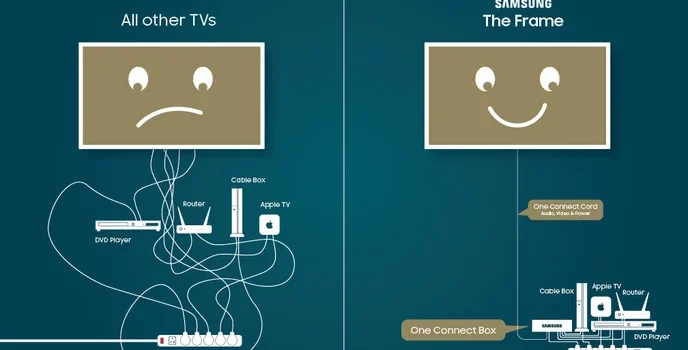
The Samsung Wireless One Connect technology solves the problem of messy TV installation by eliminating the cables connecting the TV to the other devices. The technology allows you to place the One Connect Box out of sight up to 10 meters away within the same room. It is therefore the best technology for use within the house, considering it supports high-end TV designs while resolving issues such as connectivity and delay.
Lets dive into this article to understand how wireless TV connections work.
What is Samsung Wireless One Connect?
Samsung wireless is one that connects in an advanced iteration of the brands to connect at a box, then comes the upgraded to wireless HDMI TV transmission. Unlike other wired variants of One Connect products, where a proprietary slim cable is employed to collect a group of HDMI, USB, and power ports, the RF model truncates uncompressed 4K, 8K, and 8K/120 signals through an electromagnetic wave employing WiFi 7 technology and omni-directional tech.
This obviously involves connecting gaming systems, Blu-ray machines, sound systems, and even set-top boxes to this compact box, before linking them wirelessly to Samsung TVs that support this connection. This should be noted to be separate from Samsung’s Zero Connect concept, an outdated wireless connection that was part of its portfolio for years but lacked the finesse that this connection enables
Key benefits include:
- Cleaner room design, as there are no wires visibly snaking to the TV.
- Allows for the flexible placement of boxes behind furniture and inside cabinets with minimal metal obstruction.
- It works with the TV’s multiple HDMI inputs and provides eARC functionality to send audio signals back to your soundbar.
How Samsung Wireless One Connect Works
The system operates through the use of the transmitter-receiver model. To understand the operations of the system, the following is a step-by-step explanation:
- Power Up: Connect the provided C-type power adapter to the Wireless One Connect Box and TV.
- Pairing Mode: The box’s LED starts to blink blue on its own or can be initiated by pressing the “Pair” button for 3 seconds.
- Position the box within a distance of 10 meters in line of sight
- TV Setup: Navigate the TV menu to Settings > All Settings > Connections > Wireless One Connect > Set Up. Make sure the box is detected it will pair immediately.
- Connect Devices: Connect HDMI sources to the box, which normally includes 4 HDMI 2.1, USB, Ethernet, optical.
- Signal Transmission: It utilizes 60GHz wireless, like WiGig, or even WiFi 7. The TV is effortlessly received and played on.
| Step | Action | TV Menu Path | LED Indicator |
| 1 | Power both devices | N/A | Solid white (standby) |
| 2 | Enter pairing | Hold Pair button 3s | Blinking blue |
| 3 | Scan on TV | Connections > Wireless One Connect | N/A |
| 4 | Connect sources | HDMI/eARC ports on box | Solid blue (connected) |
| 5 | Troubleshoot | Device Care > Self Diagnosis | Yellow/Red (weak signal) |
Supported TV Models and Compatibility
Not all Samsung TVs support Wireless One Connect it’s exclusive to flagship 2025+ models. Primary compatibility focuses on 8K Neo QLEDs for 8K@120Hz wireless transmission.
| Model Series | Year | Resolution | Key Features | Wireless One Connect Version |
| QN990FW | 2025 | 8K | WiFi 7, Omni-directional | Full (up to 8K@120Hz) |
| LS03FW (The Frame) | 2025 | 4K/8K | Art mode integration | Compact box, HDMI 2.1 |
| QN900D/990D | 2024 | 8K | Wired fallback | Upgradeable via box YouTube |
| S95D (QD-OLED) | 2025 | 4K | Gaming focus | Partial (4K@144Hz) |
Requires same-room placement; USB cameras must connect directly to TV USB-C. Older wired One Connect.
Latency Concerns and Performance
Latency is a concern for gamers, considering that this would introduce very minimal delay.
Factors affecting latency:
- Distance(obstacles): Optimal below 5m; each wall adds 5-10ms.
- Resolution: 8K@120Hz may push some limits, at least risking anomalies.
- Interference: Avoid microwaves/2.4GHz WiFi.
| Scenario | Avg Latency | Suitable For | Mitigation |
| 4K@60Hz Movies | <5ms | All users | Standard setup |
| 4K@120Hz Gaming | 10-15ms | Casual | Game Mode on |
| 8K@120Hz | 15-25ms | Enthusiasts | Clear LOS, firmware update |
| With obstacles | +10ms | N/A | Reposition box |
Samsung’s self-diagnosis tool flags issues; yellow/red LEDs prompt relocation. Power-saving mode (white LED after 30min idle) auto-reconnects.
Pros, Cons, and Comparisons
Pros:
The advantage offered by the Samsung Wireless One Connect in modern television setups cannot be overstated. Not only does it ensure aesthetic freedom with a box that has been made 62% smaller compared to previous versions, but it also comes with all the ports such as 4 HDMI 2.1 with eARC support, Ethernet, and USB, all in one place to facilitate all the connections such as gaming consoles and soundbars. The set itself comes with a future-proof setup with the first implementation of wireless 8K capability.
Cons:
On the other hand, a drawback of this feature is its extravagant price that reaches up to $600 or $400. It also only works within a certain room and accomplishes nothing when it comes to wired cables. Not only that, it also imposes an increased latency that could impact competitive users differently than wired cables.
Compared to alternatives:
| Feature | Samsung Wireless One Connect | Samsung Zero Connect (Older) | Standard HDMI |
| Wireless Range | 10m same room | 10m | Wired only |
| Max Resolution | 8K@120Hz | 4K@60Hz | Unlimited |
| Latency | Low (10-20ms) | Medium | Zero |
| Cost | High | Medium | Low |
Vs. competitors like Sony’s wireless prototypes: Samsung leads in bandwidth.
Setup Tips and Troubleshooting
For best results:
- Avoid enclosed cabinets.
- Update TV firmware via Settings > Support.
- Factory reset: Hold Pair 10s.
Common issues:
| Issue | LED Color | Fix |
| No connection | Red | Reposition <10m |
| Weak signal | Yellow | Clear obstacles |
| Pairing fails | Blinking blue >30s | Power cycle both |
| High latency | N/A | Enable Game Mode |
Why Choose Samsung Wireless One Connect?
This technology combines aesthetics and functionality, making it suitable for mounting a TV or an open living space concept. Though there are questions regarding its latency, it is a gamechanger for the remaining 95% of people looking for a completely wireless experience of HDMI TV Bliss. Future models coming in 2025 make this a great upgrade for die-hard Samsung enthusiasts.
FAQS
1. What is Samsung Wireless One Connect?
A compact box which can wirelessly send HDMI video as well as audio signals directly to compatible Samsung TVs.
2. How does Samsung Wireless One Connect work?
Connect devices to the box via the ports on the back, pair it with the TV through the settings menu via a blinking blue light on the box, and then beam the signal up to 10m distance through WiFi 7 technology.
3. Which TV models support it?
Mainly 2025+ series such as Neo QLED QN990F or The Frame LS03F, but firmware may be available for older versions of the QN900D.
4. Are there latency concerns for gaming?
Yes, 10 to 20 ms added delay okay for casual use/game movies, but pros use wired HDMI; use Game Mode and Line Of Sight.
5. What are the main pros and cons?
Pros: Sleek 62% smaller design, full HDMI 2.1 ports, 8K wireless. Cons: Expensive, $400-600, only works in a room