





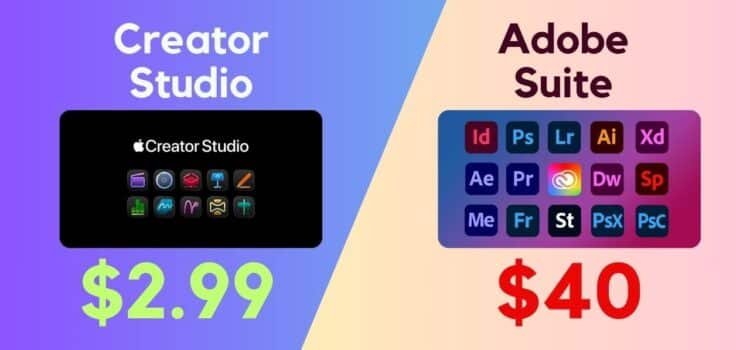
Apple Creator Studio vs Adobe is a challenge on the horizon, challenging Adobe’s Creative Cloud by delivering a suite of content creation apps through a monthly subscription. The two services differ significantly, and choosing the right package calls for careful consideration. This overview compares the two options and suggests ways to address any gaps.
On Tuesday, Apple announced it plans to compete directly with Adobe in the creative software market. Apple Creator Studio provides a collection of Apple Pro apps for video editing, music creation, art production, and other creative tasks, all designed for use on Apple hardware.
For years, professionals have relied on Adobe Creative Cloud to create a wide range of high-quality digital media using its comprehensive set of tools.
At first glance, Apple and Adobe appear to offer similar solutions. However, a closer analysis reveals important differences between the two services.
App-By-App Comparison
Apple Creator Studio vs Adobe Creative Cloud: App Coverage.
Adobe designed Creative Cloud Pro as an extensive suite of applications to support creative professionals producing a wide variety of digital content.
For this comparison, we will focus on the default paid plan that includes 22 applications and additional services.
These include:
- Photo editing
- Graphic design
- Video production
- Web design
- Animation
- Social media content creation
The suite also includes tools for professional workplaces, such as Adobe Scan, Adobe Pro, and Fill & Sign.
Additional services include Generative AI features, which allocate monthly credits for video, image, and audio tasks. These features allow users to speed up workflows and automate creative edits, potentially saving time on routine adjustments.
While Adobe offers a broad range of features, this comparison will focus on the primary areas that overlap with Apple Creator Studio.
Apple’s subscription package is significantly smaller than Adobe’s, but it is still a compelling offering.
Apple Creator Studio’s primary benefit is providing access to tools previously available only through individual subscriptions or as premium products on both Mac and iPad.
Main applications include:
- Final Cut Pro
- Motion
- Compressor
- Logic Pro
- Pixel Meter Pro
These professional-grade tools are likely the primary draw of this bundle.
Apple also includes Keynote, Pages, Numbers, and Freeform in the package. Users likely access these applications at no cost.
These applications are highlighted because the package offers additional premium content not available in the free versions. The inclusion additionally strengthens Apple’s offering compared to Adobe’s.
Apple Creator Studio vs Adobe Creative Cloud Pro: Video
For motion production, Adobe Creative Cloud Pro features several leading tools. Video professionals are likely familiar with Premiere Pro, Adobe’s industry-standard video editing software.
Several Adobe tools have earned this reputation.
Premiere Pro is the primary video tool available on both Mac and iPad. For less demanding projects, Premiere Rush is designed for social media content.
Apple offers Final Cut Pro, which provides comparable expert features to Premiere Pro. It provides advanced editing and color grading on both Mac and iPad.
While iMovie handles basic editing, Final Cut Pro manages complex, large-scale productions.
Both platforms deliver motion graphics solutions. Adobe After Effects is an industry standard, while Apple Motion is a strong alternative.
Export Content: Adobe provides Media Encoder for video formatting, while Apple offers Compressor for similar purposes.
Adobe also includes additional tools for experienced editors, such as:
- Preload and tagging
- Transcoding footage
- Bridge for asset management
Adobe users can also collaborate online using Frame.io.
For animation, Adobe offers Animate for creating cartoons and hand-drawn graphics. Character Animator enables users to quickly animate pre-designed characters.
Apple does not offer a comparable animation package. This gap may significantly limit users focused on animated content.
Apple Creator Studio vs Apple Pro Cloud: Images and Graphic Design.
Both packages actively support artists and designers working with still images.
Adobe Creative Cloud Pro offers several core applications, each made for specific types of imagery.
Photoshop is the primary image editing and composition tool in Adobe’s suite. It is widely recognized as the industry standard among professionals.
Other Adobe apps have specialized purposes; Lightroom and Lightroom Classic are aimed at photographers and editors more than at original artists.
Designers use Illustrator for vector graphics and InDesign for layouts; artists may choose Fresco for painting. Express helps with Quick Documents and Images.
Apple includes Pixel Meter Pro, acquired in late 2024, as its main general-purpose editing tool for Creator Studio. This application supports layer-based editing, retouching, photo enhancement, graphic creation, and illustration within a single interface similar to Photoshop.
Pixel Meter Pro is a versatile app that supports a wide range of styles and content types. While it lacks Adobe’s specialized tools, it remains capable.
Apple Creator Studio’s dedicated photography tools are beyond Pixelmator Pro’s editing features. For photo storage and basic edits, users use the Photos app.
Apple’s subscription lacks dedicated design and photography apps, but remains competitive due to Pixelmator Pro.
Apple Creator Studio vs Adobe: Music and Audio
Although Apple and Adobe provide comparable tools for the visual arts, their audio applications differ significantly. Each package provides dedicated apps with minimal overlap in audio functionality.
Adobe Audition is purely an analytic tool made to chop and change an audio recording. It is really designed to adjust an existing sound to meet your particular needs, making it great for tweaking a sound effect in a video, for example.
Audition efficiently edits podcasts and restores audio.
Apple includes Pro Logic and GarageBand, both capable of audio editing but fundamentally designed for crafting music.
Logic Pro stands apart as a full-fledged DAW, handling everything from recording and sequencing to virtual instruments and mastering far beyond Audition’s scope.
Audition operates only on Mac. Logic Pro runs on both Mac and iPad. Logic Remote expands controls on iPhone and iPad.
Main Stage lets performers use Logic Pro’s instrument and effect plug-ins on a Mac during live performances.
These differences highlight distinct philosophies: where Adobe focuses on refining existing audio, Apple emphasizes creation and performance, setting the stage for how their overall bundles compare beyond just audio capabilities.
Apple Creator Studio vs Adobe: Extras
As we move beyond core applications, it becomes clear that both packages offer additional features that could influence purchasing decisions.
The Creative Cloud Pro plan offers 100 GB of cloud storage. Apple does not include additional storage, but users can purchase more through iCloud or an Apple One subscription.
Adobe piles on the value with:
- Generative AI credits
- Adobe Stock
- Photoshop AI
- Adobe Portfolio
- 30,000+ fonts
- Discounts with big-name partners like Dropbox and Logitech
Apple counters with premium templates, royalty-free images, and built-in intelligence features that integrate seamlessly with Keynote, Pages, Numbers, and FreeForm.
Apple Creator Studio vs Adobe Creative Cloud: Pricing Comparison.
The breadth of features in each plan is reflected in its pricing. Adobe Creative Cloud is significantly more expensive per month than Apple Creator Studio. The Cloud Pro plan is $69.99/month for an annual plan, though you can prepay for a year at $779.88. It is available for $104.99 USD/month.
By comparison, Apple Creator Studio is an absolute steal at $12.99/month or $129/year. If you have a family sharing setup, it can be used by up to 5 other users.
For educational customers, Apple Creator Studio is $2.99/month or $29.99/year and is not eligible for family sharing.
Students and teachers can purchase the Adobe Creative Cloud package at $249.99/month for the first year of an annual plan, increasing to $39.99/month thereafter.
Apple Creator Studio vs Adobe Creative Cloud Pro: Nuance and Compromise
Choosing between Adobe’s Suite and Apple’s Package involves balancing cost and features, as well as considering pros and cons.
If price is your primary concern, choose Apple. It’s low-cost. You can get a full year’s subscription to Creative Cloud Pro and a base model Mac mini for less than a year’s subscription to Creative Cloud Pro.
However, Adobe’s industry dominance means that price alone may not be decisive. Creative professionals often require widely adopted tools to maintain compatibility and conform to industry standards.
If you edit video and collaborate with teams using Adobe tools, you generally need Creative Cloud Pro to maintain seamless project workflows and avoid compatibility issues.
For home users or hobbyists seeking more creative options than iMovie or GarageBand, Apple’s package offers a compelling option tailored to less demanding personal projects, providing guidance on whether to stick with Adobe or switch.
Alternatively, consider how the $57 monthly price difference could be allocated.
If your work relies on only one Adobe app, such as Photoshop or Lightroom, you can subscribe to Apple’s package and use the savings to access the specific app you need. For example, a designer who primarily edits photos could use the $19.99/month plan for Photoshop and Lightroom.
It can also be used to supplement Apple Creator Studio, narrowing the gap with Creative Cloud. For instance, animators using an iPad can purchase Procreate Dreams for $12.99 without a subscription.
The Affinity Suite is another strong alternative, now free for core functionality after its acquisition by Canva, though Generative AI features are excluded. Mac and iPad versions of Affinity Designer 2, Publisher 2, and Photo 2 are available for free.
To summarize, some users will require Adobe Creative Cloud Pro, while others will find Apple Creator Studio sufficient.
Not required to use Adobe; users can flexibly assemble tools to achieve similar results.
Where to purchase Adobe Creative Cloud Pro and Apple Creator Studio
Purchase Adobe Creative Cloud Pro directly from Adobe’s website. Subscribe to individual apps such as Photoshop, Premiere, and Illustrator.
Apple will offer Creative Studio from January 28. Final Cut Pro, Logic Pro, Pixelmator Pro, Motion Compressor, and Mainstage are available as one-time purchases for Mac. Access other apps for free or by subscription.
Why Apple Launched Creator Studio
Apple launched Creator Studio, a unified subscription bundle with Final Cut Pro, Logic Pro, and Pixelmator Pro for Mac and iPad. The initiative aims to make content creation more accessible, boost services revenue, and streamline creative workflows using advanced AI.
Key reasons for the launch include:
- All-in-one solution: Experience seamless video, music, and image editing in one suite. Designed for creative professionals working across Mac and iPad.
- Boost services revenue, our subscription model is designed to help you grow recurring revenue by supporting the expanding influencer and creator economy.
- AI integration: The apps include new intelligent tools such as bit detection in Logic Pro, visual search in Final Cut Pro, and text-to-image generation, allowing users to complete tasks more efficiently and reduce manual effort during production.
- Accessibility and value: The bundled subscription, priced around Rs. 399/month in India, allows more people to access and afford premium studio-grade tools than buying them separately would.
- Enhanced Ecosystem: This offering strengthens the value of iPad and Mac devices, positioning them as integrated hubs for creative professionals, students, and educators.



