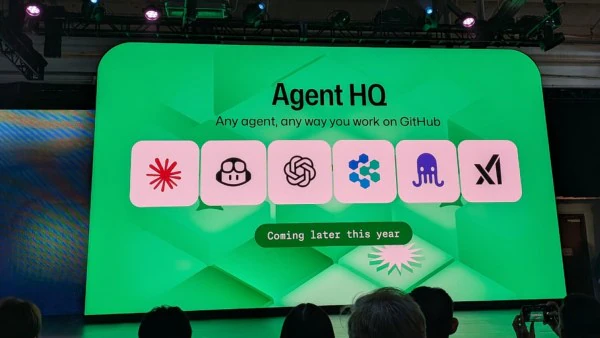




At Universe 2025, GitHub unveiled Agent HQ, a platform that serves as machine control for AI coding assistance from vendors like OpenAI, Anthropic, Google, and xAI within the GitHub ecosystem.
This initiative, often referred to as an AI Army command center, aims to transition developers from juggling separate tools to coordinating a team of agents that seamlessly write, test, and debug code together.
Main details of GitHub Agent HQ (2025-2026)
- Centralized Control Plane: Agent HQ provides a single interface in GitHub, VS Code, and the command line for assigning, tracking, and managing AI tasks in real time.
- Third-party integration: column developers can now use models from Anthropic Cloud 3.7 Sonnet, Google Labs Jules, and xAI in their GitHub workflow, not just GitHub by Copilot.
- Agents can now perform tasks in sequence independently, starting with picking up issues.
- creating branches
- committing code
- opening pull requests
- Human developers then review the agents’ work and provide feedback as needed.
- Enterprise Governance: The platform provides advanced code review by agents, a control panel to manage agent actions, and a dashboard to track AI performance.
- Following the October 2025 announcement, third-party agents gradually became available to GitHub Copilot subscribers. Over the next few months, advanced features will be offered through Copilot Pro + or to enterprise clients.
Shift To Agentic Development
GitHub COO Kyle Daigle stated that the objective is to bring order to the condition caused by rapid AI growth. Agent HQ enables developers to move beyond basic chat-based assistants by leveraging agents for more structured, step-by-step programming assignments.
Related security concerns (EchoLeak)
In early 2025, researchers identified the first zero-click AI vulnerability in Microsoft’s broader Copilot ecosystem, though not an Agent HQ-specific one. It highlighted the risks of AI agents accessing sensitive data. Microsoft responded with stronger security and auditing in its Frontier Suite (Microsoft 365 E7), launched in early 2026.
If you maintain open source projects or work on an enterprise team, seeing automated documentation fixes, new unit tests, or refactoring suggestions can be a real eye-opener. Still, automation raises a key question: how do you set limits on agents that can access your repository and the internet? You could worry about an agent using information from unreliable websites, or accidentally exposing an API token, or maybe it could start posting unnecessary comments on every open issue. For its automation to be truly valuable, it needs to be predictable.
What is the safest way to add agents to existing automations like CI/CD? Agents are unpredictable and handle untrusted inputs. Examine your repository’s state and make decisions as they run. Along with agents in CI/CD with constant oversight, you can scale your engineering, but it requires safeguards to address security risks.
GitHub agentic workflows are built on GitHub Actions. Normally, everything in an action shares the same level of trust. This means an unauthorized agent could interfere with MCP servers, access authentication secrets, or send network requests to any destination. If an agent has bugs, is manipulated by prompts, and has no restrictions, it could behave in unforeseen and unsafe ways.
This is why security is a core part of Agentic Hub workflows. We see agent execution as an extension of the CI/CD model, not as something separate. We keep the creative part of building workflows apart from the control part of running them. Then, we turn workflow into a GitHub action with clear limits on permissions, inputs, audit records, and network access.
In this post, we will explain how we designed Agentic workflows to be secure from the start, starting with the threat model and needed security architecture.
Threat Model
Two key features of agentic workflows affect the threat model for automation.
Agents can understand repository state and act independently. While useful, they should not be trusted by default, especially with untrusted inputs.
Second, GitHub Actions offer a very open execution environment. Sharing a trust domain helps with automation, broad access, and good performance; however, if untrusted agents are involved, a single trust domain can lead to extensive problems if something fails.
With this model, we assume agents may access or modify unauthorized data, use or misuse channels, or perform actions beyond their permissions through deferred GitHub agentic workflows. Use strict security settings based on this threat model, adhering to four security principles:
- Defense In-Depth
- Not Trusting Agents With Secrets
- Reviewing all writes
- Comprehensive Logging.
Defend in Depth
GitHub Agentic workflows use a layered security system with state configuration and planning layers. Each layer helps limit the impact of failures in the layers above by enforcing its own security rules.
The Substrate Layer is built on a GitHub Access Runner, running on a virtual machine, with several trusted containers that control which resources an agent can use. This layer keeps components separate, manages privileged operations and system calls, and enforces communication boundaries at the kernel level. These predictions remain valid even if an untrusted component is compromised and runs code within its container.
On top of the substrate layer is the configuration layer. This layer uses declarative artifacts and toolchains to set up a secure system and its connections. It decides which components are loaded, how they connect, which communication channels are allowed, and what privileges each has. External tokens, such as agent API keys and GitHub access tokens, are important inputs. The configuration controls which tokens are placed in which containers.
The last layer of defense is the planning layer. While the configuration layer decides which components exist and how they connect, it does not control when they are active. The planning layer’s main job is to set up a staged workflow with clear data exchanges between components. The Safe Outputs subsystem, explained later, is the main example of secure planning.
Don’t Trust Agents Bearing Secrets
From the start, we aimed for workflow agents to have no access to secrets and to maintain strict trust boundaries. Agentic workflows run as GitHub actions, with all components sharing a single trust domain on the runner VM. In this setup, sensitive items such as agent authentication tokens and MCP server API keys are stored in environment variables and configuration files that all processes in the VM can access. No extra measures are required to prevent agents from breaching these trust boundaries.
This is risky because agents can fall victim to prompt injection. Attackers might cause harmful impacts, such as web page or repository issues, that trick agents into revealing sensitive information. For example, an agent affected by prompt injection and with access to shell commands could read configuration files, SSH keys, LNS/PROC state, and workflow logs to find credentials and other secrets. It could then upload these secrets online or hide them in public GitHub objects, such as issues, pull requests, and comments.
Our first step to reduce risk was to put the agent in its own container and to implement strict controls on what it can access. This includes:
- Firewall internet access
- MCP access only through a trusted gateway
- NLM API calls are routed through an API proxy to limit internet access
Agentic workflows set up a private network between the agent and the firewall. The MCP gateway runs in a separate trusted container, starts MCP servers, and is the only one with access to MCP authentication material.
Agents like Cloud, Codex, and Copilot need to talk to an LLM over a secure channel, but we do not give these tokens directly to the agent’s container. Instead, we keep LLM auth tokens in a separate API proxy and set up agents to send modern traffic through that proxy.
Zero-Secret Agents need a balance between security and usefulness. Programming tasks often need access to compilers/interpreters/scripts/repository data. However, increasing the container setup would duplicate existing provisioning steps and add more network destinations to the five-where rules.
Instead, we use container volume mounts to give the agent access to needed host files and programs, and we run it in a chroot jail. First, we mount the whole VM. The host system has a read-only /host. Then we cover certain paths with empty tmpfs layers and start the agent in a chroot jail at /host. This way, the host setup stays unchanged, and the agent can only read and write what it needs for its work.
Stage and Vet all Writes
Even without access to secrets, prompt-injected agents can still cause problems. For example, an agent’s interest might flood a repository with unnecessary issues or pull requests to overwhelm maintenance, or add unwanted URLs and other content to repository objects.
To prevent this kind of behavior, the Agentic Workflows Compiler decomposes every workflow into clear, explicit stages. It acts as a control point, defining for each stage.
- The Active Components and Permissions (read vs write)
- The data artifacts emitted by that stage
- The admissible downstream consumers of those artifacts
While the agent runs, it can read GitHub state through the GitHub MCP server and can only prepare its updates through the safe outputs MCP server. After the agent finishes the safe outputs, the MCP server processes any buffered write operations using a set of safe output checks. It includes operations that an agent can perform. Authors can choose which GitHub update types are available, such as:
- Creating issues, comments, or pull requests
- Safe outputs limit the number of updates allowed, such as restricting an agent to creating at most three pull requests per run.
- Safe outputs analyze and update content to remove unwanted patterns, such as sanitizing URLs
Only artifacts that pass through the entire safe outputs pipeline can be passed on, making sure that each stage’s side effects are explicit and vetted.
Log Everything.
Even with no secrets and checked rights, an agent can still change repository data, use tools in ways we did not expect, or try to get around the limits we set. Agents will try many tricks to complete their tasks. If something goes wrong, we need to see the full execution path to understand what happened.
Agentic workflows make observability a first-class property of the architecture by logging extensively at each trust boundary. Network and destination-level activity is recorded at the five one-layer model request/response metadata, and authenticated requests are captured by the API proxy. All invocations are logged by the MCP gateway and MCP servers. We also have an internal implementation in the agent container to audit potentially sensitive actions such as access to environment variables. Together, these logs support end-to-end forensic reconstruction, policy validation, and rapid detection of anomalous agent behavior.
Extensive logging also sets the stage for future information flow controls. Anyway, we observe communication; we can control it. Agentic workflows already support GitHub MCP servers’ lockdown mode. In the coming months, we will add more safety controls that enforce policies across MCP servers based on whether something is public or private and who created a repository object.
What’s Next?
Join the discussion in our community or on the #GitHubNext Discord. We look forward to seeing what you build with GitHub Agentic Workflows. Stay tuned for more updates.
Source: Under the hood: Security architecture of GitHub Agentic Workflows