




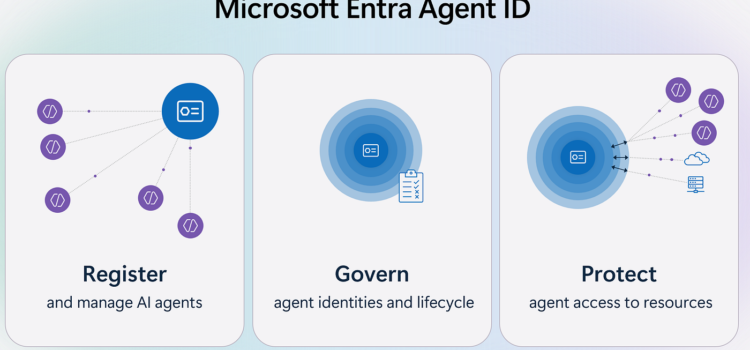
AI agents are evolving from simple tools to virtual team mates that help us work more efficiently. As teams adopt these agents, tracking them can be challenging. Their ability to handle complex tasks independently makes it critical to manage their identities, permissions, life cycles, and resource access securely.
Our goal is simple, we want to give AI agents, the new digital teammates, the same protections and controls you already use for your workforce identities. The main benefit is that you can manage the security and life cycle of all AI agents from a single central location, just as you do with your human users. Today, I’m happy to tell you about the public preview of Microsoft Entra Agent ID, announced at Microsoft Build. In this first release, we’ve created a single directory for all agent identities in Microsoft Copilot Studio and Azure AI Foundry. This means that whether an agent is built by a developer or an information worker, you can see and manage the agent securely in the Microsoft Entra admin center.
In the next six months, we’ll add more features for access management, security, and identity governance to Microsoft Entra Agent ID. We’ll also add support for agents from Security Copilot, Microsoft 365 Copilot, and other third-party solutions.
How To Get Started
As organizations increasingly adopt AI solutions, it’s important to know which agents have access to their environments. Starting today, you will see a new application type in the Microsoft Entra admin center that allows these agent identities. The agent ID application type lets you quickly view and track agent identities in your directory.
To get started, sign in to the Microsoft Entra Admin Center and go to Enterprise Applications. At the top of the list, use the filter bar, set the application type dropdown to Agent ID (preview), and review the AI agents created with Copilot Studio or Azure AI Foundry in your tenant. Begin by selecting an agent, exploring its permissions and lifecycle settings, and making any required security updates. This will ensure you are actively managing your agents securely from today.
What’s Next for Microsoft Entra Agent ID
The features we offer today are just the beginning of our work to help you secure and manage AI Agent Identities. We understand you need more than visibility, so we are developing new tools to give you greater control over AI Agents and their access to resources.
For example, we plan to make Microsoft Entra Agent ID work not just with agents built on Microsoft AI platforms. It will also support agents created using many other AI development tools.
Over the next few months, Microsoft Entra Agent ID will add new features. These updates will help you strengthen your Zero Trust security and save time for both developers and identity teams.
For Developers
- Built-in security controls: Agent identities in Microsoft Entra will use a least-privilege approach. They will request just-in-time, limited tokens for the resources the agent needs, such as a specific file or Teams channel.
- Instant Enterprise Boarding: agent identities will be full of identities in Microsoft Entra, so identity teams can find, approve, and audit your organization’s agents with the same tools they use for apps and users. There is no need for extra security reviews or custom co-auth flows once your agent has an identity in other Microsoft Entra tenants, each with its own policies, while you maintain a single codebase and telemetry stream.
For Identity Practitioners
- Richer access controls: You can set detailed conditional access policies and permissions. This ensures AI agents access only the resources they need, using real-time signals and context.
- Enhanced lifecycle management: You will be able to automate least-privileged access from the beginning and manage AI agent identities as carefully as you do for users and services, from creation to removal.
- Expanded auditing and monitoring: You will gain access to detailed logs and visibility into agent activities for compliance and security. You can track what each agent does.
Better Together: We Are Working With The Industry, Our Partners, And You
We’ve always believed security is a team sport, and this will be especially true in protecting AI agents and their identities. That’s why I am so energized by the progress we are making together as an industry. Two weeks ago, Microsoft announced our support for the agent-to-agent (A2A) protocol, and we are actively partnering with the industry to design enterprise-grade identity support for both the A2A and the popular MCP protocols.
Here is a demo of A2A in action. Our team used Azure AI Foundry and Microsoft Entra Agent ID to create a Teams agent that finds Entra and meeting room agents in the Entra registry, then uses them to book a meeting room and invite team members.
Today, I am also excited to announce that we are partnering with ServiceNow and Workday. As part of this, we will integrate Microsoft Entra Agent ID with the ServiceNow AI platform and the Workday agent system on record. This will enable automated provisioning of agent identities that can perform duties alongside human employees in parallel. We are working to integrate ServiceNow and Workday agent-enabled applications with Microsoft Entra ID so that every agent created in ServiceNow or Workday has its own identity.
As the next step, try out the new Microsoft Entra Agent ID features by managing a few AI agents in your environment. Provide feedback or questions in the comments below to help us improve. We are excited about what’s next for Microsoft Entra Agent ID and look forward to hearing how you use these features.
Ensure every identity human or agent is managed and secured together.
Source: Announcing Microsoft Entra Agent ID: Secure and manage your AI agents