






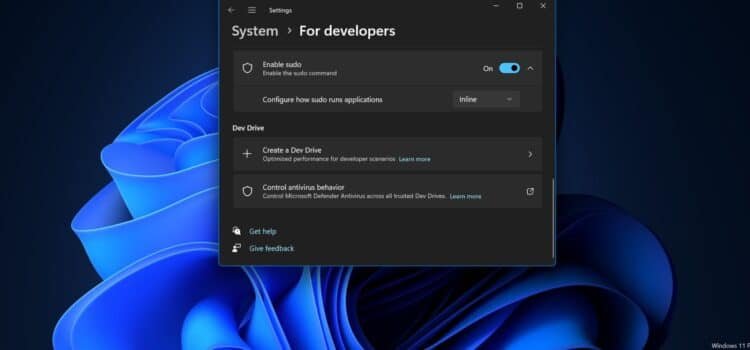
This week, Microsoft announced Sudo for Windows. You can try it out in the Windows 11 Insider program, Preview Build 26052.
Sudo stands for “super user do”. It’s a command-line tool usually found on Linux systems. On its GitHub page, Microsoft said it did not work on the Linux Sudo project. Instead, Sudo for Windows is a Windows-specific implementation of the Sudo concept. In some cases, it behaves differently from Linux’s Sudo. Some Linux Sudo scripts may not work directly with Sudo for Windows without modification.
Microsoft built Sudo for Windows mainly to make things easier. It lets users run elevated commands directly from an un-elevated console session, according to the announcement. The announcement also explains how to enable Sudo in Windows 11 preview to build 26052. This is done through the For Developers settings. Users can choose how Sudo for Windows opens: in a new window, in a pop-up, or inline.
Sudo for Windows Security
The inline option gives the most familiar interface; however, it may have fewer security controls than the other two options. All three options still elevate the Sudo process to admin privileges using user account control. Microsoft included this warning in its Sudo for Windows documentation.
Sudo for Windows can be used as a potential escalation-of-privilege vector when enabled in certain configurations. You should be aware of the security considerations when enabling Sudo on your machine.
Right now, Sudo for Windows is just available on Windows 11 preview to build 26052 and higher; however, the document indicates that it may become available on Windows 10. Microsoft doesn’t have plans to add it to Windows Server. Microsoft is also working to make Sudo for Windows an open-source project on GitHub.
The Windows 11 Version 24H2 Preview
This week, Microsoft released Windows 11 preview build 26052 to Windows Insider Program testers in the Canopy and Dev channels. The build is also known as Windows 11 v24h2, which is expected to be the commercial release coming this fall.
Microsoft now releases major Windows client updates once a year, not twice; however, it still adds new Windows features each month on update Tuesdays. These happen on the second Tuesday of every month and usually include security patches.
The Windows 11 Build 26052 preview includes some interesting features, but not all of them may make it to the final release. Microsoft is testing automatically opening Co-Pilot when Windows starts on widescreen devices. Co-Pilot in Windows will also launch if you drag an image file onto the Co-Pilot icon in the taskbar.
The registry editor in this build has an option to limit a search to the currently selected key and its descendants. App developers can access a Power Grid Forecast API to optimize local power grid costs for app users during background tasks. Microsoft is also permitting developers to secure Windows keys with virtualization-based security via a cryptographic API.
The control panel now includes a new color management screen that lets users set up color profiles for connected displays. Microsoft will also enable users to join Wi-Fi networks by scanning QR codes.
This build adds more detailed controls for low-energy audio, allowing users to pair Windows audio streaming with supported hearing aids. There is also a new voice clarity feature that shows how apps use different audio processing modes, and this preview build deprecates some features. For instance, the Windows Mixed Reality app has been deprecated, and a Windows Mixed Reality headset will not work starting with this build, although HelloLens, Microsoft’s mixed reality headset, isn’t affected. Microsoft also axed the on-demand use of Microsoft Defender Application Guard as a feature with this build release. Microsoft Edge for Business described Azure Secure Enterprise Browser as its replacement for this feature.



