



Samsung Electronics has announced the One UI 8.5 Beta program, which brings simpler ways to create, connect, and stay secure. With this update, CUV users can get more done with less effort, thanks to easier actions, easier device management, and better security.
One UI 8.5: What’s New for Content Creation
One UI 8.5 makes it easier to create and share content. With the updated photo assist, users can keep making new images without stopping. They can edit photos as much as they want, without saving each step along the way, when they are done. It is easy to review the edit history and choose their favorite versions.
Sharing is now easier with improvements to Quick Share, which can recognize people in photos and suggest sending the images directly to those contacts.
How does One UI 8.5 improve device connectivity?
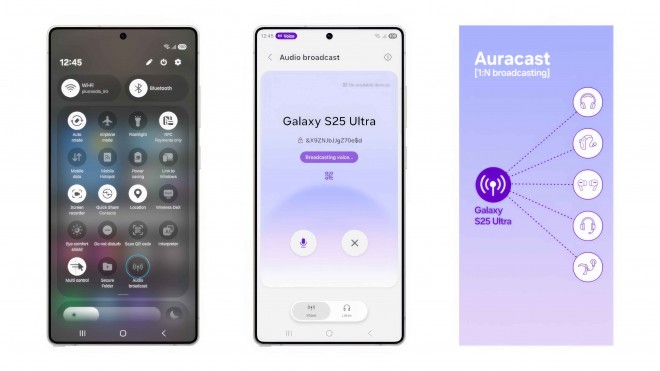
New cross-device feature: make it simpler to manage devices, share files, or connect with nearby devices. Audio broadcast lets users easily communicate with nearby LE audio-supported devices via AuraCast. Now users can also broadcast their voices through their Galaxy phones’ microphones, which is useful for group activities such as tours and events.
Storage Share connects the Galaxy ecosystem by letting users view files from other Galaxy devices, such as tablets or PCs, right in the My Files app. It also lets users access their phone’s files from other Samsung devices, including their TV.
How Is My Galaxy Device Staying Protected
One UI 8.5 enhances device security and makes security settings easier to manage. Thief protection helps keep phones and data safe. If a device is lost or stolen, the failed authentication lock will lock the screen after too many failed attempts to unlock it with a fingerprint, PIN, or password. The identity check now protects more settings, adding extra security.
Availability
The One UI 8.5 beta program will first be available for Galaxy S25 series users in select markets, including Germany, India, Korea, Poland, the UK, and the US. Starting December 8, Galaxy users can sign up for the beta through the Samsung Members app.
- Use the Generative Edit feature in Photo Assist. You need a network connection and a Samsung account. When you edit with Generative Edit, your photo may be resized. A visible watermark will appear on the saved image to indicate that the AI created it. The screen image shown is for illustration only. The actual user experience and interface may be different.
- This feature is available on devices running One UI 2.1 or later with Android Q or newer. Quick Share needs both Bluetooth Low Energy and Wi-Fi to work. The actual speed can change based on your device, network, and environment. The screen image is for illustration only. The real user experience and interface may look different.
- This feature is only available on Galaxy S25 series devices, which include the Galaxy S25, S25 Plus, and S25 Ultra.
- Each device must be signed in to the same Samsung account and must have both WiFi and Bluetooth turned on. Requires updated Galaxy phones and tablets with One UI 7 or higher, kernel version 5.15 or higher, and Galaxy Book 2 or later (Intel and Galaxy Book 4 or later) (Arm) and Samson Smart TV models, including U8000 and above, released after 2025. Feature availability may vary by region and device model. Screen image simulated for illustrative purposes; actual UX/UI may vary.
Source: Samsung Launches One UI 8.5 Beta for Next-Level Ease of Use



