




Samsung introduced its new Galaxy S26 Ultra smartphone at Samsung Unpacked on Wednesday, calling it its new AI phone. The S26 Ultra is 0.3 mm thinner and 4 g lighter than last year’s S25 Ultra. With this flagship, Samsung is focusing even more on AI, working to make machine learning a core part of the phone rather than just a feature.
Still, one of the S26 Ultra’s most interesting features isn’t about Generative AI. Samsung’s new privacy display makes it much easier to read whatever you want on public transport without worrying about prying eyes.
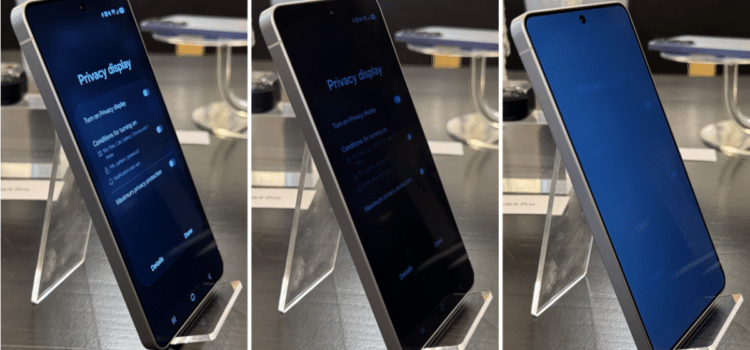
Samsung says the S26 Ultra’s privacy display is the world’s first. It reduces the screen viewing angle, making it harder for people nearby to see what you are looking at. The display uses a mix of wide and narrow pixels, separated by partition walls. When you turn on a privacy display, the wide pixels switch off, so the screen is only visible from a narrow angle. You can make this angle even smaller by turning on maximum privacy protection mode.
We tried the new privacy display at a recent Samsung briefing and found it very effective, especially in maximum mode. When the privacy display is on, the S26 Ultra’s screen looks much darker from the side, making it hard to read unless you are looking straight at it. The maximum privacy protection mode was even more impressive, making the screen look almost as if the phone were turned off.
Both privacy and maximum privacy protection modes make the display look washed out. The effect is stronger in maximum mode, but it’s neither noticeable nor distracting during normal use. Most people will get used to it quickly. I had to switch the modes on and off to really see the difference.
If you don’t like the washed-out look, the Samsung Galaxy S26 Ultra lets you set privacy display to turn on only for certain apps when entering passwords or pins and when you get notifications. In these cases, privacy display only covers the notification, so the rest of the screen stays visible. This feature lets you enjoy the phone’s bright display while keeping your information private.
For others, having maximum privacy protection turned on all the time may offer more peace of mind. Why hide your notifications while leaving your spicy book talk preferences open for scrutiny?
Fortunately, keeping this mode enabled shouldn’t drain your phone battery either. A Samsung spokesperson couldn’t definitively say whether privacy display affects the S26 Ultra’s battery life; however, since it involves turning pixels off, it’s reasonable to speculate that it may even have a small beneficial effect.
To turn on the Galaxy H26 Ultra’s privacy display:
- Swipe down from the top right corner to open Quick Settings.
- Tap the Privacy Display button to open a menu where you can turn it on or set the conditions for it to activate at maximum.
To turn the Privacy Display on or off, you need to activate either “Turn On Privacy Display” conditions for turning on, or both.
Samsung’s new privacy display is only available on the Galaxy S26 Ultra, so you’ll need to get the flagship model if you want this feature. The Galaxy S26 Ultra is available for pre-order now, starting at $1,299, and will ship on March 11.
Source: Samsung Galaxy S26 Ultra hands-on: Privacy Display is the coolest innovation by far



