






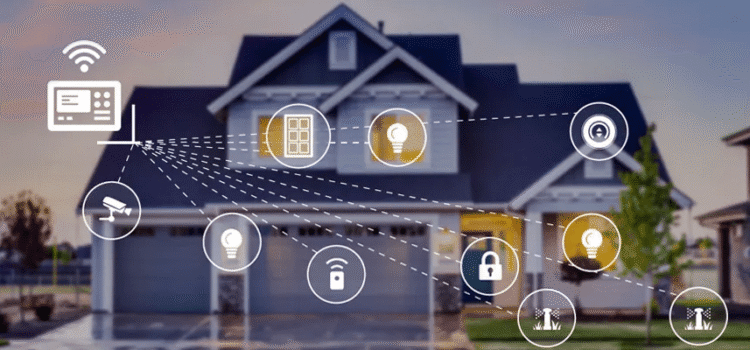
In the recent evolving days in the world of connected living. Automation, security and setup serves you an obsolute roadmap to master smart home setup. Incase if you are looking for the budget smart home project or if one is looking deep down into the automation article, then this is the one article which gives you a glance on the process, from selecting compatible devices to creating seamless Alexa/Google routines. With the rise of the possible standards like the matter and thread, whereas now the modern homes are integrating lighting, locks, theromats, and cameras effortlessly, which changes everyday lifestyle into intuitive, and voice activated ensures the comfort and efficiency.
This article prioritizes the practicality of automation, robust security measures, and scalable setups tailored to any lifestyle. Explore tabular breakdowns of components, budget strategies, and troubleshooting tips designed to future-proof your space against emerging tech trends.
Getting Started with Smart Home Setup
Always smart home setup with assessing one’s requirements on budget. Select a central hub like that amazon echo, google nest, or the apple homepod to connects devices via internet or emerging standards like Matter and Thread for better interoperability. There are required steps which ensure strong wifi coverage and downloading all the apps. Start small with smart plugs or bulbs to test compatibility before expanding.
Core Components of Home Automation Guide
A home automation article emphasizes hubs and protocols, and devices working in unison. Moreover, there is the issue on commands and as well as the networks will be depending on the devices which executes like dimming lights at dusk.
Most popular protocols include Zigbee for low-power mesh networks and Matter for cross-brand compatibility, reducing vendor lock-in. Mostly the Thread enhances Matter with reliable, low-latency connections ideal for battery devices. Interestingly there is the voice control via Alexa or Google Assistant which makes routine flexible, for instance like a “good night” to lock the doors.
| Component | Description | Examples | Protocols Supported |
| Hub | Central brain for commands | Google Nest Hub, Amazon Echo Show | Wi-Fi, Zigbee, Matter |
| Network | Communication backbone | Mesh Wi-Fi routers | Thread, Z-Wave, Bluetooth |
| Devices | Action executors | Smart bulbs, locks | Zigbee, Wi-Fi |
Budget Smart Home Strategies
So here comes the budget smart home setups ensuring the high impact on low-cost devices.furtherly the smart plugs turn the existing appliances smart for price under $15 each like the automating fans or lamps. There is a option of selecting the matter certified gear to future proof investments, starting with EVe which is compatible for Alexa, google and home kit.
Layer in open-source options like Home Assistant on a Raspberry Pi for under $100, offering unlimited custom automations without subscriptions.
| Budget Tier | Starter Kit Cost | Key Devices | Savings Tips |
| Under $50 | $30-50 | Plugs, basic bulbs | Use Wi-Fi only, skip hubs |
| $100-200 | $100-200 | Hub + sensors | Matter for multi-platform |
| $300+ | $300+ | Full room kit | Open source for expansion |
Automation Essentials: Alexa and Google Routines
Home automation is something which automates your daily routine, it’s like numerous actions can be triggered from just few phrases like “Movie time “to on or off the light and close the blind folds.
Furthermore, Google routines excel in context aware triggers, which is adjusted based on the location or turn AC if arriving home
Advanced setups use conditions: If motion detected after 10 PM and no one’s home, activate security mode.
- Set sunrise lights: Gradually brighten bulbs via app schedules.
- Energy savings: Thermostat lowers 4°F when away, saving 10-15% on bills.
- Morning routine: Coffee brews, news plays, shades rise at 7 AM.
Matter and Thread Explained
Matter and thread helps in revolutionizing smart home setup by the communication. Also, the matter is an IP–based protocol which ensures devices from Philips Hue and the switchbot work seemlessly.
Thread provides the mesh backbone, extending range without hubs straining Wi-Fi, perfect for large homes.
Adopting these cuts setup time: Scan QR code, pair instantly across ecosystems.
| Feature | Matter | Thread | Benefits |
| Compatibility | Universal standard | Low-power mesh | Cross-brand control |
| Range | Hub-dependent | 30-100m per hop | Reliable in big spaces |
| Power Use | Varies | Ultra-low | Battery life years youtube |
Security in Smart Homes
Always smart homes promise the convience for the people on the voice activated lights and the automated thermostats, and also the remote door locks, there is no security risk at all. Just last year, reports surfaced of vulnerabilities in popular smart bulbs that let intruders listen in on conversations through built-in mics to imagine that happening while you’re discussing dinner plans. The interconnected nature of these devices means one breach can cascade, controlling everything from your garage to your baby monitor.
To fight back, start with the basics: use strong, unique passwords for every device and enable two-factor authentication wherever possible. Regularly update software, as manufacturers often patch flaws quietly in the background think of it like changing locks after a break-in. Network segmentation helps too; set up a guest Wi-Fi for IoT gadgets so if your smart fridge gets compromised, it doesn’t touch your laptop. Tools like VPNs and firewalls add extra layers, and apps from companies like Bitdefender scan for weak spots in your setup.
Looking ahead, the future of smart home security lies in standards like Matter, which aims to make devices interoperable and more secure out of the box. Privacy-focused brands are rising, emphasizing end-to-end encryption and minimal data collection. Ultimately, stay vigilant and treat your smart home like a real one, with locks, alarms, and a healthy dose of skepticism toward flashy new gadgets. Balance the wow factor with solid protection, and you’ll sleep soundly, even if your lights don’t.
| Security Device | Key Features | Integration | Price Range |
| Cameras | 2K video, AI detection | Alexa, Google | $40-150 |
| Locks | Auto-lock, PIN codes | Matter-compatible | $100-250 |
| Sensors | Door/window alerts | Z-Wave hubs | $20-50 |
Step-by-Step Smart Home Setup
Follow this home automation guide for foolproof installation.
- Map your space: Identify Wi-Fi dead zones, add extenders.
- Pick ecosystem: Alexa for affordability, Google for AI smarts.
- Install hub: Plug in, connect to Wi-Fi, link accounts.
- Add devices: Scan codes or use Bluetooth pairing.
- Create routines: Test simple ones first, like timed lights.
- Secure it: Update firmware, use guest networks.
Test with IFTTT for cross-platform automation if mixing brands.
Advanced Automation Techniques
With the introduction of advanced automated technology, today’s manufacturing sector is experiencing a rapid transformation, going beyond traditional robotic systems used in assembly line production. For instance, artificial intelligence (AI) and machine learning systems assist in developing ‘collaborative robots’, or ‘cobots’, which work alongside human workforce members to create an efficient workplace through the integration of sensing technology to check where the other person is located, thus predicting movements and preventing collisions between cobots and the human workers.
Universal Robots pioneered this technology within the manufacturing sector by automating operations that reduced the time required to set up a manufacturing process from several hours to just minutes while simultaneously increasing the precision of tasks such as welding or handling highly delicate electrical devices. The advantages of working with cobots also include the ability to leverage information collected via realtime analytics to continuously improve upon the delivery methods as part of adapting to changing operational conditions (e.g., products undergoing changes to design specifications) and to re-establish continuity when supply chain disruptions occur.
The development of predictive maintenance using machine learning has taken automation one step further by using algorithms to analyze the machine-generated sensor data to identify when equipment is likely to fail before that occurs, rather than simply responding after equipment has failed and has already stopped production on the factory floor. Manufacturers are now utilizing devices such as Siemens’ MindSphere to identify wear patterns on motors or belts several days before experiencing a failure. This new approach has resulted in a reduction of downtime of as much as 50% in some industries, allowing manufacturing engineers the opportunity to direct their time and energy toward innovative designs instead of constantly “fire fighting”. In conjunction with edge computing which allows IoT streams to be produced and analyzed without overloading central systems during the process, predictive maintenance has stretched the capabilities of highly connected factories enabling them to become a reality.
The true revolutionary breakthrough is the implementation of digital twins-tools through digital-twin technology. The integration of digital-twin technology with the tools referenced herein will allow for faster experimentation of possible production scenarios through the use of digital twins to assess all aspects of a factory’s operation over time. For example, Tesla’s factories perform many thousands of tests and experiments to optimize every step of the production process from assembling batteries, painting, and inspecting finished products before shipping out to customers. As 5G becomes widely available, this low-latency connectivity will enable real-time coordination between multiple locations and therefore allow for increased flexibility, resiliency, and scalability within the automation landscape and allow for new opportunities for businesses to maintain a competitive edge in an evolving global economy.
Troubleshooting Common Issues
When your computer freezes up mid-task, the first thing to check is the basics: Is it overheating? Dust buildup in the vents can turn your machine into a reluctant toaster. Grab a can of compressed air and give those fans a gentle clean. I’ve saved more late-night deadlines this way than I can count. If that doesn’t do the trick, force a restart by holding the power button, but not before saving any open work. Next, boot into safe mode to see if a rogue app or driver is the culprit; from there, uninstall recent additions and run a quick antivirus scan. Patience is key rushing through steps often leads back to square one.
Network glitches hit hardest when you’re streaming or uploading files, leaving you staring at that endless buffering wheel. Start by restarting your router unplug it for a full 30 seconds, as this resets the connection handshake. Check if other devices on the network are hogging bandwidth; pause those smart fridge updates if needed. If Wi-Fi is spotty, switch to Ethernet for a stable line, or tweak your router’s channel settings via its admin page to dodge interference from neighbors’ signals. For deeper issues, log into your ISP account online and test for outages sometimes the problem miles away from your setup.
Printer woes are the ultimate patience tester, especially when that “out of paper” error mocks your full tray. Power cycle everything: printer, computer, and even the outlet. Ensure drivers are up to date by heading to the manufacturer’s site generic ones from Windows often fall short. Clear any paper jams thoroughly, checking rollers for gunk, and align print heads if the output looks streaky. If it’s stubbornly offline, set it up as a new device; old configurations can linger like bad habits. A little trial and error goes a long way here, and you’ll be back to crisp prints in no time.
| Issue | Cause | Fix |
| Disconnects | Weak signal | Add mesh nodes |
| Slow response | Overloaded hub | Upgrade or segment |
| No integration | Protocol mismatch | Use Matter/Thread |
Conclusion:
Integrating a smart home system is more than adding some advanced electronic devices within your home. It’s creating a space that anticipates your everyday needs and fits seamlessly into the overall flow of your life. You may want to automate all the different aspects of your home, such as when to turn on the lights with your morning cup of coffee, or having a secure system in place to ensure you feel comfortable leaving your home unattended. All the examples presented allow for creating an intuitive living space, as well as easy-to-use applications, inexpensive hubs, and expandable solutions. That means that anyone, regardless of experience level, can participate in creating such a space.
By entering into the world of smart homes, you’ll gain access to increased efficiency, a more secure way of protecting your family, and the thrill of being able to connect with the latest technology easily. By taking steps to protect your family, reduce your household chores, and create an overall streamlined living experience, you can take advantage of a life that is free from the clutter of everyday tasks. Explore, experiment, and enjoy this new lifestyle opportunity! The future is now at your fingertips!
FAQS
1.What is the first step in smart home setup?
Begin by evaluating your Wi-Fi strength and choosing a central hub like Amazon Echo or Google Nest Hub, which supports protocols such as Zigbee, Z-Wave, or Matter for device compatibility. Download the companion app and start with basic devices like smart plugs to test integration before scaling up.
2. How do I set up a basic smart home automation hub?
Start by choosing a compatible hub, like Google Home or Amazon Echo, connect it to your Wi-Fi, and pair devices, such as lights or thermostats, through the app. Test routines like “goodnight” mode to automate shutdowns, ensuring all components sync seamlessly for daily use.
3. What are the best security features for beginners?
Key features include motion-detecting cameras, door/window sensors, and geofencing that sends alerts when you leave home. Smart locks with temporary codes provide access control, while integration with sirens effectively deters intruders.
4. Can smart home systems integrate automation and security?
Yes, platforms like Samsung SmartThings or Hubitat link security cameras with automations, like turning on lights during the night. This literally creates the layered protection that streamlines efficiency and safety.
5. What should I consider for smart home setup costs?
Entry-level setups start at $100-300 for a hub, basic sensors, and one camera, with pro monitoring adding $10-30 monthly. Factor in Wi-Fi strength and compatibility to avoid hidden expenses, prioritizing scalable systems for future expansions