




Artificial intelligence, or AI, is the phone world’s new favourite buzzword. Almost every upcoming phone has plans to incorporate machine learning and large language models in some form or another, and the first to do so are already on sale. But what are the best AI phones worth having? Let’s find out.
Best AI Phone Overall
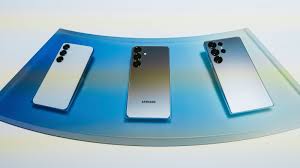
The Samsung Galaxy S25 Ultra is as feature-stuffed as AI phones get right now. As well as having most of Google’s Gemini smarts, there’s a full contingent of Galaxy AI features too. It’s all tightly integrated into OneUI, which is more streamlined than ever and the phone itself is a true-blue flagship.
Galaxy S25 Ultra AI Features
Galaxy AI, Samsung’s suite of AI-enhanced software, debuted on the Galaxy S24 Ultra. With shortcuts and OS-wide tools instead of standalone apps, it is much smarter.
AI Select
It lives in a pop-out sidebar and lets you highlight text to activate Writing Assist, or images to generatively edit them.
Writing Assist
It is an evolution of the Chat assist tool baked into the S24 Ultra’s onscreen keyboard. It can create more professional-sounding copy for work, pepper sentences with hashtags for sharing on social media, or sprinkle in emojis for expressive texting. There are also options to summarise longer stretches of text, translate between languages, and check spelling and grammar on the fly.
You’ll also find a transcription summarizer built into the voice recorder, which transcribes conversations on the fly (in multiple languages, to boot) and then creates a succinct synopsis in just a few taps. Real-time voice translation, for both phone calls and in person, also relies on AI to give speedy and accurate interpretation. It supports 13 languages at launch, with more expected to follow later.
Now Brief and the Now Bar
Now Brief and the Now Bar are all new for 2025. The former is a contextual hub that summarises useful info from your apps. Think sports scores, weather reports, commute traffic and upcoming calendar appointments. The latter simplifies that even further on your lock screen, a bit like Live Activities on iOS.
Circle to Search
There’s also Circle to Search; this Google-led tool isn’t exclusive to Samsung phones any more, but it works brilliantly with the S25 Ultra’s S Pen. Press and hold the home button (or gesture bar, if you’re using gesture controls) and draw a circle around anything onscreen. Machine learning recognises objects and locations in a flash, bringing up relevant Google searches, including where to buy the items in question.
Samsung has also added AI to its image editor and photo gallery. It can remove unwanted reflections from glass and shadows from faces with a tap, delete or reposition objects anywhere in the frame, and generationally expand any images you’ve cropped too tightly. The AI camera elements are largely done post-shutter press, rather than before, but object detection does rely on machine learning.
Instant Slow-mo
Instant Slow-mo can create extra frames and inject them into your recorded video footage, creating a convincing effect even if your clips were only shot at 30fps. Just preview your video in the Samsung Gallery app, press and hold on the moment you want slowed down, and it’ll play back brilliantly smoothly.
Samsung will likely bring most of these AI additions to the Galaxy Z Fold6, Flip6, Galaxy S24 and Galaxy S23 series, meaning you don’t need to upgrade to try them out.
Pros
- AI offerings far more streamlined than previous efforts
- Flagship performance, display and build quality
- Very capable (if not class-leading) cameras
Cons
- AI functions only free for first year
- As expensive as flagship phones get
Best Apple AI phone
The Apple iPhone 17 Pro Max ticks all the AI boxes, but in a typically Apple way. It’s all tightly integrated into each iOS 26 app, and has improved considerably since its initial introduction.
Apple Intelligence
Apple Intelligence admittedly had some teething problems. It didn’t arrive alongside the iPhone 16, and saw a staggered rollout across various territories. Apple had to roll back certain features because they were inaccurate, like the notification summaries that showed false headlines attributed to the BBC and other news sources. But a year later, iOS 26 has expanded its feature set significantly.
Live translation is built into Messages, FaceTime, and the Phone app, working on the fly to eliminate language barriers; Image Playground now has baked-in ChatGPT support to generate images in custom styles based on text prompts, not just the ones installed by default from Apple; and Visual Intelligence is able to scan your screen now, inferring context to add things like appointments to your calendar
This is all on top of the existing feature set. Writing Tools live in a contextual menu and lets you proofread or rewrite text selections or entire documents. It can summarise articles, reformat them into bullet points or tables, and directly call up ChatGPT through its Compose option.
The Photos app has a Clean Up option similar to Google’s Magic Eraser. It also lets you search for specific pics or clips using natural language, then create Memories animations from the prompts.
The Notes app can transcribe recordings, and summarise that transcription for quick reference later. The dialler app can do the same for calls (as long as you live somewhere it’s legal to record phone conversations).
And Siri can phone a friend for more complex queries, by tapping into ChatGPT with or without a free or paid OpenAI account.
Pros
- Ludicrously powerful with impressive battery life
- Impressive new camera smarts
- Incorporates AI throughout the OS in ways only Apple can do
Cons
- Distinctive new design maybe not to all tastes
- Return to aluminium after years of tough titanium
Best AI Phone for Photography
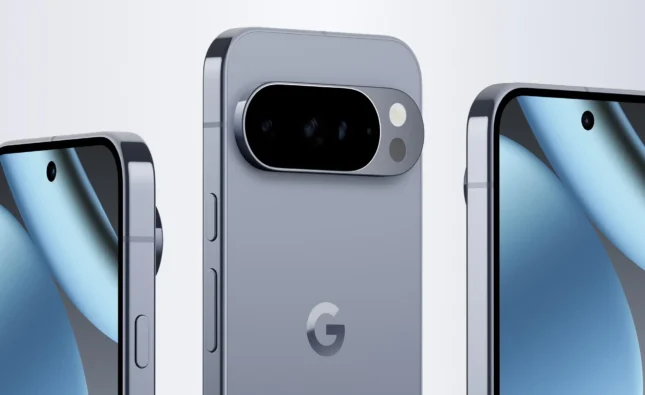
While the Google Pixel 10 Pro XL might not have the outright best camera hardware of any phone, its image processing is phenomenal as are its AI abilities. Beyond generative edits, it can also analyse a scene in the camera app and suggest ways to change the composition for more impactful shots.
On the software side, Gemini is now at the core of the Pixel experience.
Gemini Live lets you have fluid, natural conversations with Google’s AI, complete with screen and camera sharing for real-time help. Magic Cue brings proactive intelligence into chats, calls and searches, surfacing exactly the right info at the right moment. Camera Coach guides you step-by-step to better photos, Auto Best Take ensures group shots look flawless, and 50MP Portrait Mode takes the highest-resolution portraits of any phone.
Right now, its top features include a Summarise function in the voice recorder app. Open any recording, tap the Transcript button, then Summarise at the top; the phone will generate a bullet point synopsis, all on-device.
Smart reply in Gboard uses AI to suggest responses to your WhatsApp, Line, and KakaoTalk chats – but only in US English right now, and as a developer preview. It should start rolling out more widely later this year.
Circle to search is available to everyone, right now. Press and hold the gesture indicator (or onscreen home button if you have it enabled) and draw a circle around any onscreen text or image; your phone will then look it up on Google, using machine learning to recognise objects and locations with impressive speed and accuracy
The Pixel 9 Pro can also create AI-generated wallpapers. It’s baked into Android 14, so will eventually be added to other manufacturers’ mobiles. You can pick from a bunch of themes, objects, materials and colours, with the phone creating a mix of convincing, surreal and clearly computer generated images.
Naturally for a Pixel phone, the Pixel 9 Pro’s AI focuses heavily on photography. Magic Editor intelligently recognises objects when you tap them, letting you move them around the image or remove them entirely, with the phone filling in the gaps. The results can be genuinely impressive.
Video Boost sends your recorded video footage off to the Cloud for AI-based processing. It enhances colour and lighting to an impressive degree, but it’s Google’s servers doing all the heavy lifting here, rather than your phone.
Pros
- Flagship-worthy build and styling
- Consistently great cameras in all conditions
- Android’s AI upgrades a sign of things to come
Cons
- Beaten on raw processing power by Snapdragon rivals
- Higher price makes rivals more tempting
Best Affordable AI Phone
The Nothing Phone 3a costs a quarter of the other phones listed here, but has raced ahead with a clever AI-powered central hub that stores and sorts all your notes, screenshots and saved links. It’s like a smart scrapbook for the 2020s.
Phone 3a has all of Android’s usual AI-driven features, including Circle to Search and Gemini Live – but the Essential Space is unique to Nothing hardware. It’s a hub for all your screenshots, voice notes and web links, opened with a double-press of the dedicated button. Press the Essential key once and it’ll take a screen grab; hold it down and it’ll record a voice memo.
AI then analyses each entry, pulling text from photos and making everything searchable. Voice recordings are transcribed automatically (with good accuracy, based on my testing).
There’s also Essential Search, which dials into your calendar, contacts book, image gallery and apps list. You can use it for web searches, and it’ll answer natural language questions too. It’s a decent replacement for Android’s usual Google search widget, and is improving with each new update to NothingOS.
Pros
- Mid-tier performance and battery for considerably less cash
- Familiar Nothing hallmarks like glyphs and widget-based OS
- Capable cameras for the money, with mature processing
Cons
- Can’t match the 3a Pro for zoom clarity
Final Thoughts
Once upon a time, whenever a conversation involved AI on smartphones, it revolved around a specific feature on a certain device. Those days are long gone, as the AI buzzword is found practically every smartphone released in the past couple of years. While the phrase might be an overused buzzword, the reality is that there is such a thing as the best AI phone.
FAQs
1. What makes a smartphone an “AI phone” in 2026?
AI phones are designed with advanced on-device intelligence, including AI-driven photography, voice assistants, predictive suggestions, real-time translation, and adaptive system optimizations that enhance everyday use.
2. Do I have to pay for AI on my smartphone?
Currently, most phone brands are in a “the first hit is free” phase: the various AI features are baked into each handset from the factory, with no need to pay extra upfront to access them. That’s rapidly changing, though: you might find tasks that need a lot of cloud-based processing, like image generation, require paid-for tokens.
3. How do AI phones improve camera performance?
AI phones use machine learning to recognize scenes, optimize settings, reduce noise, stabilize footage, and even suggest creative compositions, resulting in better photos and videos without needing professional skills.
4. Can I keep all AI processing on my phone, rather than the cloud?
If you’re concerned about data security and don’t like the idea of algorithms storing your personal info somewhere in the online ether, most phones give you the option to restrict AI processing to on-device only. This may lock you out of certain features, and it may not be as quick to process, though it’ll vary between brands and apps.
5. Do AI features work without an internet connection?
Many AI phones in 2026 use on-device AI for core tasks (like camera enhancements and predictive typing), so they still perform intelligently even offline, though some features may require internet for cloud-based processing.