






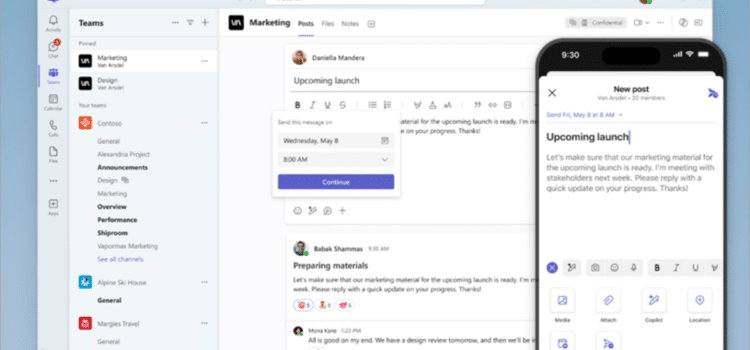
Microsoft has introduced a new update to Microsoft Teams aimed at improving how users interact with the platform, particularly by freeing up more screen space during meetings and collaboration sessions. The change reflects Microsoft’s continued focus on refining user experience as Teams becomes an increasingly central tool in both workplace communication and personal productivity.
As hybrid work and digital collaboration remain standard across industries in the United States, interface efficiency has become just as important as feature expansion. This update signals a shift toward simplifying the on-screen experience, reducing clutter, and allowing users to focus more directly on content and communication.
A Subtle but Meaningful Interface Shift
The latest update focuses on optimising how Teams uses available screen space, particularly during meetings. Microsoft has adjusted the layout to reduce unnecessary UI elements, streamline controls, and prioritise active content such as video feeds, presentations, and shared documents.
Instead of introducing entirely new features, the update refines existing ones. Toolbars, participant panels, and controls have been repositioned or minimised, so they do not occupy valuable screen real estate unless actively needed.
This type of change may appear incremental, but for users who spend hours in virtual meetings each day, even small improvements in layout efficiency can have a noticeable impact on usability and productivity.
Why Screen Space Matters More Than Ever
The need for screen space has become increasingly important as people depend on digital collaboration tools for their work. Users now operate their laptops in environments where they use single screens because their work area is confined, thus making interface design essential.
Teams has become a primary tool in workplace settings because users need to access both their native applications and other programs, which include spreadsheets, presentations, and project management systems. A cluttered interface makes it hard to work on multiple tasks at once and diminishes the success of collaboration.
Microsoft solves a widespread user problem with its space-expansion solution. Users can now access additional content without resizing their windows or switching between applications, helping them stay focused during meetings and collaborative sessions.
Enhancing Meetings and Collaboration
The meeting experience receives its most significant changes from the update. The system gives users more control over shared content, which improves their ability to follow conversations and work with materials during live discussions.
The updated layout allows for larger video feeds and clearer presentation views, which helps all participants see better. The system gives users more control over shared content, which improves their ability to follow conversations and work with materials during live discussions. The controls stay available to users, but their presence becomes less noticeable. Users can manage their meetings effectively with this system because it lets them maintain control without using up their display space.
The changes help teams that depend on visual collaboration work together more effectively by minimising conflicts during their conversations.
Integration with the Broader Microsoft Ecosystem
The Teams platform establishes strong connections with the entire Microsoft 365 software suite through its seamless operation with Word, Excel, PowerPoint, and OneDrive. Microsoft has updated its interface to establish a unified design system, improving the user experience across all its products.
Microsoft enables users to switch between tools in Teams because the company developed it to reduce visual elements that could cause confusion. The need for this solution arises from the requirement that enterprise environments must manage multiple ongoing application operations.
The update adds to Microsoft’s current efforts to develop AI-based capabilities, which Teams now includes as part of its features. The tools gain greater operational capacity through a cleaner interface that removes all unnecessary visual elements.
Productivity Gains for US Workplaces
The US workforce benefits from hybrid and remote work models because better collaboration tools directly enhance their productivity. Teams serves as the primary platform for daily meetings, project work, and cross-departmental communication.
The platform enables users to complete their work more efficiently because its design reduces the need to explore the system. Organisations that use Teams as their primary communication tool. The tool will experience productivity improvements that become visible over time. The update improves accessibility by enabling users to view and interact with content more effectively, benefiting people who work in different environments.
Responding to User Feedback
Microsoft has consistently demonstrated its commitment to developing Teams by incorporating user feedback into its update process. The current release includes multiple interface changes requested by users to achieve a more streamlined, less cluttered design.
Teams have become more complex as developers keep adding new features, so the development team works to manage this increased complexity through its continuous development process. The current update focuses on improving the user experience by simplifying design elements rather than adding new product features. Microsoft shows its commitment to better user experiences through its work on these issues.
The Role of Design in Next-Gen Computing
The update shows a larger trend in next-generation personal computing: design and usability now have equal value with system functionality. The increasing power of devices and software creates a new challenge, requiring developers to build systems that users can understand and control.
The Teams collaboration tool requires users to work with technology through three main improvements: reducing operational barriers and enhancing system transparency. The design approach of this system centres on screen space as its primary principle. Microsoft product design shows current user requirements through its design process, which focuses on displaying essential screen content.
What Comes Next
The current update delivers interface enhancements and establishes a foundation for future development. Microsoft needs to maintain its Teams interface design because the company keeps adding new AI features and system improvements.
The upcoming updates will introduce new content management systems that help users automate tasks and deliver personalised experiences through straightforward interfaces. The current objective is to create a more efficient and user-friendly platform that meets the needs of contemporary workspaces.
A Cleaner Experience for Everyday Collaboration
Microsoft Teams received its latest update, which will benefit millions of users by adding new features that have received little media attention. The company solved its main digital collaboration problem by implementing two improvements that increased available screen space and simplified the user interface.
The workspace needs both effective results and clear communication, so even tiny enhancements become important. The Teams update provides users with a more organised and efficient work environment through its new features.
Source: Microsoft 365 Blog