Microsoft has introduced a new update to Microsoft Teams aimed at improving how users interact with the platform, particularly by freeing up more screen space during meetings and collaboration sessions. The change reflects Microsoft’s continued focus on refining user experience as Teams becomes an increasingly central tool in both workplace communication and personal productivity.  

As hybrid work and digital collaboration remain standard across industries in the United States, interface efficiency has become just as important as feature expansion. This update signals a shift toward simplifying the on-screen experience, reducing clutter, and allowing users to focus more directly on content and communication.  

A Subtle but Meaningful Interface Shift  

The latest update focuses on optimising how Teams uses available screen space, particularly during meetings. Microsoft has adjusted the layout to reduce unnecessary UI elements, streamline controls, and prioritise active content such as video feeds, presentations, and shared documents.  

Instead of introducing entirely new features, the update refines existing ones. Toolbars, participant panels, and controls have been repositioned or minimised, so they do not occupy valuable screen real estate unless actively needed.  

This type of change may appear incremental, but for users who spend hours in virtual meetings each day, even small improvements in layout efficiency can have a noticeable impact on usability and productivity.  

Why Screen Space Matters More Than Ever  

The need for screen space has become increasingly important as people depend on digital collaboration tools for their work. Users now operate their laptops in environments where they use single screens because their work area is confined, thus making interface design essential.  

Teams has become a primary tool in workplace settings because users need to access both their native applications and other programs, which include spreadsheets, presentations, and project management systems. A cluttered interface makes it hard to work on multiple tasks at once and diminishes the success of collaboration.  

Microsoft solves a widespread user problem with its space-expansion solution. Users can now access additional content without resizing their windows or switching between applications, helping them stay focused during meetings and collaborative sessions.  

Enhancing Meetings and Collaboration  

The meeting experience receives its most significant changes from the update. The system gives users more control over shared content, which improves their ability to follow conversations and work with materials during live discussions.  

The updated layout allows for larger video feeds and clearer presentation views, which helps all participants see better. The system gives users more control over shared content, which improves their ability to follow conversations and work with materials during live discussions. The controls stay available to users, but their presence becomes less noticeable. Users can manage their meetings effectively with this system because it lets them maintain control without using up their display space.  

The changes help teams that depend on visual collaboration work together more effectively by minimising conflicts during their conversations.  

Integration with the Broader Microsoft Ecosystem  

The Teams platform establishes strong connections with the entire Microsoft 365 software suite through its seamless operation with Word, Excel, PowerPoint, and OneDrive. Microsoft has updated its interface to establish a unified design system, improving the user experience across all its products.  

Microsoft enables users to switch between tools in Teams because the company developed it to reduce visual elements that could cause confusion. The need for this solution arises from the requirement that enterprise environments must manage multiple ongoing application operations.  

The update adds to Microsoft’s current efforts to develop AI-based capabilities, which Teams now includes as part of its features. The tools gain greater operational capacity through a cleaner interface that removes all unnecessary visual elements.  

Productivity Gains for US Workplaces  

The US workforce benefits from hybrid and remote work models because better collaboration tools directly enhance their productivity. Teams serves as the primary platform for daily meetings, project work, and cross-departmental communication.  

The platform enables users to complete their work more efficiently because its design reduces the need to explore the system. Organisations that use Teams as their primary communication tool. The tool will experience productivity improvements that become visible over time. The update improves accessibility by enabling users to view and interact with content more effectively, benefiting people who work in different environments.  

Responding to User Feedback  

Microsoft has consistently demonstrated its commitment to developing Teams by incorporating user feedback into its update process. The current release includes multiple interface changes requested by users to achieve a more streamlined, less cluttered design. 

Teams have become more complex as developers keep adding new features, so the development team works to manage this increased complexity through its continuous development process. The current update focuses on improving the user experience by simplifying design elements rather than adding new product features. Microsoft shows its commitment to better user experiences through its work on these issues. 

The Role of Design in Next-Gen Computing  

The update shows a larger trend in next-generation personal computing: design and usability now have equal value with system functionality. The increasing power of devices and software creates a new challenge, requiring developers to build systems that users can understand and control.  

The Teams collaboration tool requires users to work with technology through three main improvements: reducing operational barriers and enhancing system transparency. The design approach of this system centres on screen space as its primary principle. Microsoft product design shows current user requirements through its design process, which focuses on displaying essential screen content.  

What Comes Next  

The current update delivers interface enhancements and establishes a foundation for future development. Microsoft needs to maintain its Teams interface design because the company keeps adding new AI features and system improvements.  

The upcoming updates will introduce new content management systems that help users automate tasks and deliver personalised experiences through straightforward interfaces. The current objective is to create a more efficient and user-friendly platform that meets the needs of contemporary workspaces.  

A Cleaner Experience for Everyday Collaboration  

Microsoft Teams received its latest update, which will benefit millions of users by adding new features that have received little media attention. The company solved its main digital collaboration problem by implementing two improvements that increased available screen space and simplified the user interface.  

The workspace needs both effective results and clear communication, so even tiny enhancements become important. The Teams update provides users with a more organised and efficient work environment through its new features. 

Source: Microsoft 365 Blog  

Early tests show that Intel has improved its raw performance and AI capabilities, but Apple Silicon continues to lead in efficiency and performance per watt. Throughout this ongoing battle, Apple sets the bar in single-core performance while Intel and Qualcomm steadily close the gap in AI tasks.  

Early M1 vs. Intel 11th generation (2020 to 2021) 

  • Intel benchmarks showed that the Apple M1 was faster than most Intel-based Macs in single-core tasks.  
  • Intel stated that its 11th Gen Core i7-1185G7 could match or exceed the M1 in specific productivity tests when running non-native applications. For instance, it exported PDFs in Office 365 up to 2.3 times faster.  
  • Though Intel made these claims, Apple Silicon demonstrated greater energy efficiency and often operated at lower temperatures, requiring fewer fans than Intel-based MacBooks.  

Recent & Upcoming Competitions 2025-2026 

  • Intel’s upcoming Panther Lake chips, built using the 18A process (where 18A refers to a manufacturing method with smaller, more efficient transistors), are launching in late 2026 and are expected to compete with Apple in AI and overall performance. The next 14A process, planned for 2027, aims to improve energy efficiency per watt by 15-20% compared to 18A.  
  • As of 2025, Apple’s M4 processor cores are 34 to 48 times faster than competitors in single-core tests, which measure speed when the chip runs one task at a time, and also offer better thermal efficiency, producing less heat.  
  • Recent data shows that high-end Windows laptops, especially those with Qualcomm chips, are now ahead of Apple’s M5 series in on-device AI tasks. However, Apple still leads in overall GPU–CPU efficiency.  

Key Takeaways 

  • Apple consistently leads in single-core performance.  
  • Thermal/battery advantage. Apple Silicon still delivers better battery life and produces less heat, which is important for thin laptops and brings them closer to Apple’s performance-per-watt.   

2021 reports noted that Intel’s testing sometimes highlighted narrow scenarios to gain an advantage.  

Intel has introduced its Intel Core Ultra 200 HX Plus series mobile processors, giving gamers and professionals more high-performance choices in the Core Ultra 200 series.  

Optimized for advanced gaming, streaming, content creation, and workstation use, the Intel Core Ultra 200HX Plus series introduces two new processors: Intel Core Ultra 9 290HX Plus and Intel Core Ultra 7 270HX Plus. These processors add new features and architectural refinements, including support for the new Intel binary enhancement tool, a first-of-its-kind binary translation layer optimization capability that can improve native performance in select games.  

According to Intel, the Intel Core Ultra 200HX Plus series is intended to raise mobile computing performance for gamers, creators, and professionals, delivering higher performance with increased die-to-die frequencies and the binary enhancement tool for gaming, creative, and professional use.  

Josh Newman, General Manager and Vice President of Product Marketing, Client Computing Group.  

The Intel Core i9-290HX Plus offers up to 8% faster gaming performance and up to 7% faster single-thread performance. Single-thread performance measures the speed of a single computing task compared to the previous Intel Core i9-285HX. If you upgrade from older devices, you could see up to 62% faster gaming and up to 30% faster single-threaded performance versus the Intel Core i9-12900HX.  

Notable new specifications and features include:  

  • The new chips can boost die-to-die frequency by up to 900 MHz compared to the Intel Core Ultra 7, 285HX, and 265HX. This nearly 1 GHz increase speeds up the CPU and memory controller link, reducing system latency and enhancing game performance.  
  • These processors support the new Intel binary enhancement tool, which uses Intel’s experience in workload optimization to increase instructions per cycle (the number of operations completed in each cycle) and improve user performance. It works even if the workload the set of tasks a processor must execute was designed for another x86 processor (an Intel-compatible CPU), a game console, or an older architecture. This tool is part of Intel’s long-term plan to boost performance for power users. The chips also support discrete (separate, add-on) Intel Wi‑Fi 7 at 5 GHz for wireless connectivity, Intel Wireless Bluetooth 5.4 for improved device pairing, and Intel Thunderbolt 5, which gives users up to 80 Gbps (gigabits per second) bidirectional bandwidth to transfer large files, stream 8K video, charge devices, and connect multiple accessories to a single PC.  

Intel Core Ultra 200HX Plus powered systems will be available from OEM partners throughout the year, starting on March 17, 2026. Check with your preferred vendor for specific availability. Some partner systems are launching today, with more coming later this year. 

Source: Intel Launches New Core Ultra 200HX Plus Series Mobile Processors  

After public disapproval and viral examples of strange or inaccurate AI-generated advice, like telling users to eat rocks or put glue on pizza, Google has added ways to limit and control AI overviews in search results.  

Google has not offered a permanent way to turn off all AI content, but users now have more ways to reduce its presence and improve accuracy.  

Options To Limit AI Answers 

  • The web filter now adds a dedicated tab for web search, excluding AI summaries, knowledge panels, or most videos.  
  • Limitation: You have to select this option for every search since it cannot be set as the default view right now.  
  • Search Labs Control. If you joined AI experimental features through Search Labs, you can turn them off on the Google app or desktop. Click the beaker icon and adjust the settings to disable AI overuse and more.  
  • Browser extensions. Third-party tools like Hide and Google AI Overviews are available for Chrome and Firefox. These extensions automatically remove AI summaries from your search results.  
  • The hyphen AI search modifier adding “-AI” or similar terms. (eg, “no AI”) to the end of your search can sometimes prevent the AI banner from appearing.  

Changes to AI Functionality 

Besides giving users more control, Google has also added extra safeguards.  

  • Restricted topics: AI overviews will not appear for some hard news topics, or when accuracy and up-to-date information are especially important.  
  • Google made specific changes to safeguard quality in health-related searches.  
  • Source restriction: Google now limits the use of user-generated content, like social media posts, to help prevent misleading advice.  

Despite these changes, Google maintains that AI overviews improved search and plans to keep them as a permanent feature.  

I don’t mind Google’s AI mode. Sometimes it’s actually helpful for questions that are hard to phrase with just keywords, but I find AI overviews in regular results much less useful.  

AI Overviews launched in May 2024 generate natural-language responses using information from Google search results. Although they’ve improved since their early issues, I still see too many errors.  

The need to fact-check each AI overview diminishes its value, as it requires returning to the original source. For this reason, a direct presentation of relevant links is often preferable to potentially inaccurate AI-generated summaries.  

If you miss when Google just showed a list of links, the company now offers a web filter that only displays website links. With some quick setup, you can make this your default search view.  

To see only website links, adjust your browser. I’ll show you how to do it in Chrome, Firefox, Safari, or Edge.  

What Exactly Is the Google Search Web Filter? 

The new web filter works like Google’s News, Images, Videos, or Shopping filters. Choosing it shows only text links, no AI summaries, videos, or panels like Top Stories or People Also Ask.  

You will find the new filter below the search box next to News, Images, and Videos. If you don’t see it, click the three-dot “More” menu to find it.  

When you click the web filter, your search results will be made up entirely of text-based links with no answers, AI, or extras. The word “web” will be underlined and highlighted in blue below the search box.  

In my initial tests, when I first tried Google’s web filter, I didn’t see any sponsored results or ads. However, a Google spokesperson said the filter can still show ads for some searches. After testing more search terms, I did see ads for a few specific queries.   

Web Filters for Browser Bar Searches 

Let’s look at how you can set up your browser. So, searches from your address bar use the Google web filter. You just need to create a custom site search shortcut using a keyword or set it as your default for all searches.  

The key URL is %s. %s stands for your search, and UDM = 14 activates the web filter results.  

Here are some steps to add a custom site search for Google’s web filter in the four most popular desktop browsers: Google Chrome, Microsoft Edge, Mozilla Firefox, and Apple Safari. Not to bother with browser settings, you can always just use the website built by Ernie Smith of TDM: & UDM=14. It provides a front-end to Google search with the necessary web filter parameter automatically included.  

Google Chrome 

Open Google Chrome and click the three-dot button in the top right, then select Settings from the menu. Alternatively, type chrome://settings in the address bar to open the settings page directly.  

Select a search engine. Choose the search engine from the left column. Then click Manage Search Engines and Site Search in the center of the window. Scroll down to Site Search and click the blue Add button. p-hyphen-up window, create a name for the new search shortcut and a keyword for triggering it. I chose “old Google” and “og” for the last field.  

URL with percentages in place of query: enter the URL I mentioned above, %, then click the blue Add button.  

Now, when you type OG followed by your search term in the address bar, you will get results using Google’s Web Filter. Click the three-dot menu next to your new site search and select Make Default. After you make the new search shortcut your default, all your address bar searches will use the web filter. No keyword needed.  

Microsoft Edge 

Click the ellipses menu in the top right, open Settings, and choose Privacy, Search, and Services. Scroll down to the Address bar, Search, and select Manage search engines or type edge://settings/searchEngines in the address bar to go there directly.  

Click Add for a new shortcut. Enter a name like “old Google”, a trigger word like “og”, and this URL: %s 

To set your Google URL as the default, return to the address bar and enter a search query. Open the search engine dropdown, select your custom search, and you are done.  

Mozilla Firefox 

In Firefox, create a search keyword by making a bookmark. Use this keyword in the address bar to access Google Web Filter results. Note that Firefox’s desktop version does not allow direct addition of search engines.  

Open Bookmarks, choose Manage Bookmarks. Right-click a folder and select Add Bookmark. The folder location doesn’t matter for use in the address bar.  

Enter a name like “old Google”, the URL %s, and a keyword such as OG. Click Save. Use your keyword in the address bar for filtered results.  

Apple Safari 

Safari does not natively support custom set shortcuts. To set up a Google Web Filter search, install the free Safari extension Smart Keyword Search. This allows you to create and use search shortcuts in Safari.  

Enable Smart Keyword Search to modify Google search results. Open Settings, click Extensions at the top. Select Smart Keyword Search and click Edit Websites. Use the drop-down menu next to Google.com and choose Allow.  

Close settings. Click the smart keyword search icon in the pop-up, next to the address bar. Click compose for a new rule. Enter a name like “old Google,” a prefix like “Moji,” and the filter search URL. Smart keyword {search} uses search instead of %S for queries. So use {search}. Now type your prefix in the address bar for Google’s web filter.  

Source: Just Want Links in Google Search Results Instead of AI Overviews? Here’s How to Do It  

  • Meta AI Support Assistant now offers 24/7 help on Facebook and Instagram for account updates and settings.  
  • In the coming years, we will introduce advanced AI systems across our apps. These will help us find and remove serious content violations, such as scams and illegal material, so you encounter them less.  

We are launching new AI tools to support and enforce content on our apps, enhancing your experience. As technology advances, we are using AI to provide more reliable assistance and detect serious violations, like scams, faster and more accurately, with fewer mistakes.  

Meta AI Support Assistant is now available on Facebook and Instagram 

In December, we introduced the Meta AI Support Assistant, a tool built to offer reliable 24/7 support for almost any issue. Now it’s available in countries and regions where Meta AI is supported on Facebook and Instagram for iOS and Android, as well as on the desktop Help Center, with even more features to assist you. Updated on March 20, 2026, at 1:30 PM PT to reflect availability.  

When you have an account Issue, you want solutions, not just answers. The Meta AI Support Assistant is designed to resolve problems from start to finish. It can answer questions about notifications or new features, and handle follow-up requests in Facebook and Instagram, such as:  

  • Reporting scams, impersonation accounts, or problematic content.  
  • Making it easier to see why your account was taken down, to appeal, and to track what happens next.  
  • Managing your privacy settings.  
  • Resetting passwords.  
  • Updating profile settings.  

The Meta AI Support Assistant is built into Facebook and Instagram, responding in under 5 seconds to reduce wait times. Meta AI Support Assistant improves app support. Most feedback is positive. It’s available for all support topics in supported languages.e.  

We’ve begun offering support to people who need help logging into Facebook and Instagram, starting with certain cases in the US and Canada. We plan to expand to more countries and account access scenarios soon. We are investing in AI-powered tools to make support more accessible, reliable, and effective. As more people use Meta AI support assistance and as technology improves, we’ll keep improving it. Learn more about the Meta AI support assistant here.  

Improving Content Enforcement With More Advanced AI 

Last year, we shared positive results from changes designed to reduce mistakes and focus our enforcement on the most serious content, such as terrorism, child exploitation, drugs, fraud, and scams. We’ve also been testing more advanced AI systems for content enforcement. We think these systems can catch more violations accurately, stop more scams, and respond faster to real-time events, all with fewer mistakes.  

Early tests of these systems have been promising, as they can:  

  • AI identifies 5,000 scam attempts daily that review teams missed, reducing login detail theft.  
  • Identify and prevent additional accounts from impersonating celebrities and other high-profile figures, helping us increase user reports about the most impersonated celebrities by over 80%.  
  • Catch two times more violating adult sexual solicitation content than our revisions, while also decreasing the rate of mistakes by more than 60%.  
  • AI stops account takeovers by flagging new locations or profile edits as threats.s.  
  • Advanced AI can spot scam sites by recognizing fake web addresses, irregular prices, and misuse of real logos, reducing scam ad views by 7%.  

These AI systems cover languages used by 98% of people online, adapting to different cultural and regional traits.  

A Smarter Approach 

In the next few years, we will deploy these advanced AI systems across our apps once they consistently surpass our current content enforcement methods. As we do this, we will rely less on third-party vendors and focus on building up our own systems and teams. While people will still review content, these AI systems will handle tasks better suited to technology, such as repetitive reviews of graphic content or areas where bad actors often change tactics, such as illicit drug sales or scams.  

Even as we use new technology to expand what’s possible, people will remain central to our approach. AI lets us move faster and scale, but doesn’t replace human judgment. Instead, it applies that judgment more reliably to billions of pieces of content. Experts will design, train, oversee, evaluate, and measure our AI’s performance and make the most complex decisions. For example, people will still handle the highest-risk and most critical issues, such as account-disability appeals. Experts will design, train, oversee, evaluate, and measure our AI’s performance and make the most complex decisions. Once to prevent bias and ensure accuracy. Our community standards remain unchanged, with tools like the Meta-AI support assistant. We’re improving how people report policy violations and appeal mistakes. Ultimately, this approach lets people focus on their strengths while technology handles what it does best, merging advanced AI with human expertise for mutual support.

Source –  Boosting Your Support and Safety on Meta’s Apps With AI 

News Summary

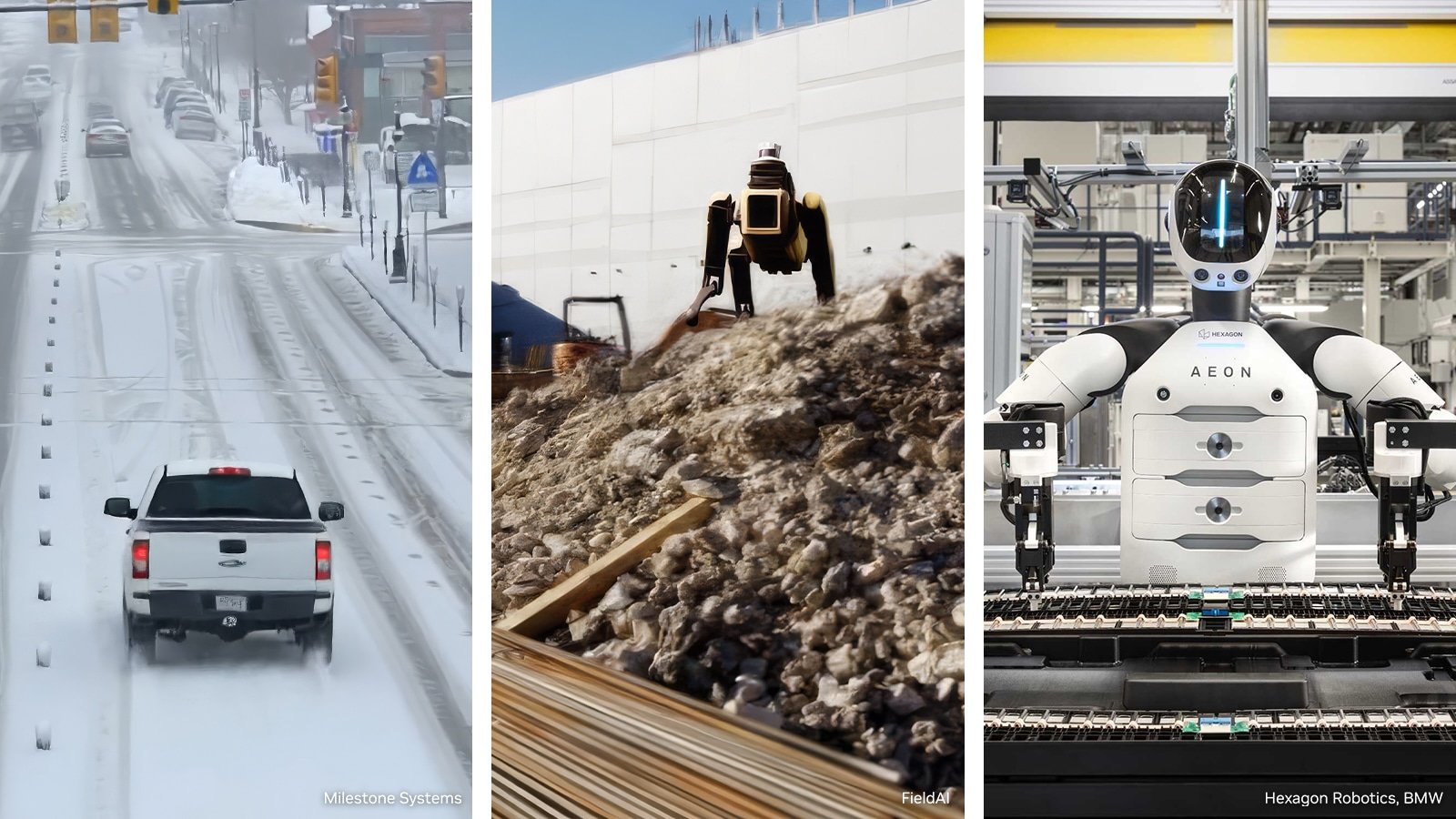
Leading companies in robot-brain development, industrial and surgical robots, and humanoid innovation are using NVIDIA technology to develop and deploy physical AI at scale.

NVIDIA has introduced Cosmos, world models AI systems that create and simulate digital environments for robots to learn in and ISAAC simulation frameworks, software tools that allow users to design, test, and train robots virtually. The new ISAT GR00TN models offer improved training for intelligent robot behavior.

Collaborative alliances are transforming platform integrations into concrete industry results, including precise electronics assembly, autonomous construction, and AI-powered automation for manufacturers of all sizes.

At GTC, NVIDIA announced new partnerships with the Global Robotics Community and introduced new ISAAC Simulation Frameworks, as well as Cosmos and ISAAC GR00T open models to support next-generation intelligent robot development, training, and deployment.

Industry leaders are leveraging the N-Media platform to advance robotics innovation.

Physical AI has arrived. Every industrial company will become a robotics company, said Jensen Huang, founder and CEO of NVIDIA. NVIDIA’s full-stack platform spanning computing, open models, and software drive frameworks is the foundation for the robotics industry, uniting a worldwide ecosystem to build the intelligent machines that will power the next generation of factories, logistics, transportation, and infrastructure. Yeah, sure.

Testing the World’s Largest Robotic Fleets

As industrial robotics relies more on AI, manufacturers need accurate, high-quality simulations to design, test, and refine systems before deployment.

FANUC, ABB Robotics, Yaskawa, and KUKA, with over 2 million robots installed globally, use NVIDIA Omniverse libraries and ISAAC simulation frameworks within their virtual environments. commissioning tools. These tools allow companies to develop and test complex robotic applications and production lines using accurate digital replicas known as digital twins. The firms are also incorporating NVIDIA Jetson modules, which are AI processors, into their robot controllers to deliver real-time AI on the production line.

Creating Robot Brains for Any Type of Robot

Robotics is evolving from single-task machines to adaptable systems that maintain the accuracy and dependability required by industry. Accomplishing this requires robots to process information more like humans, enabling them to perceive, decide, and act independently. Developers like Field AI and Skild AI are creating general-purpose robot brains with NVIDIA, Cosmos World models for data, and ISAAC simulation frameworks to test their systems. This lets any robot learn new tasks with little extra training. WorldLabs uses ISAAC SIM to test its generative world models, and Generalist AI uses Cosmos to generate synthetic data.

NVIDIA has announced Cosmos 3, the first world foundation model to combine synthetic world creation, vision reasoning, and action simulation. This advancement will accelerate the development of general robot intelligence for multi-faceted environments, paving the way for the next generation of humanoid robots.

Building humanoid robots remains a major challenge in robotics. Replicating human mobility, dexterity, and reasoning requires integrating advanced AI perception and real-time control into safe, reliable, and self-governing systems that can withstand adversaries, such as 1x. Agibot Agility, Agile Robots, Boston Dynamics Figure, Hexagon Robotics, Humanoid, Menti, and Neura Robotics are building the next generation of humanoids using Cosmos World Models. ISAAC SIM and ISASC Lab to accelerate the development and validation of their robots. NVIDIA has announced ISAC Lab 3.0 in early access, enabling faster, larger-scale robot learning on NVIDIA DGX-class infrastructure. Built on the new Newton Physics Engine 1.0 and the NVIDIA PhysX Software Development Kit, it adds multi-physics simulation and enhanced support for complex dexterous manipulation.

Agibot, Humanoid, LG Electronics, Neura Robotics, and Noble Machines use NVIDIA ISAC GR00TN models to speed up industrial deployment of their humanoids. NVIDIA announced that GR00T-N1.7 is available in early access with commercial licensing, offering generalized robotic skills, including advanced dexterous control and production-ready deployments.

During his GTC keynote, Huang reviewed GR00TN2, a next-generation robot foundation model based on Dream Zero research built on a new world action model. GR00TN2 enables robots to complete new tasks in unfamiliar environments more than twice as often as leading vision-language-action models scheduled for release by year-end. GR00TN2 currently ranks first on Malmo Spaces and Robo Arena for generalist robot policies.

These systems are powered by the NVIDIA Jetson Thor robotic computing platform, enabling developers to transition from simulation training to field deployment faster with greater speed, intelligence, and reliability.

Expanding physical AI to healthcare robotics

Healthcare yields a significant opportunity for physical AI. However, using autonomous systems in surgery, imaging, and hospitals requires infrastructure that meets the strictest safety and regulatory compliance standards.

CMR Surgical is using the Cosmos H simulation platform to train and validate the robotic intelligence for its Versius surgical system prior to clinical deployment. Johnson & Johnson MedTech is using Isaac SIM and Cosmos-based post-training workflows to train and validate systems for the Monarch urology platform. Medtronic is exploring NVIDIA, IGX, and Thor to deliver machine-critical exactness and functional safety in surgical robotic systems.

A Global Catalyst for Robotic Innovation

NVIDIA is building an open, unified platform that enables users to design, train, test, and deploy physical AI solutions. This model fosters collaboration within the robotics sector and streamlines scaling real-world integrations.

Supporting The Next Generation Of Physical AI Innovators

NVIDIA wants to make physical AI tools available to everyone, whether you are part of a new startup or the worldwide open source community.

The NVIDIA Inception Program is a global startup incubator with over 40,000 members. It gives robotics innovators access to NVIDIA’s open physical AI stack. Members like Bedrock Robotics, Dexterity AI, Flexicon, Lightwheel, Rivr, Standardbots, Vention, and World Labs receive technical support, powerful computing resources, and opportunities to interact with key robotics partners and customers.

NVIDIA is also working with Hugging Face to integrate ISAAC and GR00T into the LeRobot open-source framework. This partnership brings together NVIDIA’s 2 million robotics developers and Hugging Face’s 13 million AI builders worldwide, helping accelerate open-source robotics development.

Source: NVIDIA and Global Robotics Leaders Take Physical AI to the Real World 

A recent ChatGPT update from March 2026 lets you upload more files at once, so you can analyze more documents together.  

Here Are the Main Changes for File Analysis 

  • You can now attach up to 20 files per message, with double the previous word limit.  
  • The update supports more text and code files, like logs and configs.  
  • Using Cmd+A or Ctrl+A now selects only transcript content, not interface elements, simplifying management.  
  • These updates are now available on Free, Plus, and Pro plans and work on the web, iOS, and Android.  

2026 File Analysis Limits By Plan 

  • ChatGPT free: You can upload up to three files each day.  
  • ChatGPT Plus: Upload up to ~80 files every 3 hours (10 per message, 512 MB each, rolling 3-hour window).  
  • ChatGPT Pro/Enterprise: Unlimited uploads (no per-message limit; 40 per project in some setups; 512 MB per file).  

These changes, plus cloud options, simplify document analysis.  

The number of files you can upload to ChatGPT depends on your subscription. Free users can upload 3 files/day; Plus, users can upload about 80 files in 3 hours; and Pro users have no cap.  

This guide explains file upload limits for each 2026 plan, including message, daily, and size restrictions.  

ChatGPT File Upload Limits 2026 

Plan  Price.  Files you can upload.  Per message.  
Free.  $0  3 files / Day  Three files  
Go.  $5.50 per month  Extended more than free.  Ten files.  
Plus  $20 per month.  80 files / 3 hours.  10 files  
Pro.  $200 per month.  Unlimited.  Unlimited  
Team  $25/user/month.  ~80 files / 3 hours  10 files  
Enterprise  Custom.  Negotiable.  Negotiable.  

ChatGPT Free: 3 Files Per Day 

With ChatGPT’s free plan, you can upload up to 3 files each day. This differs from paid plans, which may offer higher upload limits. Don’t worry, the limit resets every 24 hours, so you’ll get a fresh start tomorrow.  

  • Daily limit: three files total.  
  • Per message: up to 3 files.  
  • Each file can be up to 512 MB.  
  • Reset every 24 hours.  

If you reach this message, you will see it. You’ve reached your file upload limit. Don’t worry, our guide has quick steps to help you fix this error.  

ChatGPT Plus: ~80 Files per 3 Hours 

ChatGPT Plus, at $20 per month, gives you a much higher upload limit.  

  • Plus: About 80 files allowed per 3-hour rolling window.  
  • Each message can contain up to 10 files.  
  • File size: 512 MB per file.  
  • The 3-hour window gradually refreshes upload limits.  

How the Rolling Window Works 

Plus’s rolling window means uploads refresh gradually over time, not just once daily.  

  • Example: Upload at 2 pm, refresh by 5 pm.  
  • Older uploads expire over time, freeing space for new files.  
  • Uploads refresh bit by bit over time; you don’t have to wait for a full reset.  

The 10-File-Per-Message Limit 

Even with Plus, attach up to 10 files per message. For big projects, upload in batches across several messages.  

Chat GPT Pro: Unlimited Uploads 

ChatGPT Pro ($200 per month) is the only plan that enables truly unlimited file uploads; Free and Plus have distinct caps.  

  • Upload limit: unlimited, subject to abuse guard rails.  
  • No practical limit per message.  
  • Each file can be up to 512 MB.  
  • Additional perks, unlimited GPT-5.2, and advanced reasoning features.  

At $200 per month, $2400 per year, Probe is perfect for power users and professionals who want to use AI to their heart’s content. No limits.  

File size limits (all plans) 

File type  Maximum size.  
Documents, PDF, DOCX, TXT etc.  512 MB  
Images: PNG, JPG, GIF, WEBP  20 MB  
Spreadsheets, XLSX, CSV.  50 MB  
Text content  ~2 million tokens.  

Supported File Types 

ChatGPT accepts these file formats.  

  • Documents: PDF, DOCX, DOC, PPTX, PPT, TXT, RTF, ODT.  
  • Spreadsheets, XLSX, XLS, CSV.  
  • Code JS, KS, PY, Java, C, C++, Go, Rust, Ruby, PHP, and more  
  • Images: PNG, JPG, JPEG, GIF, WEBP.  
  • Data, JSON, XML, HTML.  

How To Upload More Files Than Your Limit 

If ChatGPT’s limits are getting in your way, here are some options you can try.  

Option 1: Combine Files Recommended 

The best workaround is to merge multiple files into a single file before uploading. ChatGPT counts the number of files, not the total number of items in them. So a single large file with 100 documents still counts as a single upload.  

One file does this automatically.  

  • Go to onefileapp.com  
  • Upload your files or folders or import from GitHub.  
  • Download the combined output as a single file.  
  • Upload the combined file to ChatGPT to keep all your content in one easy-to-access spot.  

This method works with any plan, even the free version. Combine 100 files into a single file, upload it, and let ChatGPT analyze them all together seamlessly.  

Option 2: Upgrade Your Plan 

  • Free to Plus $20 per month increases your limit from 3 files per day to about 80 files every 3 hours.  
  • Plus 2 Pro at $200 per month gives you truly unlimited uploads.  

Option 3: Batch Your Uploads 

If you have a plus or pro, upload your files in groups of 10 across several messages; mention your earlier uploads in your prompts to keep the context.  

If your plan limits the number of files you can upload, try combining them into a single file before uploading. This method works with any plan and is free.  

Source: How Many Files Can You Upload to ChatGPT? (2026 Limits)

Apple’s upcoming 50th anniversary on April 1, 2026, centers on celebrating its core belief: technology that empowers people.

Apple CEO Tim Cook published a letter Thursday titled 50 Years of Thinking Different. He wrote, 50 years ago, in a small garage, a big idea was born. Apple was founded on the simple notion that technology should be personal, a belief that was radical at the time and changed everything.

Cook’s letter highlights Apple’s founding goal of thinking differently and improving lives. While he doesn’t mention Steve Jobs by name, Cook ends with a job sort. “The people crazy enough to think they can change the world are the ones who do.”

Another Apple website shares a glimpse of the company’s anniversary plans, first hinted at by Cook in an internal employee meeting.

In the coming weeks, Apple and its global community will celebrate the company’s 50th anniversary, commemorating the creativity, innovation, and impact that people around the world have made possible with Apple technology.

While these announcements describe a celebration period spanning several weeks before and after April 1, 2026, it is typical for Apple to keep detailed plans secret, even for a milestone anniversary.

While Apple is known for looking forward, this milestone offers a special moment to contemplate the journey that has brought the company here to celebrate the people and communities who have thought differently with us and to honor the abiding values that continue to guide our work, the post said.

Apple announced it will celebrate its 50th anniversary and reaffirm its vision of innovation that transforms how people connect, create, and experience the world.

Since April 1, 1976, Apple has believed progress comes from challenging conventions and imagining new possibilities. This mindset has produced products and services that changed industries and improved lives, from the Apple II to MacBooks to iPhone, iPad, Apple Watch, Apple Vision Pro, and services like the Apple Store, Apple Music, Apple Pay, iCloud, and Apple TV. Apple merges technology and design to help people do more.

This anniversary is a chance to reflect on Apple’s journey, honor the community, and share its vision and guiding values.

To celebrate the milestone, CEO Tim Cook posted a letter on Apple.com reflecting on Apple’s history and values and honoring the people who have shaped the company over the past 50 years.

Apple and its global community will commemorate 50 years, highlighting the creativity, innovation, and impact enabled by Apple’s technology.

Thinking differently has always been at the heart of Apple, said Tim Cook, Apple’s CEO. It is what has driven us to create products that empower people to express themselves, to connect, and to create something wonderful. As we celebrate 50 years, we are deeply grateful to everyone who has been included in this journey and who keeps inspiring what comes next.

Apple believes technology alone is not enough; merging it with the liberal arts and a human touch gives products meaning. This principle guides Apple, from developing Apple Intelligence to designing with privacy, accessibility, and the environment in mind.

As Apple marks this anniversary, it doubles down on its commitment to innovation that improves lives and shapes the world.

Microsoft is using artificial intelligence to address pressing challenges in US water infrastructure, focusing on leak detection, cybersecurity, and data analytics. These efforts drive the company’s commitment to becoming water-positive by 2030 returning more water to the environment than it uses while building community resilience against growing water-related risks.  

These are some keyways Microsoft is using AI in the water sector:  

  • AI-Powered Leak Detection: Microsoft is working with FIDO tech to use AI that listens for and finds water leaks in pipe networks. This technology is being used through Water United in the Colorado River Basin to help save water and improve efficiency.  
  • Water Security and Cyber Security: Microsoft is helping strengthen the cybersecurity of US water utilities through the Water Utilities Pilot Program. The goal is to protect critical water services from growing cyberattacks.  
  • AI for Water Management (NASA Partnership): Microsoft is working with NASA to use AI tools, including Azure AI and Water Copilot, to analyze complex data from the North American Land Data Assimilation System (NLDAS-3). This helps decision-makers, such as state water agencies, manage water risks and detect contamination.  
  • Data Center Water Optimization: AI development consumes significant water for cooling, but Microsoft is working to reduce its impact by building new data centers with zero-water-cooling systems. These centers use closed-loop systems to use less water.  

Main Project Focus Areas 

  • Arizona/Colorado River Basin: Microsoft is supporting the Las Vegas Valley Water District and other regions facing severe water shortages.  
  • Infrastructure repair. Microsoft is using AI to find small leaks, which can help prevent future water shortages.  

These projects aim to make US water systems more resilient by using AI to protect infrastructure and the environment from droughts and other climate threats. The goal is to ensure reliable water access and safeguard communities.  

Communities across North America face serious challenges like water shortages, flooding, and changing agricultural conditions. Recent reports show that extreme weather, especially drought, is causing major agricultural losses, while flooding remains one of the most damaging and expensive natural disasters. These problems hurt infrastructure, disrupt economies, and hit vulnerable communities the hardest. Because of this, decision-makers such as state water agencies, farmers, and urban planners need timely, detailed information to anticipate risks and adapt.  

NASA has developed advanced hydrology and land-surface datasets, enabling progress in drought warning systems, environmental planning, and research. However, many potential users find them difficult to access and use due to the specialized knowledge required.  

NASA and Microsoft are teaming up to make these conclusions easier to access by using AI agents powered by Microsoft Azure, OpenAI Service, and Microsoft Foundry. After the success of the Earth co-pilot demonstration, NASA’s Hydrological Sciences Lab is now developing a multi-agent co-pilot. This tool aims to help more scientists, researchers, and policymakers work with and learn from these detailed datasets.  

The Usability Gap 

Many organizations, such as state water agencies, emergency managers, agricultural planners, and research teams, struggle not with getting data but with having the expertise to use it. Hydrology datasets contain detailed information across many variables, each with its own units, resolutions, and processing steps. To understand things like soil moisture, drought, or flood indicators, you often need a strong background in hydrology and remote sensing.  

This complexity slows scientific analysis and limits the extent to which hydrological data can be used. Useful insights that could help communities prepare for drought, manage water supplies, or predict floods often remain out of reach due to technical barriers. The challenge is to keep the science accurate while making the information easier to explore, understand, and use.  

A Copilot for Hydrology 

To solve this problem, NASA and Microsoft have worked together on a new multi-agent AI system that lets users interact with hydrology datasets using simple everyday language. This system builds on the NASA Earth co-pilot architecture they developed earlier, bringing trusted science, user-focused AI, and scalable cloud technology to hydrology.  

Instead of browsing complex manuals or writing custom code, users simply ask the system questions like “what’s the risk?” or “show me” or “Drop stress indicators across the southern plains.” When a user asks a question, the co-pilot breaks down the request by identifying key hydrologic terms in the query, locating the relevant datasets, and determining which variables are needed. It then runs geospatial searches, interprets scientific data, and generates results in the form of maps, charts, and explanations. This process enables users to interact with the system as if they were consulting a knowledgeable hydrologist, streamlining data analysis, and making complex workflows more intuitive.  

This approach makes it much easier for people to use NASA’s hydrology datasets. Now, planners, water managers, scientists, and agricultural analysts can quickly access information that previously required significant technical expertise.  

NLDAS 3: A New Era of Water Intelligence 

At the core of this new system is the North American Land Data Assimilation System Version 3 (NLDAS-3), one of NASA’s most advanced hydrology datasets. NLDAS-3 provides hourly data at a 1 km resolution across North and Central America, covering over 20 years of observations. Combining satellite data with advanced land-surface and hydrological models provides a detailed, continent-wide view of the water cycle.  

With NLDAS3, users can examine changes in rainfall and temperature, track soil moisture and groundwater, monitor runoff and flood conditions, assess snowpack and snowmelt trends, and analyze vegetation health and evapotranspiration over time. Because it is so detailed, this dataset is extremely useful for drought monitoring, flood risk assessment, emergency planning, farming planning, and managing water resources.  

NLDAS 3 offers continuous, high-resolution information across many regions and years. Organizations can use it to assess risks and make informed decisions. When combined with the AI copilot, scientific data becomes actionable insights for a wider audience.  

Azure AI Behind the Scenes 

The Hydrology Copilot runs on a modern Azure AI and data system designed for scientific work. Azure Synapse Analytics organizes and indexes hydrology datasets, such as NLDAS 3, making them easy and fast to search. This lets users look at decades of environmental data or current conditions in just seconds.  

Azure AI Search enables the system to understand hyermology concepts and connect them to the appropriate variables and processes. Indexing NASA’s scientific documents and metadata ensures that answers are based on reliable information.  

All these parts work together in Microsoft Foundry, which manages language models, multi-agent workflows, and retrieval-augmented generation pipelines. The result is a system that combines NASA’s hydrology science with Microsoft’s AI to create a smooth conversational experience.  

An Appeal to Action 

Water shortages, flooding, and changes in agriculture will continue affecting our environment and economy throughout the 21st century. To address these problems, we need to understand how water conditions change using clear, fast, and accurate information.  

NASA has advanced hydrology datasets. Microsoft, with Azure AI, helps make these datasets more accessible and impactful for users.  

This collaboration is a critical step to democratize access to hydrology insights, empowering communities to plan for the future with actionable information. As AI and cloud technology advance, transforming scientific data into impactful action will become even more effective.  

If you want to see how Azure AI can help your organization use NASA’s Hydrology data for environmental resilience and water planning, contact our team. Together we can turn data into useful insights and build a stronger future for everyone.

Source:  Microsoft and NASA apply AI agents to key hydrology data, deepening our understanding of Earth 

For a long time, the biggest obstacle to autonomous last-mile delivery has been something as ordinary as the front porch step. Sidewalk robots and self-driving vans have improved at navigating neighborhoods. But getting from the curb to the front door has been a real challenge. Now, new developments in Seattle and other testing centers show real progress. Amazon is testing stair-climbing robots for home deliveries, moving from simple wheels to robots with legs or fabric designs that can finally handle the stairs and levels found in today’s homes.  

The hardest part of the last 50 feet isn’t just about having enough power. It’s about how the robot sees and balances itself as it climbs stairs with a 15-pound package. A robot has to manage its center of gravity and map the surfaces it is working on in real time. Stairs are much trickier than flat sidewalks because they are uneven and require the robot to move more flexibly. Amazon’s newest prototypes, developed through its work with cutting-edge robotics companies and its own Proteus and Sparrow projects, are built to go beyond what the old six-wheeled robots could do.  

The Mechanical Evolution of the Delivery Fleet 

To climb stairs, robots need new designs. Most delivery bots today use high-traction wheels suited for flat ground but can’t handle a 7-inch step. The latest bots being tested use different approaches: some have a triple- or star-wheel setup for rolling over obstacles, while others use two or four legs to walk up stairs.  

With four-legged designs like those used in industrial inspection, these robots can maintain three points of contact with the ground at all times. This extra stability is important for handling uneven stone steps at each joint. Let the robot crouch and shift its weight, so the package stays level as it climbs. This helps prevent the contents from shifting, a problem with earlier delivery robots.  

Sensor Fusion And The Geometry Of The Porch 

The second key to stair-climbing robots is how they sense their surroundings. To move safely up stairs, a robot needs to know the depth, height, and stability of each step. Amazon’s test robots use sensors like solid-state LiDAR, stereo depth cameras, and ultrasonic proximity sensors to build accurate maps.  

The robot’s onboard AI uses a process called semantic segmentation, which means the software separates and identifies different objects in its camera images, distinguishing between a solid step and something temporary like a toy or a pet. By combining data from all its sensors, the robot builds a 3D map of the area it needs to climb. Even if it encounters a loose board or a slippery surface, its path-planning software will look for another route or adjust the hardness of its steps to avoid slipping. This kind of awareness is necessary for working in homes in which every entryway is different.  

Addressing the Social and Regulatory Setting 

As Amazon tests stair-climbing robots for home deliveries, there are issues beyond the technology. Having a moving legged machine on private property raises questions about privacy and people’s comfort with them. To help with this, the robots are made to look friendly with rounded edges, gentle lighting, and quiet sounds to avoid making people uneasy.  

From a legal perspective, being able to climb stairs could help these robots follow local rules. Many cities worry about sidewalk robots blocking people walking by or allowing people to get onto homeowners’ private paths more quickly. Amazon can reduce the time the robot spends in public spaces. Also, placing packages right at the door instead of at the bottom of the steps helps prevent package theft since deliveries are less visible from the street.  

The Role Of Edge Computation And The AWS Backbone 

Stair climbing takes a lot of computing power. Every step requires the robot to make thousands of calculations per second to maintain its balance. To avoid draining a battery too quickly, Amazon uses a hybrid computing approach. Basic motor control and obstacle avoidance are handled right on the robot’s own processors, so there is no delay in response.  

More complicated navigation and long-term planning are handled by Amazon’s AWS Cloud. When a robot discovers a new building layout, it sends a compressed version of the data to the cloud. This information helps improve the navigation system for all the robots. Over time, the whole fleet gets smarter as they share what they’ve learned about different ports and stair designs. This shared knowledge will help autonomous delivery grow from small tests to a worldwide service.  

Efficiency And The Carbon Footprint Of The Last Mile 

Air-climbing robots aren’t just making things easier. They’re also about saving money on the last part of the delivery. The last mile is the most costly and most important part of getting packages to people, and it uses smaller electric robots that can complete deliveries independently. Amazon can reduce the number of delivery vans waiting on neighborhood streets.  

These robots are meant to be sent out from hub vans or small local centers. One man can serve as a base for about a dozen robots, which handle the final leg of the delivery while the driver manages the main route. This teamwork combines human decision-making and robots’ steady work, making deliveries more efficient and sustainable.  

Concluding With a Stride Into the Unknown 

As these metallic couriers master the verticality of our world, we might soon see the old days of ground-only robots as a thing of the past. Picture a time when the doorbell rings, not after footsteps but after the steady work of a machine that climbs your stairs as easily as it moves across a warehouse floor. Over time, these robots could become a normal part of our neighborhoods, quietly waiting for the path to clear and moving up our steps with steady patience. Maybe one day a robot will not only deliver your package to the top of the stairs but will pause for a moment, its sensors taking in the view of a city where every doorway is within reach. Is Amazon using the same industry-standard power-to-weight ratios to ensure gas-type stair-climbing units can handle 10-hour shifts without charging?  

Source- Amazon News 

Some things, like your messages, company files, or government secrets, should stay private. Mobile phones can pose a real privacy risk by storing sensitive information such as government IDs, bank details, health records, and work documents.  

Samsung aims to address these risks with the Galaxy S26 Ultra’s Privacy Display, a feature on Ultra models that makes your screen hard to view in public. It offers quick, simple privacy, but does it deliver? Here’s what to know.  

New Display Tech At Work 

Privacy Display is a hardware feature that protects your on-screen information from prying eyes. It’s built right into the screen at the pixel level. Samsung’s technology uses narrow pixels and controls how light spreads. When you look straight at the screen, everything looks normal, but from the sides, the screen dims so much that it almost looks off. This means people behind you won’t be able to snoop on your data.  

Unlike plastic screen covers, a privacy display can be toggled off or on instantly. Just swipe down from the top of the screen to activate it. Additional customization is available. You can use a password pattern or PIN to turn it on, or set it to work only with certain apps, such as your work email.  

There are two modes to match your privacy needs: Maximum Privacy Protection fully hides your screen, so sensitive information like banking details remains just for your eyes, while Partial Screen Privacy conceals only the notification bar, letting you preview messages without exposing them to others. These options give you tailored protection for different situations.  

I tried Privacy Display at Galaxy Unpacked, and it worked just as promised. The screen dimmed so much from the side that I couldn’t read it at all. When I used the phone normally, I couldn’t even tell the feature was on. My experience didn’t change.  

At this point, Samsung hasn’t said if or when Privacy Display will come to other devices. Still, if you often try to read sensitive information in private, this feature means you won’t have to hide it anymore.  

While Privacy Display is currently only on the Ultra, all three phones offer many other privacy features, ensuring comprehensive protection across the lineup.  

A Closer Look at Knox Security 

Many of the S26’s privacy features rely on Knox, Samsung’s built-in security system. The Knox vault protects your personal data, biometric information, and more, keeping your most sensitive information safe and separate from the main system. It works a lot like Google’s Titan M2 security chip to offer extra peace of mind.  

Call Screening checks incoming calls to help you avoid potential spam or scams. Privacy Alerts warn you when apps try to access your data without permission, helping you keep control. Private Album lets you lock and hide photos or images, so only you can see them.  

The new AI features are designed with your privacy in mind. The personal data engine encrypts all your personal info and keeps it in the Nux world. This allows features like Nounmudge to recommend actions based on your messages while making sure your data stays safe and protected.  

Ultimately, whether you want to hide your screen in public or keep your personal info safe from AI, Samsung says its Galaxy phones cover it all. We will further test Privacy Display and other privacy features in our full review, so stay tuned.  

Source: I Put the Galaxy S26 Ultra’s Privacy Display to the Test. It Seriously Feels Like Spy-Level Tech