






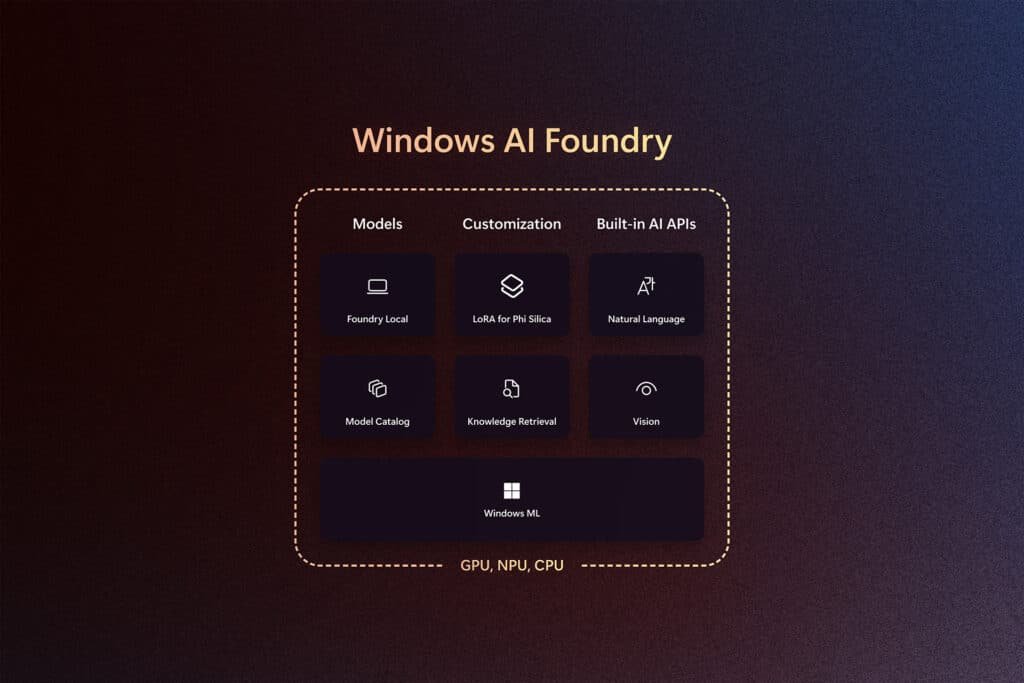
A recent internal Windows build has uncovered a hidden toggle that hints at a major change in how users interact with their desktops. Found in a mysterious registry entry, the AI navigator system flag suggests Microsoft is aiming for more than just chatbots. This feature seems built to coordinate complex tasks across several apps at once. It marks a move from simple search bars to a smarter system that understands what users want to do.
The Architecture of Native Intelligence
Tech enthusiasts exploring the Canary channel discovered that this new system flag turns on a background process that always runs. Unlike today’s cloud-based assistants, this feature runs directly in the kernel, so it responds almost instantly and doesn’t need to send data over the internet. Because it runs on the device itself, it can scan local files and app specs in detail while keeping project information safe on the user’s computer.
Internal documents show that this setup uses NPU (neural processing unit) acceleration to stay efficient. Rather than using up CPU resources, it sends complex tasks to specialized hardware, helping save battery on laptops and tablets. This lets the OS keep track of open windows and background tasks in real time. Soon, your desktop might even predict which file you’ll need next based on your calendar.
Moving Toward the System Agent Model
The arrival of a built-in agent marks a shift toward computers that can act autonomously. Instead of just answering questions, this software can perform several steps in a row. For example, you could ask it to format the last three spreadsheets and email them to the accounting team. The OS would then open Excel, run the macros, and automatically prepare the Outlook email for you all.
For the system to work smoothly, it needs to understand how apps and screen content interact. Microsoft seems to be using its new progress in semantic indexing to connect traditional software with what users actually need. By watching how people work, the OS can suggest shortcuts and autonomous automations that used to be buried in menus. This makes the computer a more helpful partner.
Privacy and Local Execution Limits
With such deep access to user data, the primary risk is telemetry overreach. Microsoft has emphasized that the reasoning engine for this Windows AI framework performs most core tasks entirely on the device. By utilizing small language models (SLMs), the system can perform complex logical deductions without needing a connection to a remote data center. This sandboxed intelligence ensures that sensitive corporate documents or personal photos never leave the local environment.
However, these features need powerful hardware. Only the newest Copilot+ PCs will likely get the full experience. Older computers might only get a limited version or depend more on cloud processing. This means your device’s hardware will decide how smart your Windows system can be.
The Future of the AI Navigator Interface
The new user interface will likely be simple, not cluttered like old sidebars. Early previews show a clear overlay that displays useful tools based on your cursor’s location. If you’re editing a video, it might show color grading options. If you’re coding, it could suggest the need for helpful documentation. The aim is to save you time searching through menus.
As this technology develops, the line between using an app and using the OS will fade. The AI navigator will connect different programs into one smooth experience. Soon, the operating system will handle task completion, so users can focus on what they want to achieve. This should be the biggest change to Windows since the introduction of the Start menu.
Redefining Desk Productivity
This could have a big impact on businesses. IT teams could set up custom reasoning profiles for whole departments, giving everyone access to shortcuts tailored to their company. This would make onboarding and tech support much faster. If the OS understands the company handbook, it can guide employees through tricky tasks just like a real assistant would.
The main goal is to help users get into a flow where the computer just works in the background. By cutting out manual file work and repetitive data entry, people can spend more time on creative and important tasks. The hidden features in the latest developer builds are just the first signs of this big change.
In conclusion, the activation of this new system flag marks a definite turning point for the Windows AI ecosystem. It moves the desktop experience away from static icons and towards a dynamic reasoning-based environment. While hardware limitations and privacy concerns remain significant hurdles, the promise of a native system agent is too great to ignore. As these features migrate from experimental builds to the stable release, the very nature of personal computing will be redefined. The future of the PC is no longer just about processing power; it is about the intelligence that directs it. This native AI navigator is the first step toward a truly autonomous workspace.
Source: Accelerating Frontier Transformation with Microsoft partners