





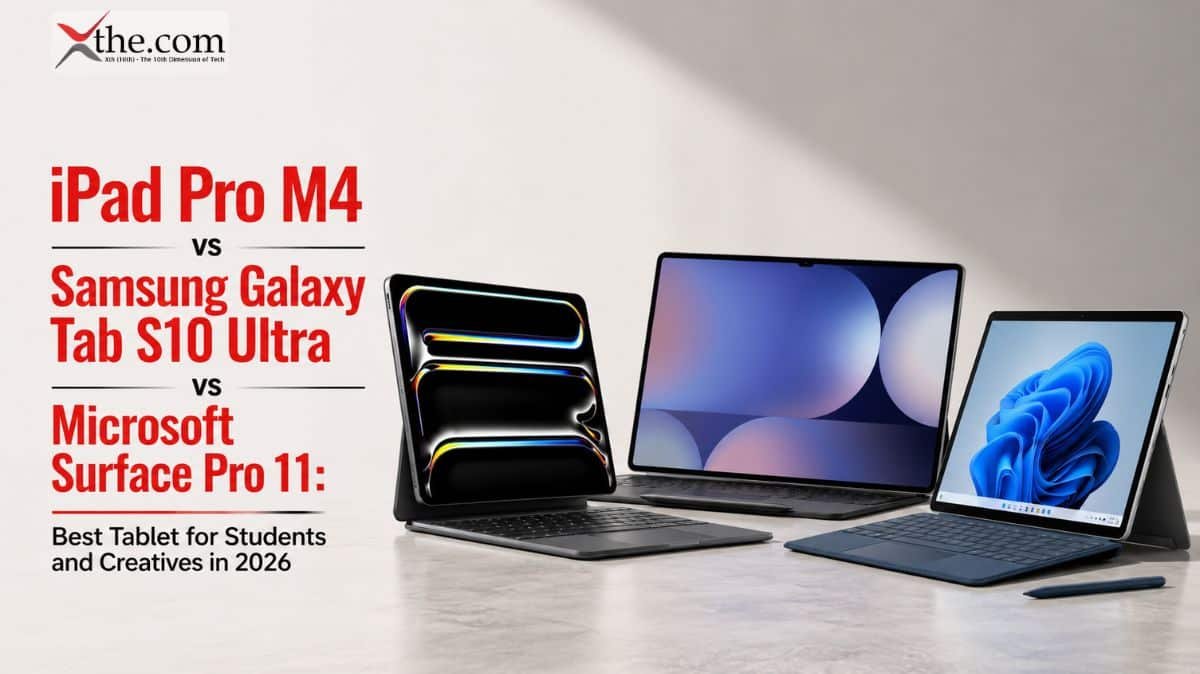
Tablet computing has evolved far beyond media consumption devices. In 2026, the flagship tablet market serves three distinct professional workflows: Apple’s iPad Pro M4 dominates digital illustration and video editing, Samsung’s Galaxy Tab S10 Ultra offers Android flexibility with desktop-class multitasking, and Microsoft’s Surface Pro 11 bridges the gap between tablet portability and full Windows productivity. With back-to-school season in full swing and remote work remaining permanent for 28% of American professionals, choosing the right tablet impacts daily productivity.
This comparison evaluates display quality, stylus performance, keyboard accessories, software ecosystems, and real-world battery life to determine which tablet earns a place in your backpack.
Core Differences
The iPad Pro M4 is a touch-first creative powerhouse running iPadOS — powerful but deliberately limited to prevent cannibalizing MacBook sales. The Galaxy Tab S10 Ultra runs Android 16 with Samsung DeX, offering windowed multitasking that iPadOS still restricts. The Surface Pro 11 runs full Windows 11 on ARM, meaning it runs Photoshop, Excel macros, and legacy enterprise software that mobile operating systems cannot touch.
Key Comparison Table
Table
| Feature | iPad Pro 13″ M4 | Galaxy Tab S10 Ultra 14.6″ | Surface Pro 11 | Winner |
| Starting Price | $1,299 | $1,199 | $1,499 | Galaxy Tab |
| Display | 13″ Ultra Retina XDR Tandem OLED | 14.6″ Dynamic AMOLED 2X, 120Hz | 13″ PixelSense Flow, 120Hz | Galaxy Tab (size) |
| Resolution | 2752 x 2064 | 2960 x 1848 | 2880 x 1920 | iPad (pixel density) |
| Brightness | 1600 nits peak | 1200 nits | 650 nits | iPad |
| Processor | Apple M4 (9-core) | Snapdragon 8 Gen 3 for Galaxy | Snapdragon X Elite | iPad / Surface |
| RAM | 8GB / 16GB | 12GB / 16GB | 16GB / 32GB | Surface |
| Storage | 256GB / 512GB / 1TB / 2TB | 256GB / 512GB / 1TB | 256GB / 512GB / 1TB | Tie |
| Stylus | Apple Pencil Pro ($129) | S Pen (included) | Slim Pen 2 ($139) | Galaxy Tab (included) |
| Keyboard | Magic Keyboard ($349) | Book Cover Keyboard ($229) | Surface Pro Keyboard ($279) | Galaxy Tab (value) |
| Battery Life | 10 hours mixed use | 9 hours mixed use | 14 hours mixed use | Surface |
| Weight | 1.28 lbs | 1.46 lbs | 1.94 lbs | iPad |
| OS | iPadOS 18 | Android 16 / One UI 7 | Windows 11 on ARM | Subjective |
| Multitasking | Stage Manager (limited windows) | DeX (true windowed) | Full Windows desktop | Surface |
| App Ecosystem | 900,000 iPad-optimized apps | Android tablet apps improving | Full Win32 apps + emulated x86 | Surface |
| Video Editing | Final Cut Pro, LumaFusion | LumaFusion, CapCut | DaVinci Resolve, Premiere | iPad |
| File Management | Files app (limited) | My Files (flexible) | File Explorer (unlimited) | Surface |
Display Quality: OLED Wars
Samsung’s 14.6-inch Dynamic AMOLED 2X is the largest display ever fitted to a mainstream tablet, and it is glorious for media consumption. Watching Netflix or editing spreadsheets, the extra real estate reduces eye strain and eliminates the cramped feeling of smaller tablets. However, the 1200-nit peak brightness struggles in direct sunlight compared to the iPad Pro’s tandem OLED, which reaches 1600 nits.
Apple’s Ultra Retina XDR display uses two stacked OLED panels to achieve extraordinary brightness and contrast. For HDR video editing in DaVinci Resolve or color grading in Final Cut Pro, the iPad’s color accuracy (Delta-E < 0.5) is reference-grade. The 13-inch size is more portable than Samsung’s behemoth but can feel limiting when running Split View multitasking.
The Surface Pro 11’s LCD panel is the weakest of the three — lower brightness, less vivid colors, and visible backlight bleed in dark scenes. Microsoft’s strength is not display technology but software compatibility.
Performance and Creative Workloads
Apple’s M4 chip, built on second-generation 3nm architecture, remains the fastest mobile processor available. In the Affinity Photo benchmark, the iPad Pro M4 exports a 50-layer 4K PSD file in 12 seconds. The Galaxy Tab S10 Ultra takes 28 seconds. The Surface Pro 11 with Snapdragon X Elite finishes in 19 seconds — impressive for Windows on ARM, but still behind Apple.
For video editing, the iPad Pro M4 handles four streams of 4K ProRes in Final Cut Pro without dropping frames. LumaFusion on Android achieves similar smoothness with H.265 footage, but codec support is narrower. The Surface Pro 11 runs full DaVinci Resolve 19, offering node-based color grading and Fusion compositing that no mobile app can match — but rendering times are 40% slower than on an Intel-based laptop due to ARM emulation overhead.
Stylus and Note-Taking
The Apple Pencil Pro introduces squeeze gestures, barrel roll detection, and haptic feedback — subtle improvements that add up during long illustration sessions. Latency is imperceptible at 9ms, and pressure sensitivity (0-1000 grams) captures delicate watercolor washes and heavy ink strokes equally well. However, at $129 plus $349 for the Magic Keyboard, Apple’s accessories push the total cost to $1,777 before tax.
Samsung’s S Pen is included in the box — a significant value advantage. It offers 2.8ms latency, technically lower than Apple’s 9ms, though both feel instantaneous. The Air Command menu provides quick access to translation, screen capture, and Smart Select tools that power users appreciate. The Tab S10 Ultra’s larger display makes split-screen note-taking alongside textbooks genuinely practical.
Microsoft’s Slim Pen 2 provides excellent pressure sensitivity and tactile feedback, but Windows ink integration remains inconsistent across applications. OneNote and Whiteboard work beautifully; Adobe Photoshop’s touch implementation is frustrating. At $139 plus $279 for the keyboard, Microsoft’s accessory pricing rivals Apple’s.
Keyboard and Productivity
The Magic Keyboard for iPad Pro is the best tablet keyboard ever made — full-size keys with 1mm travel, a responsive glass trackpad, and a floating cantilever design that adjusts viewing angles. But iPadOS 18 still limits multitasking: only four apps visible simultaneously via Stage Manager, and no true external monitor support (mirroring only, no extended desktop).
Samsung DeX transforms the Galaxy Tab into a desktop-like environment when connected to the keyboard. Multiple resizable windows, a taskbar, and right-click context menus create a workflow that closely mimics Windows. For students writing research papers while referencing PDFs and browsing the web, DeX is more productive than Stage Manager.
The Surface Pro 11 is fundamentally a laptop with a detachable screen. Full Windows 11 means Excel macros run natively, Chrome extensions work perfectly, and VPN clients install without compatibility layers. For business students, MBA candidates, and corporate professionals who need to run SAP, Salesforce, or proprietary enterprise software, the Surface is the only viable choice.
Battery Life and Portability
The Surface Pro 11’s Snapdragon X Elite delivers extraordinary efficiency — 14 hours of mixed use including web browsing, video calls, and document editing. This is laptop-class endurance from a tablet form factor. The iPad Pro M4 manages 10 hours under identical conditions, while the Galaxy Tab S10 Ultra’s massive OLED screen drains the battery in 9 hours of active use.
Weight matters for students carrying devices across campus. The iPad Pro at 1.28 lbs is barely noticeable in a backpack. The Galaxy Tab at 1.46 lbs is manageable. The Surface Pro 11 at 1.94 lbs approaches laptop territory — fine for occasional tablet use but tiring for extended handheld reading.
Software Ecosystem: The Deciding Factor
iPadOS 18 offers the most polished tablet-optimized apps. Procreate, Affinity Designer, Logic Pro, and Final Cut Pro are exclusive to iPad and represent the gold standard in creative software. However, iPadOS deliberately restricts background processes, external device support, and file system access. You cannot run a local Python development environment, connect arbitrary USB devices, or manage files freely without workarounds.
Android 16 with One UI 7 provides more flexibility. Samsung DeX supports Linux on DeX for coding, and the file manager allows direct access to internal storage. But Android tablet apps remain inferior to iPad versions — Instagram, TikTok, and many banking apps are simply blown-up phone interfaces. The gap has narrowed but not closed.
Windows 11 on ARM offers unlimited software compatibility through emulation, though performance on non-native apps varies. Photoshop runs well; CAD software struggles. The ability to install any Windows application is liberating for power users but overkill for students who only need Office, Chrome, and Zoom.
Pricing and Student Value
Table
| Configuration | iPad Pro 13″ M4 | Galaxy Tab S10 Ultra | Surface Pro 11 |
| Base Tablet | $1,299 (256GB) | $1,199 (256GB) | $1,499 (256GB) |
| Stylus | $129 | $0 (included) | $139 |
| Keyboard | $349 | $229 | $279 |
| Total Investment | $1,777 | $1,428 | $1,917 |
| Student Discount (edu) | $1,599 | $1,079 | $1,349 |
Samsung offers the best value, particularly with education pricing. The included S Pen and cheaper keyboard make the total package $500 less than Apple’s equivalent and $489 less than Microsoft’s. For budget-conscious students, this is decisive.
Who Should Buy Which Tablet?
Buy the iPad Pro M4 if you:
- Are a digital artist, illustrator, or video editor who needs the best creative apps
- Value display quality and color accuracy above all else
- Want the lightest, most portable flagship tablet
- Are already invested in the Apple ecosystem (iPhone, Mac, AirPods)
- Can afford the premium price and expensive accessories
Buy the Samsung Galaxy Tab S10 Ultra if you:
- Want the largest screen for media consumption and multitasking
- Need included stylus and affordable keyboard accessories
- Prefer Android’s file management and customization flexibility
- Use Samsung Galaxy smartphones and want ecosystem continuity
- Are a student seeking maximum value per dollar
Buy the Microsoft Surface Pro 11 if you:
- Must run full Windows applications for school or work
- Need the longest battery life of any tablet
- Want true laptop replacement capability with tablet portability
- Use Microsoft 365 extensively and value Windows integration
- Are a business professional or STEM student requiring specialized software
Verdict
There is no universal “best tablet” — only the best tablet for your specific workflow.
The iPad Pro M4 remains the creative professional’s dream device. No Android or Windows tablet matches its combination of display quality, processing power, and app ecosystem. But Apple’s deliberate software restrictions prevent it from being a true laptop replacement.
The Galaxy Tab S10 Ultra offers the best value proposition in 2026. The massive display, included S Pen, affordable keyboard, and capable DeX multitasking make it the ideal student tablet. Creative professionals will miss Procreate and Final Cut Pro, but for 90% of academic and entertainment use cases, Samsung delivers more hardware per dollar than any competitor.
The Surface Pro 11 is the only choice for users who need Windows. The Snapdragon X Elite finally delivers ARM performance that approaches Intel levels, and 14-hour battery life eliminates range anxiety. But the heavier chassis, dimmer display, and higher total cost make it overkill for users who only need web browsing and video streaming.
For back-to-school 2026, art and design students should choose iPad Pro. Business, engineering, and computer science students should choose Surface Pro. Everyone else — and particularly budget-conscious undergraduates — should choose the Galaxy Tab S10 Ultra.
FAQs
1. Which tablet is best for note-taking in college lectures?
The Samsung Galaxy Tab S10 Ultra offers the best note-taking value with its included S Pen and large 14.6-inch display that accommodates full-page PDF annotation alongside handwritten notes. The iPad Pro with Apple Pencil Pro is equally capable but costs $500 more for the complete setup.
2. Can the iPad Pro M4 replace a laptop for college?
For humanities, social sciences, and arts majors, yes — with the Magic Keyboard. For STEM, business, and computer science majors, no. iPadOS restrictions on file management, external monitors, and software compatibility create friction that Windows avoids.
3. Does the Surface Pro 11 run all Windows apps?
It runs all Windows apps through native ARM support or x86 emulation. However, emulation reduces performance by 20-40% for demanding applications. Check Microsoft’s compatibility database before purchasing for specific software needs.
4. Which tablet has the best display for watching movies?
The Samsung Galaxy Tab S10 Ultra’s 14.6-inch AMOLED display provides the most immersive movie-watching experience. The iPad Pro M4 offers superior HDR brightness but a smaller 13-inch screen.
5. How long do these tablets last before needing replacement?
Apple supports iPad Pro models with software updates for 6-7 years. Samsung promises 4 years of Android updates and 5 years of security patches. Microsoft offers 5 years of Windows updates for Surface Pro devices.
Sources: