The Google Pixel 8 review demonstrates how this small but mighty device is the best AI smartphone available in the market for American consumers looking for an intelligent and seamless experience with hardware and software capabilities. When looking at reviews of Google phones, the Pixel 8 is one of the best devices available with its Tensor G3 technology and features such as Magic Editor image editing, Best Take camera software for group photos, and live translate. With a price tag of $699 and seven years of updates, this smartphone provides American consumers with a better display with 120Hz, better camera capabilities, and long-lasting battery life compared to other devices available in the market. 

Design and Build: Familiar Yet Refined 

The Pixel 8 has the same clean and modern look that Google has been using for its phones. It is not completely different than earlier models, but everything about it has a more premium feel to it. The glass back is matte finish and looks and feels great, but will show fewer fingerprints on it than a shiny glass product. The processed aluminum body gives the phone a solid feel in your hand. 

The Camera Bar has also been updated from previous models with a more integrated design that does not look as bulky, creating a more elegant look overall on the back of the Pixel 8. The phone feels comfortable in hand, and its IP68 water and dust resistance make it practical for everyday use, whether you’re commuting in New York or hiking in Arizona. 

For many Americans who value subtle design with serious functionality, the Pixel 8 hits a great balance. 

Display: Bright, Vivid, and Adaptive 

The Pixel 8 features a 6.2-inch OLED display with smooth adaptive refresh rates, up to 120Hz, meaning scrolling stays fluid without draining battery unnecessarily. 

Colors are vivid and accurate, and the brightness is strong enough to cut through bright sunny outdoor environments, a must for U.S. users who rely on their phones outdoors. Watching videos, browsing social apps, and reading text feels comfortable and detailed. 

While some flagship phones push slightly higher resolution numbers, the Pixel 8’s display delivers real-world performance that’s rich and responsive. 

Performance: AI-Boosted Power 

Under the hood, the Pixel 8 runs on Google’s Tensor G3 chip, a silicon stack built around AI and machine learning performance rather than raw benchmark dominance. 

In everyday use, that means: 

  • Fast app performance 
  • Smooth multitasking 
  • Smart background processing for AI features 

Gaming performance is solid but not class-leading. If your primary use is eSports-level gaming at ultra settings, dedicated gaming phones may still hold an edge. For most U.S. users, however, including students, professionals, and social media creators, the Pixel 8 feels fast and responsive. 

AI Features: The Pixel 8’s Core Strength 

The headline here is AI intelligence baked into everyday tasks and unlike many marketing buzzwords, Google’s implementation shows practical payoff. 

Real-Time Transcription and Translation 

Perhaps the most impressive feature is real-time transcription and translation. Speak into the phone in one language and get instant text in another. For U.S. travelers, bilingual households, or professionals on global calls, this is a genuine productivity boost, no third-party apps needed. 

Live Caption Everywhere 

Google’s Live Caption feature is expanded deeply into the Pixel 8. Whether you’re on a Zoom call, watching a video, or listening to a voice message, real-time captions appear without an internet connection. This is especially useful in noisy environments or for accessibility. 

Speech-to-Text With Context 

Dictation is contextually smarter than before. It understands pauses, punctuation cues, and even filler words, making voice-to-text far more accurate without manual editing. 

Photo Magic and AI Editing 

AI reaches deeply into the camera app, offering one-tap improvements and scene-specific suggestions while keeping edits looking natural. 

Magic Eraser now intelligently removes objects, backgrounds, or even people with minimal effort. Portrait mode is also sharper and cleaner. 

Camera: Pixel Best-in-Class 

Google’s camera software is still one of its biggest strengths, often outperforming physically “better” hardware from competitors thanks to advanced computational photography. 

The Pixel 8’s main camera sensor produces sharp, colorful images with excellent dynamic range, even in tricky lighting. Night Sight continues to impress, delivering usable low-light shots without intrusive noise. 

Portrait shots feel more refined, and video quality is solid with stable recording and accurate color reproduction. 

Where other flagships focus on ultra-wide or telephoto lenses with high megapixel counts, Google focuses on software-optimized goodness — and for most everyday shots, that strategy delivers. 

Battery Life: All-Day Performance 

Most U.S. users should get through a full day with typical use of messaging, social media, music, maps, and moderate video streaming. Heavy AI usage (like real-time translation or on-device processing) may draw more power, but the phone still lasts through a long workday. 

Fast charging via USB-C is supported, and wireless charging works smoothly for compatible pads, a convenience if you prefer cable-free power at night. 

Comparatively, battery performance sits in the middle of the flagship pack, reliable, consistent, and user-friendly. 

Software: Clean, Smart, and Long-Term Support 

The Pixel 8 runs Google’s clean Android interface, one of the most user-friendly experiences you’ll find. No bloatware. No confusing overlays. Just fast, intuitive navigation. 

Google promises long-term software updates, making the Pixel 8 a smart long-term investment. Monthly security patches and feature drops keep the phone feeling fresh and safe. 

For privacy-minded users, Google’s on-device AI processing means many smart features don’t require cloud uploads, keeping personal data more private. 

Connectivity and Extras 

You get: 

  • 5G support for ultra-fast data 
  • Wi-Fi 6E (or newer) for strong home and office connectivity 
  • Bluetooth 5.4 for low-latency audio 
  • NFC for contactless payments 

U.S. networks are fully supported, and carrier integration with major operators is smooth. Switching carriers or traveling domestically shouldn’t disrupt connectivity. 

Face Unlock and improved fingerprint responsiveness also help streamline daily use. 

Pros: What Makes the Pixel 8 Stand Out 

1. AI features that feel genuinely useful 

Real-time translation, on-device transcription, and adaptive suggestions are genuinely practical rather than gimmicky. 

2. Excellent camera performance 

Google’s computational photography continues to outclass many competitors in everyday shooting. 

3. Clean software with long support 

Three to four years of updates or more means longevity. 

4. Real-world performance 

Speed and efficiency where it counts: apps launch fast, multitasking feels smooth, and AI workloads don’t bog down the system. 

5. Google ecosystem synergy 

Deep integration with services like Photos, Assistant, and Workspace benefits U.S. users invested in Google’s ecosystem. 

Things to Improve on 

1) Battery Life Good – not class leader – Heavy users might need another charge partway through the day. 

2) No dedicated Telephoto Lens – competitors have better optical zoom than this. 

3) User habits dictate AI benefits – If you do not use features such as real-time translation/transcription regularly, it will feel like just another great Android flagship phone 

4) Gaming Performance – Casual/Moderate gaming performs well – not a dedicated/gaming phone 

Who the Pixel 8 Is Best For 

• Everyday users who love excellent photography 

• People who travel or work with multiple languages 

• Remote workers and students relying on transcription or captions 

• Google ecosystem users using Workspace, Photos, and Drive 

• Anyone wanting a future-proof software experience 

Verdict 

Google Pixel 8 is among the most important smartphones available in America that use AI and Machine Learning to simplify your life. It doesn’t attempt to follow all of the latest smartphone trends and specifications; rather, it uses AI to enrich your standard daily life through beneficial tools, including: Translation, Transcription, Camera Enhancements, and Real World Assistance that is performed without the need to download additional applications or use other devices. 

Although the Google Pixel 8 does not have the leading hardware features (longest battery life, biggest optical zoom lenses, or highest GPU speed) it is still a powerful smartphone, and the benefits of its AI features are significant and will make many of your daily tasks less difficult and provide you with additional usefulness. 

If you are looking for a smartphone that has an even distribution of hardware and operating system incentives with an emphasis on using AI for a better user experience, along with a commitment to long-term support and updates, then the Google Pixel 8 is one of your best options available today. 

FAQs  

1. What makes the Pixel 8 different from other Android phones? 

The Pixel 8 runs on Google’s Tensor G3 chip, which prioritizes AI and machine learning performance. Unlike many Android phones that focus on benchmark speed, the Pixel emphasizes practical AI features integrated into daily tasks. 

2. How good is the Pixel 8 camera? 

The Pixel 8 delivers excellent photo quality thanks to Google’s computational photography. Features like Night Sight, improved Portrait mode, and AI-powered Magic Eraser help it compete with and often outperform, other flagship phones in everyday shooting. 

3. How long does the Pixel 8 battery last? 

Most U.S. users can expect all-day battery life with typical use, including messaging, social media, and moderate streaming. Heavy AI usage or gaming may require a recharge before the end of the day. 

4. How many years of software updates will the Pixel 8 receive? 

Google promises long-term Android updates and regular security patches, making the Pixel 8 a strong long-term investment for users who plan to keep their phone for several years. 

5. Does the Pixel 8 support 5G in the United States? 

Yes. The Pixel 8 supports major U.S. 5G networks and works smoothly with leading carriers, making it suitable for fast data speeds across urban and suburban areas. 

Source link:  

Google Pixel 8 Review | PCMag 

Google Pixel 8 Review: ‘Best Take’ Levels Up AI-Enhanced Photos – CNET 

Google Pixel 8 review: The best Android phone for most people | Tom’s Guide 
Page Not Found | ZDNET 

In this exhaustive iPhone 15 review, we are taking a thorough look at the latest in the long line of Apple iPhone review essentials that are sweeping the US cellular networks, including Verizon and AT&T. Whether you are considering the iPhone specs, from the Dynamic Island notch and USB-C charging to the A16 Bionic processor, this iPhone 15 Full Review – Pros, Cons & Verdict is the place for the discerning consumer looking for the perfect balance of speed, camera wizardry, and battery life in today’s fast-paced 2026 environment. 

Design and Build: Familiar but Polished 

At a quick glance, the iPhone 15 looks similar to its predecessor. Apple has made a few minor changes, but the overall look has remained the same, resulting in an improved feeling of luxury when you hold it in your hand. You will notice that the aluminum frame and the significantly larger area of colored glass on the back of the phone create a softer and/or subtler result. While remaining very lightweight and durable, the iPhone 15 continues to be of excellent build quality, as expected from Apple. Additionally, the edges on the iPhone 15 appear to have been rounded off when compared to previous generations of phones. 

For everyday users in the U.S., the biggest design change isn’t visual, it’s functional. 

USB-C Replaces Lightning 

That single change simplifies life. You can now use the same cable to charge your iPhone, iPad, MacBook, and many non-Apple devices. For travelers and remote workers juggling multiple cables, this is a meaningful upgrade. 

Display: Bright, Sharp, and Now More Dynamic 

The iPhone 15 features a 6.1-inch Super Retina XDR OLED display. Colors are vibrant, blacks are deep, and text is crisp. One of the biggest improvements is brightness. Outdoor visibility, especially under direct sunlight, is noticeably better. For U.S. users who rely on their phones for navigation, outdoor photography, or streaming at the park or beach, this matters. 

The display also now includes the Dynamic Island feature, previously limited to Pro models. It replaces the traditional notch with a more interactive notification system. 

It’s not revolutionary, but it adds subtle functionality for music playback, timers, ride-share tracking, and more. 

That said, the iPhone 15 still runs at 60Hz refresh rate, not 120Hz like Pro models or many premium Android competitors. If you’re sensitive to smooth scrolling and animations, this may feel like a limitation. 

Performance: More Than Fast Enough 

Under the hood, the iPhone 15 runs on Apple’s A16 Bionic chip previously found in the iPhone 14 Pro models. In real-world use, performance is excellent. 

Apps open instantly. Multitasking feels smooth. Gaming performance is strong, even with demanding titles. Video editing, social media browsing, and streaming are seamless. 

For most U.S. consumers, the A16 chip provides more power than they’ll realistically need. Unless you’re pushing the phone to extreme limits, performance won’t be a bottleneck. 

This is a device that will age well over several years of iOS updates. 

Camera: Big Upgrade Where It Counts 

One of the most important improvements comes in the camera system. The iPhone 15 now features a 48MP main camera sensor, allowing for more detailed images and improved low-light performance compared to previous standard models. 

Photos are sharp, colors are balanced, and Apple’s image processing continues to deliver consistent results. Portrait mode has improved as well. The phone can automatically detect when a person or pet is in the frame and allow you to adjust focus after taking the photo. For everyday U.S. users capturing family events, travel moments, or social media content, the camera is more than capable. 

However, it lacks the telephoto lens found in Pro models. If optical zoom photography is important to you, that’s something to consider. 

Battery Life: Solid All-Day Performance 

Most users can comfortably get through a full day of moderate use, including streaming, messaging, social media, and navigation without needing to recharge. 

Fast charging via USB-C is convenient, though charging speeds are not dramatically faster than previous generations. Wireless charging remains available, including MagSafe support for compatible accessories. 

For typical U.S. daily use commuting, work, streaming battery performance is dependable. 

Software and Ecosystem 

The iPhone 15 has the latest version of the iOS platform and provides an easy to use and fluid experience when using the device. The iPhone 15 offers one of Apple’s Strongest attributes which is its ecosystem. If you already use any of Apple’s products such as; AirPods, Apple Watch, MacBook or iPad, the integration will be seamless with your new iPhone 15. 

With features such as AirDrop, iMessage, FaceTime and iCloud sync, the iPhone 15 will appeal to those users who are already integrated into the Apple ecosystem. The fact that Apple is able to provide a user with 5+ years of software and OS updates, adds a large amount of value to the long-term ownership of the device. 

Pros of the iPhone 15 

The iPhone 15 offers several clear advantages for U.S. buyers. USB-C simplifies charging and reduces cable clutter. 

The 48MP camera is a meaningful upgrade for photography enthusiasts. 

The display is brighter and more versatile with Dynamic Island. 

Performance is powerful and future-proof. 

Battery life is reliable for everyday use. 

Software support remains among the best in the industry. 

Cons of the iPhone 15 

Every phone has its faults and none are without limitations, including; The iPhone 15. 

The 60Hz display is inferior to many Android phones at a similar price point which feature a 120 Hz display. 

There is no telephoto lens for optical zoom. 

The charging speed is still in the average range instead of the leading category like many current Android devices. 

If you are upgrading from iPhone 14, many of the updates to the iPhone 15 may not warrant the expense. 

Who Should Upgrade? 

The iPhone 15 represents considerable improvements for people using iPhone 12 or earlier models through considerably better camera, battery and display quality, as well as the convenience of using the USB-C connector. 

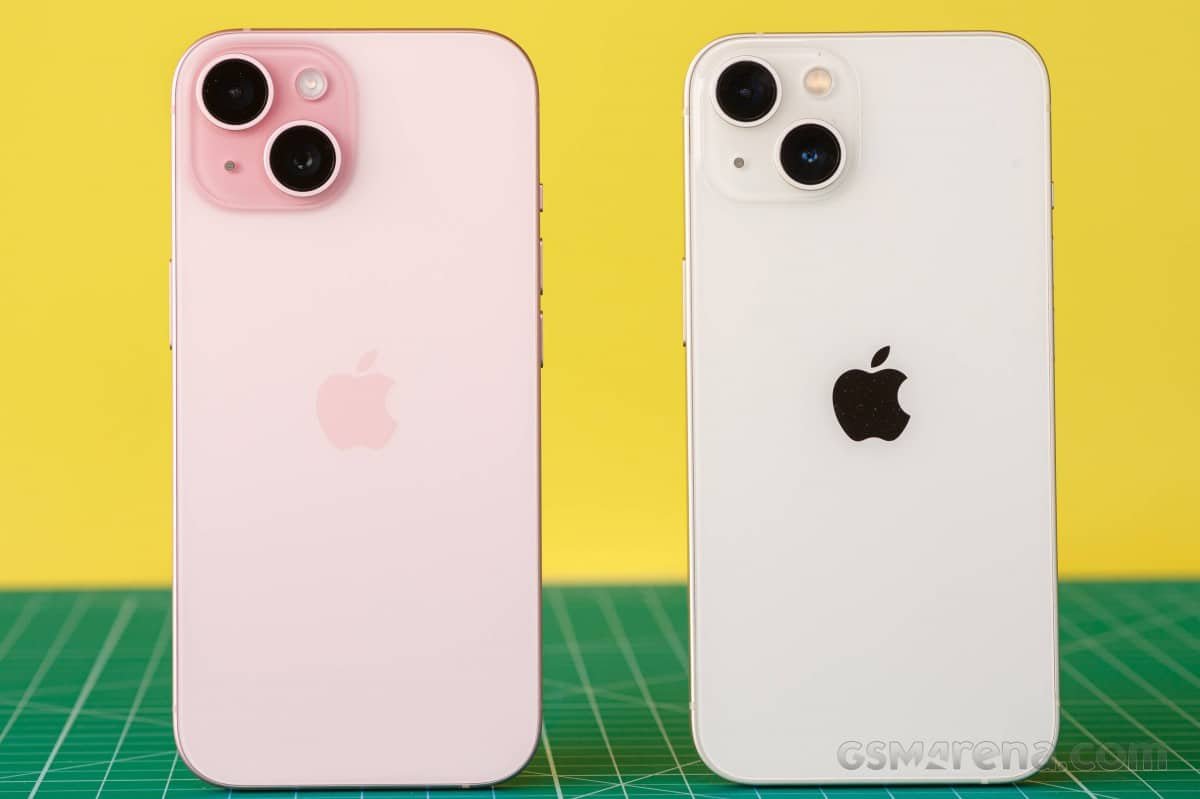
You will have to think twice about upgrading from iPhone 13 or iPhone 14, especially since most people would consider the improved camera, USB-C port and variety of other features to be upgraded. 

If you currently use an Android device and are thinking of switching to iPhone 15, you will find that it offers a smooth experience, is part of a great system of accessories and performs consistently without issue. 

Also, the availability of carrier trade-in promotions in the U.S. may provide additional savings and will affect the actual cost considerably. 

How It Compares to Pro Models 

The iPhone 15 Pro models offer additional features like 120Hz ProMotion displays, titanium builds, telephoto lenses, and more advanced performance. 

If you’re a mobile photographer, gamer, or power user who wants the absolute best specs, Pro models may justify the higher price. 

For most everyday users, however, the standard iPhone 15 strikes a better balance between price and performance. 

Is It Worth the Price? 

The iPhone 15 sits in a premium pricing category. 

For many U.S. buyers, the value depends on upgrade timing and trade-in opportunities. Apple devices tend to hold resale value well, which softens the long-term cost. 

While competitors may offer more aggressive hardware specs on paper, Apple delivers consistency, reliability, and ecosystem advantages. 

It’s not the most innovative iPhone ever released. But it is a very well-rounded one. 

Final Verdict 

There is nothing revolutionary about the new iPhone 15. This version continues to build off items that have already had success with users as far as having strong performance, a great camera, great battery life and working well together within a seamless ecosystem. 

The new addition of USB-C will allow users to charge their devices using modern cords, and along with the better camera compared to past base models, the iPhone 15 has become a much more attractive option. 

Two of the biggest detriments to the iPhone 15 are the 60Hz refresh rate and the absence of a telephoto lens which may be concerning for some enthusiasts, but I don’t think most everyday users would feel impacted by them. 

For a consumer in the United States upgrading from an older version of an iPhone will be an intelligent decision that is balanced. 

If you already own a more recent edition of an iPhone, it may not be worth your time to upgrade. 

If you are looking for a dependable and very smooth smartphone that can perform well for multiple years, then the iPhone 15 provides most users with exactly what they need without all of the added unnecessary complexity. 

FAQs  

1. Does the iPhone 15 have USB-C? 

Yes. The iPhone 15 replaces the Lightning port with USB-C, allowing you to use the same cable for many Apple devices and other electronics. This simplifies charging and travel for U.S. users. 

2. Does the iPhone 15 have a 120Hz display? 

No. The standard iPhone 15 has a 60Hz refresh rate. Only the Pro models feature Apple’s 120Hz ProMotion display for smoother scrolling and animations. 

3. How long does the iPhone 15 battery last? 

Most users can expect all-day battery life with moderate use, including streaming, messaging, and navigation. Heavy gaming or video recording may require charging before the end of the day. 

4. How does the iPhone 15 compare to the iPhone 15 Pro? 

The iPhone 15 Pro offers a 120Hz display, titanium build, telephoto lens, and more advanced performance. The standard iPhone 15 focuses on value, offering excellent performance and camera quality at a lower price point. 

5. Does the iPhone 15 support MagSafe and wireless charging? 

Yes. The iPhone 15 supports MagSafe accessories and wireless charging, in addition to USB-C wired charging. 

Source link: 

Apple iPhone 15 Review | PCMag 

Apple iPhone 15 and 15 Plus Review: A Big Leap From Older iPhones – CNET 

iPhone 15 review: The best iPhone value | Tom’s Guide 

In 2026, American consumers looking for the best budget Android phones under $400 can get flagship-quality features such as AMOLED displays, large batteries, and decent cameras without going over budget. Whether you are looking for cheap Android phones for your daily commute on Verizon or AT&T networks, phones under $400 for students, or configurations designed for gaming on budget phones such as Genshin Impact on medium settings, this article highlights the best US-released options from Samsung, Motorola, and Nothing. Let’s get into the article. 

Top Picks Overview 

The best budget for Android phones that bring balance between performance, software support, and price is meant to be top pick. So, Samsung is the top pick in the entire category, followed by Motorola, which offers special features such as styluses and glyph interfaces. 

The phones that cost less than $300 and those that cost close to $400 are the best for consumers in the US. 

Phone Model Price Key Strength Standout Feature 
Samsung Galaxy A36 5G $400 Software & Display 120Hz AMOLED, 6 OS upgrades  
Motorola Moto G Power 2026 $300 Battery & Durability IP69 rating, massive battery   
Samsung Galaxy A26 5G $300 Brand Reliability Pretty AMOLED, balanced specs   
Nothing Phone 3a ~$350 Design & Camera Telephoto lens, unique look   
Motorola Moto G Stylus (2025) $400 Productivity Built-in stylus, improved AMOLED   

Detailed Specs Comparison 

Compare core hardware across the best budget Android phones to find your fit. 

Feature Galaxy A36 5G Moto G Power 2026 Galaxy A26 5G Nothing Phone 3a Moto G Stylus (2025) 
Processor Faster Exynos chip, 8GB RAM   MediaTek, solid multitasking MediaTek Dimensity 6300 Improved Snapdragon   Snapdragon, stylus-ready 
Display 6.6″ AMOLED 120Hz   6.7″ LCD 120Hz AMOLED, vibrant   Glyph AMOLED AMOLED upgrade   
Battery 5,000mAh, 25W charging Largest capacity, wireless hints   5,000mAh decent life   Efficient daily use Decent, not class-leading   
Camera 50MP main, adequate 50MP+32MP selfie   Decent quality   Telephoto addition   Solid options   
Updates 6 Android OS   Android 16 base   Samsung promise Nothing OS timely Underwhelming policy   
Other IP67 rating IP69 waterproof   6/128GB base International appeal   Stylus, vegan leather 

Samsung’s A-series excels in software longevity, ideal for US networks like Verizon and AT&T. 

Performance for Daily Use 

These budget Android phones are capable of browsing, streaming, and running applications effortlessly. The 8GB RAM enhancement in the Galaxy A36 performs multitasking better than before, and the processor in the Moto G Power is adequate for light image editing. 

The Nothing Phone 3a stands out for its smooth Nothing OS, which has less bloatware. A 120Hz fast experience is expected on all boards. 

Gaming on Budget Phones 

Gaming on budget phones has improved with capable chips and cooling. Here’s how top picks perform for titles like Genshin Impact or Call of Duty Mobile. 

Phone Gaming Score (Est.) Strengths Limits 
Galaxy A36 5G High (8GB RAM) Steady frame rates, AMOLED vibrancy   No heavy cooling 
Moto G Power 2026 Medium-High Long sessions via battery   LCD less vivid 
Nothing Phone 3a High Snapdragon boost, glyph alerts   Mid-tier GPU 
Galaxy A26 5G Medium Balanced, no lag in casual games   Avoid ultra settings 
Moto G Stylus Medium Stylus for strategy games   Battery dips faster   

Camera Breakdown 

Phone Model Main Camera Selfie Camera Key Strengths Low-Light Performance Video Capability 
Galaxy A36 5G 50MP versatile main  Standard Daylight sharpness, processing Excellent (Samsung edge)  4K support 
Moto G Power 2026 50MP main  32MP standout  Selfie quality beats rivals Decent 4K for social 
Nothing Phone 3a 50MP main + telephoto  Solid Rare zoom capability Good 4K recording 
Galaxy A26 5G 50MP main  Standard Balanced daylight Strong processing  4K video 
Moto G Stylus (2025) 50MP main  Decent Everyday reliability Average 4K option  

Battery and Charging 

Endurance is what cheap Android phones are all about. Moto G Power 2026 tops the list with IP69 rating and better endurance for 2 days. The Galaxy series has 25W wired connectivity, reaching 50% in 30 minutes battery life. 

Software and Updates 

Samsung promises six OS updates on A36, with Galaxy AI subsets, which is unusual for this price. Motorola begins with Android 16 but trails in battery life. Nothing offers a clean and customizable OS. 

Phone Model OS Updates Android Version Key Software Perks 
Galaxy A36 5G 6 years OS + security Android 16 base Galaxy AI subsets, smooth One UI phonearena+1 
Moto G Power 2026 2-3 years security Android 16 Clean stock experience, basic features  
Galaxy A26 5G 6 years OS + security Android 16 base Reliable Samsung ecosystem  
Nothing Phone 3a 3-4 years timely Nothing OS 3.x Glyph interface, highly customizable  
Moto G Stylus (2025) 2 years OS Android 15/16 Stylus-optimized apps  

Under $400 Phones Spotlight 

For tighter budgets, target these under $400 phones. 

Model Price Why Buy 
Galaxy A26 5G $300 AMOLED value over A16   
Moto G Power 2026 $300 Waterproof beast   
Galaxy A16 5G ~$250 Battery champ   

These deliver 80% of $400 performance, perfect starters. 

Buying Tips for US Shoppers 

Check carrier deals like Verizon or AT&T for Samsung bundles and freebies to lower costs on budget Android phones. 

Tip Category Details Why It Matters 
Carrier Deals Samsung often includes free accessories or credits  Drops effective price below $300 for under $300 phones 
Retailers Amazon, Best Buy, carrier sites for lowest prices Frequent sales and fast shipping for US buyers 
Trade-Ins Exchange old devices for extra discounts Makes cheap Android phones even more affordable 
Durability Focus Prioritize IP67/IP69 ratings Protects against drops and water exposure 
Feature Testing Try Moto G Stylus for note-taking Built-in stylus boosts productivity on budget phones  

Where to Buy 

Prices fluctuate in 2026 always verify current MSRP before purchase. 

Phone Model Best Retailers Notes 
Galaxy A36/A26 5G Samsung.com, Amazon Direct from Samsung for warranty; Amazon Prime deals  
Moto G Power 2026 / Moto G Stylus (2025) Motorola.com, Best Buy In-store pickup; Best Buy financing options androidcentral+1 
Nothing Phone 3a Nothing.tech (US import), select carriers May need import for full US compatibility  

To conclude in 2026, the top budget Android phones for under $400 enable American consumers to enjoy high-end technologies such as AMOLED screens, long battery life, and gaming power without paying a high-end price. Whether it’s Samsung’s commitment to long software update cycles with the Galaxy A36, Motorola’s long-lasting Moto G Power, or Nothing’s fashionable Phone 3a, these budget Android phones and models for under $400 offer unbeatable value with carrier contracts at Best Buy or Amazon. 

FAQS 

Q1: What is the best budget for Android gaming phone under $400? 

A: The Samsung Galaxy A36 5G leads the gaming experience on budget Android phones with its 8GB RAM, smooth frame rates on medium settings in Genshin Impact, and colorful 120Hz AMOLED screen perfect for US gamers on a budget. 

Q2: Are there good cheap Android phones under $300 for the US market? 

A: Yes, the Galaxy A26 5G and Moto G Power 2026 provide great value at $300, offering AMOLED displays, good batteries, and network support for Verizon/AT&T subscribers looking for phones under $300. 

Q3: How long do the best budget Android phones support software updates? 

A: Samsung’s Galaxy A36/A26 provide 6 years of OS updates, beating Motorola’s short update cycle and Nothing’s on time but shorter update support, providing long-term support for US consumers. 

Q4: Are these phones available with carrier deals or trade-ins? 

A: Of course, investigate Samsung packages on carrier websites or Amazon/Best Buy trade-ins to lower costs even further, potentially making budget Android phones even cheaper for American consumers. 

Q5: Is the Nothing Phone 3a a good choice for American consumers? 

A: It’s a great choice for its distinctive design and telephoto lens, but as an import from Nothing. tech available to US consumers, check compatibility with your carrier, such as T-Mobile, for smooth 5G connectivity. 

Sources –  

Best Android Phones of 2026: Tested by Our Experts – CNET 

Best Phones Under $300 in 2026 – CNET 

The best cheap phones in 2026: Expert tested and reviewed | ZDNET 

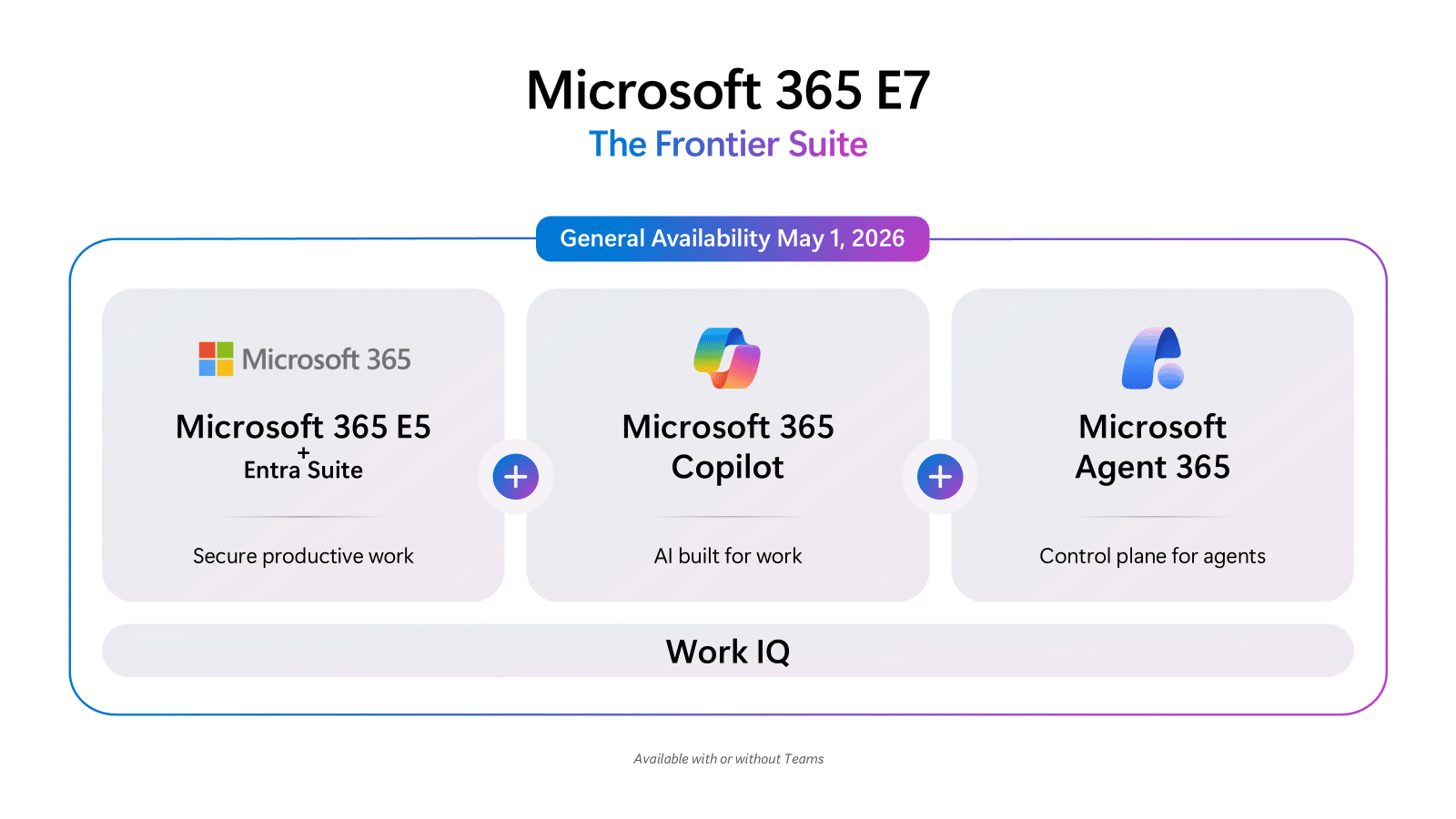
Microsoft is making significant moves in enterprise AI. On May 1, the Microsoft EC365/E7 suite will launch at US$99 per user per month. At the same time, Microsoft will introduce a research preview of Co-Pilot and Co-Work, developed with Anthropic, and expand its Agent 365 control plane.  

E7 is the first new Enterprise license from Microsoft in about 10 years, unifying offerings like E5, Mac 365 Copilot, and Agent 365. The E7 suite is priced at $99 with Teams or $90.45 without Teams per user per month.   

Meanwhile, Copilot CoWork arrives at a time when new products from Anthropic have shaken enterprise software stocks. Investors are concerned that Anthropic, OpenAI, and other AI startups could undermine established software companies like Microsoft, Salesforce, IBM, and Oracle.  

Vasu Jakkal, Corporate Vice President of Microsoft Security, told CRN that these new offerings present a big opportunity for managed security services providers (MSSPs).  

Intelligence cannot scale without that trust, Jakkal said. It’s not just IT professionals (using AI). It’s not just classic developer teams using it. It’s business functions using AI and creating agents. That’s awesome. But we also see that without the right tooling, that’s a real risk.  

E7 is launching just as Microsoft plans to raise prices for several application suites on July 1. The timing is significant, as Mike Wilson, chief technology officer and partner at Interlink Cloud Advisors in Mason, Ohio, told CRM that the price increase is justified by the added value Microsoft brings to its packages.  

Wilson emphasized considering the price in light of technology’s value relative to human cost, stating that the value is clear.  

Before E7’s reveal, Wilson said Microsoft must provide AI scaling tools. He noted Copilot Studio is key and highlighted Agent 365 as critical for governance.  

Wilson noted that agents will be revolutionary and said Microsoft’s governance layer is a major advantage, crediting Microsoft for strong security and governance efforts.  

Microsoft has shared data showing growth across its AI products. The number of paid Co-Pilot seats has more than doubled in the past year. In January, company executives said during the quarterly earnings call that Microsoft 365 Copilot now has 15 million paid seats.  

The vendor has also seen daily active Copilot usage up 10-fold, and the number of MC365 Copilot customers with more than 35,000 seats tripled year over year. Manufacturing, retail, and financial services are among the industries leading Microsoft Agent adoption, according to the vendor.  

Microsoft’s Security Business Protects 1.6 Million Customers and Leverages More Than 100 Trillion Daily Signals, According to the Vendor.  

Microsoft’s upcoming E7 Suite 

On May 1, Microsoft will launch the M365 E7 Frontier Worker suite, which integrates M365 E5, M365 Copilot, A365 Intra Suite, and enhanced features from Defender, Intune, and Purview. This combination aims to provide tools that work across spreadsheets and business platforms. According to Microsoft, IT and security staff will benefit from comprehensive observability and governance capabilities for enterprise-wide AI.  

Microsoft says the $99 E7 suite is less than buying features separately—for reference, M365 Copilot is $30 and Entra is $12 ($9 for E5 holders) per user per month.  

  • And M365 E5 is $57 per user per month until July 1, when Microsoft will increase the suite by 5% to $60 per user per month.  
  • Without Teams, E5 is $48.45 per user, increasing to $51.45 on July 1.  

M365 E3 is $36 per user per month until July 1, when it increases by 8% to $39. Without Teams, E3 is $27.45 until July 1, when it increases 11% to $30.45, according to Microsoft.  

Microsoft Co-Pilot CoWork 

Microsoft introduces Copilot Co-Work as part of the third wave of updates for Microsoft 365 Copilot. This enhancement builds on the original Copilot capability by adding built-in agent features, evolving the tool from a virtual assistant into one that can autonomously complete tasks.  

Copilot Co-Work, developed with Anthropic, can manage entire workflows. For example, it can build presentations, assemble financials, and email a team to help a user get ready for a customer meeting. Microsoft is also creating ready-to-use plugins for different scenarios.  

According to Microsoft, CoWork uses Enterprise Data Protection and the WorkIQ Intelligence layer to understand user work patterns, relationships, and organizational context. CoWork is currently being tested with select customers and will enter a research preview this month through the Frontier program.  

Copilot can complete tasks in the background while workers do other things. According to Microsoft, it can interact with user email, documents, files, and data in Microsoft 365 without connectors, integrations, or data movement. Data never leaves the enterprise boundaries and doesn’t have to run locally on user devices; it instead stays in the cloud.  

Alongside CoWork, this third wave of Microsoft Agent capabilities brings updates to M365 Copilot in Word, Excel, PowerPoint, and Outlook. For example, in Excel, users can ask Copilot to create pivot tables, update calculations, forecast cash flow, and more.  

Microsoft says Copilot Chat will soon let users create and improve artifacts, build agents within tools they use every day, and enjoy other enhanced features.  

Wave 3 also includes the addition of Anthropic’s Claude in mainline Copilot Chat for Frontier Program members, alongside the latest generation of OpenAI models, according to Microsoft. Copilot Chat also offers an auto-proctor to select the best-suited model for a job. Cloud has already been introduced in Researcher and Copilot Studio.  

The Agent 365 Control Plane 

Microsoft will make its Agent 365 control plane for AI agents generally available (GA) on May 1 for US$15 per user per month. Agent 365 serves as a centralized management suite for monitoring, governance, and security of AI agents, working in tandem with other E7 components.  

Agent 365 was first available to Frontier members as announced at Microsoft Ignite 2025 in November. It provides a central place for agent monitoring, governance, management, and security throughout the organization.  

Without a unified control plan, IT teams may not know how many agents exist, how they behave, who can access them, or what security risks they pose.  

In 2 months, tens of millions of agents have appeared in the Agent365 registry by preview customers. According to Microsoft, the vendor itself uses A365 for visibility into 500,000+ agents across the company. So far, most agents have been used for research, coding, sales, intelligence, customer triage, and human resources self-service.  

According to Microsoft, agents have produced more than 65,000 responses per day for employees over the past 28 days.  

Starting May 1, A365 will offer general availability of features such as an agent registry and security policy templates for the whole tenant, which can be enforced in the Microsoft Admin Center during onboarding new agents. The registry includes:  

  • agents built into Microsoft products  
  • partner agents  
  • those registered through APIs  

Users can also receive reports on Agent Performance, Adoption Usage, and an Agent Map and Activity Details, as per Microsoft, and use Intra to evaluate Agent Identity Risk.  

Risk signal evaluation will still be in public preview on May 1 for most Defender and Purview capabilities, although a Defender Protection Enterprise public preview in April instead of May 1 is for Runtime Threat Protection. Investigation and hunting for agents that leverage the Agent 365 tools to get away, according to Microsoft.  

With intra features in A365 becoming generally available on May 1, users can assign each agent a unique identity customized to their needs. They can also apply Trusted Access Policies, Identity Protection, and Conditional Access for agents, extending current policies for instant access decisions.  

Access decisions can be based on risk. Microsoft Intune device compliance and custom security attributes for agents acting on behalf of users. Microsoft says the goal is to prevent agents from being compromised or misused by hosts and parties.

Source:  Microsoft Unveils E7 Suite, Copilot Cowork In Enterprise AI Push

NVIDIA CUDA 13.2 represents a major step forward for accelerated computing, focusing on both high-performance AI and the stringent security requirements of Sovereign AI projects. Unlike previous updates that mainly highlighted speed and new libraries, version 13.2 puts reliability first. With native memory-safe pointers and updated C++ abstraction layers in the Core Compute C++ Libraries (CCCL 3.2), NVIDIA provides developers with the tools they need to meet the stringent data correctness and security standards required by national AI systems. 

The Sovereign AI Security Mandate 

By 2026, Sovereign AI has shifted from a political idea to an essential technical requirement. Countries and tightly regulated sectors like defense, healthcare, and finance now need AI that is both hosted locally and proven to be secure. Traditional GPU programming, which often uses manual C-style memory management, has been a common source of security risks. Problems like buffer overflows and pointer errors in low-level code are now seen as potential avenues for data leaks or even state-level spying. 

CUDA 13.2 tackles this by modernizing the memory model. The update presents “Safe Pointer” primitives and enhanced memory resource abstractions that substantially lower the risk of out-of-bounds access and dangling references. These features allow developers to build AI pipelines that enforce memory safety at the architectural level, rather than relying solely on manual code reviews and post-hoc debugging.  

Modern C++ and Memory-Safe Abstractions 

A key part of the 13.2 update is the new version of CCCL 3.2. NVIDIA has swapped out old C-style wrappers for modern C++ runtime APIs that use RAII (Resource Procurement Is Initialization) principles. For developers, this introduces cud:buffer and Cuda: memory_resource, making GPU memory management safer and reducing coding overhead. These APIs allow developers to enjoy the reliability and ease of modern C++ on the host side, streamlining their code and cutting down on common mistakes. 

These new types offer safer memory management. Unlike raw CUDA malloc pointers, they check boundaries at runtime and automatically free memory. In Sovereign AI projects, where any memory leak risks failure or legal noncompliance, the move to automated memory management boosts security.  

Enabling Confidential Computing and MIG Isolation 

CUDA 13.2 improves security not just in software, but also in how hardware is managed. The update adds major improvements to Multi-Instance GPU (MIG) support, especially for new Arm-based systems like Jetson Thor. Now, the toolkit lets you split GPU resources into separate, fully isolated instances, each having its own memory and cache. 

This strong isolation is important for Sovereign AI centers that need to run several sensitive tasks on the same hardware. It makes sure that a less important model cannot affect or access the memory of a critical motor control or encryption process. With these features, NVIDIA offers the security needed for national AI operations. When used with CUDA 13.2’s memory-safe pointers, developers can create a Zero-Trust environment where hardware and software work together to guard against both local and remote threats. 

Improving the Developer Experience 

While security is the primary driver, NVIDIA has ensured that these safety features do not come at the cost of productivity. CUDA 13.2 introduces a. Although security is the main focus, NVIDIA has ensured these safety features do not reduce productivity. CUDA 13.2 now offers a single toolkit for both Tegra and desktop GPUs, making it easier to package and deploy AI models across multiple systems. Developers can use the same SBSA (Server Base System Architecture) toolkit for everything from small edge devices to large data center clusters. They can identify not just performance bottlenecks but also memory-related anomalies that might signal a security vulnerability directly from their Python code. The addition of support for Visual Studio 2026 and Python 3.14 ensures that the development environment remains current with the latest host-side standards.  

Conclusion: A Foundation for Resilient AI 

NVIDIA’s CUDA 13.2 update is more than a technical patch; it is a strategic alignment with the worldwide shift toward resilient, autonomous intelligence. By baking memory safety into the core of the GPU programming model, NVIDIA is providing the technical foundation for Sovereign AI to safely operate.  

As developers and government agencies roll out national AI models in 2026, the safety features in CUDA 13.2 will probably become the standard for any serious AI project. The days of fast but fragile AI are ending, making way for a new era of reliable, memory-safe, and sovereign-ready computing.

Source: NVIDIA / cuda-samples 

Starting May 2026, Microsoft will enable hot patching by default for enterprise devices in Windows Autopatch, reducing the need for reboots and aiming for 90% compliance in half the usual time.  

Key Points About Hotpatching As The Default Setting 

  • Starting May 2026, devices running Windows 11 Enterprise, Education, or 365 on x64 with VBS enabled and managed with Intune or Graph API will have hot patching enabled by default.  
  • Hotpatching applies most security updates in memory, reducing the need for reboots. Only quarterly cumulative updates require a restart.  
  • Hot patching helps organizations reach 90% compliance in half the typical time, quickly closing security gaps after updates.  
  • Management: Although hot patching will be enabled by default, Intune administrators can adjust or disable it in the Intune admin center. Although hot patching will be enabled by default, IT administrators can adjust or disable it in the Intune admin center.  
  • Eligible devices include Windows 11 Enterprise, Education, and 365 on x64 architecture with VBS enabled.  

Soon, Windows Auto Patch will enable hot patch security updates by default, helping you secure your devices faster. Beginning with the May 2026 Windows Security Update, this will affect all eligible devices managed through Microsoft Intune or Microsoft Graph API. Hot patching lets you achieve 90% compliance in about half the time, since security fixes apply immediately without a restart. You still have control over your settings.  

New controls will be available on April 1, 2026, one month before this change. Here’s what you need to help you decide on your next steps.  

The Advantage Of Hot Patch Updates 

Each month, Windows releases security updates to fix common vulnerabilities and exposures (CVEs) and keep your organization safe. As an IT admin, you often have to wait for days for devices to restart before they are fully compliant. Typically, you give devices three to five days after installing updates before forcing a restart. When Windows Auto Patch updates launched about a year ago, this changed. Now, security updates take effect as soon as they are installed, and Windows Auto Patching enables devices to reach about 90% compliance within roughly half the previous timeline, often in around one to three days, because no restart is needed.  

In our FASTER Patching study, we spoke with four organizations managing 30,000 to 70,000 devices about the speed of compliance.  

Today, over 10 million devices use hot patch updates, reflecting broad trust in the feature. You can also explore the benefits of smaller update sizes and Microsoft’s own internal use.  

Hotpatch by default: how it works? 

With the May 2026 security update, Windows auto-patch will defer to hot-patch updates, improving the security screen for organizations using Microsoft Intune or Microsoft Graph API.  

What does this mean for you?    

All Patching Policies in Microsoft Intune rely on Windows AutoPatch. The default setting only applies to devices that are not part of a Quality Update Policy. Windows Auto Patch follows your Quality Update Policy settings. If a device is assigned to one of these policies, the hot patch settings from that policy will be used. Your choices for update deferral and update ring settings are also on/off. If a device meets the prerequisites and has installed the April 2026 security update, it will start receiving hot-patch updates with the May 2026 security update. Double-check whether a device is enrolled in hot-patch updates using the new Windows Auto Patch Update Readiness Tools.  

How Do I Know If a Device Will Receive a Hotpatch Update 

Before the May 2026 hot patch update, check the Hot Patch Quality Updates report in Intune. This report lists devices with hot-patch updates enabled and shows which will receive or have already received the update.  

You can also use the Quality Update Status report in Intune to see which devices are ready for a hot patching update. The Hot Patching Readiness column indicates whether a device meets the requirements. Soon, a new Hot Patching Enabled column will show each device’s status.  

Adapting To The Change At Your Own Pace 

Windows Auto Patch will enable hot patching by default as the fastest way to secure your devices. We recommend keeping hot patch updates enabled. However, if you choose not to use hot patches, you can opt out for specific device groups or your entire tenant. Opting out is done through the Intune admin center or by assigning devices to a Quality Update Policy that blocks hot patches. Detailed steps are provided below for both tenant-wide and group-specific opt-outs.  

The option to opt out of Hot Patch updates for your tenants will be available starting April 1, 2026. Since April is a Hot Patch baseline month, you have until May 11, 2026, before any Hot Patch updates are installed.  

How To Count The Number Of Hotpatch Updates Across Your Tenant 

When the changes go live in April, follow these steps to set your tenants’ default hot patching update behaviour.  

  1. Navigate to Tenant Administration, Windows Auto-Patch, Tenant Management.  
  1. Select the tenant settings tab.  
  1. Switch the “When available, apply updates without restarting the device (hot patching)” setting to either allow or block.  

How to Opt Out of Hot Patch Updates for Groups of Devices 

To opt in or out of device groups, assign each device group a Quality Update Policy. Windows Auto Patch uses these policy settings. To set or assign a policy, follow these steps.  

  1. Navigate to Devices > Manage Updates > Windows Updates.  
  1. Select the Quality Updates tab.  
  1. Select Create.  
  1. Select the Windows Quality Update Policy from the drop-down menu.  
  1. Fill in the title and details on the Basics tab, then select Next.  
  1. In the Settings step, switch the “When available, Apply Without restarting the device (hot patching)” setting to either Allow or Block, then click Next.  
  1. Apply any scope tags, then select next.  
  1. Assign the Microsoft Entra Groups you want, then select Next.  
  1. Select Create.  

You can set hot-patching updates for your tenant or specific device groups to override the default. Switch the hot patching setting to allow or block hot patching.  

To use hot-patch updates by default, ensure your devices meet the requirements. For more information, see hot patch updates and the Windows auto patch frequently asked questions.

Source:  Securing devices faster with hotpatch updates on by default

Key Takeaways 

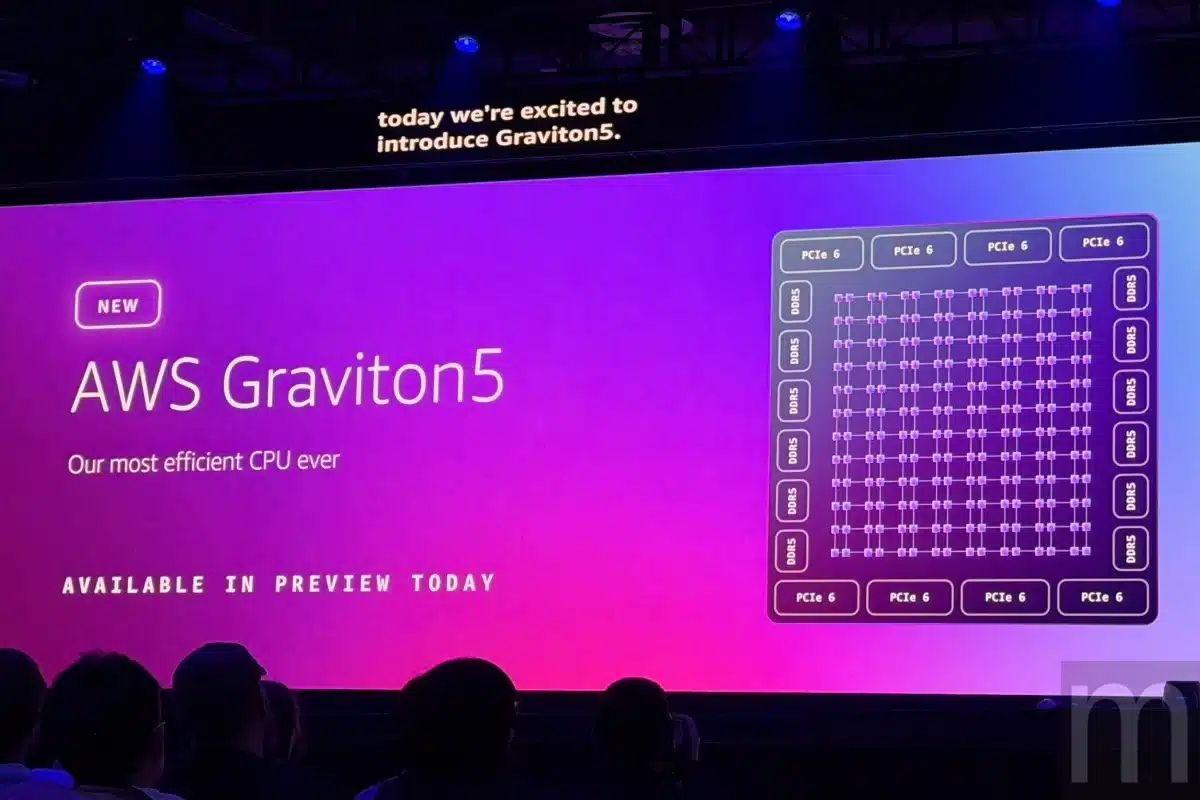
  • New AWS Graviton5-based Amazon EC2 M9G instances deliver up to 25% higher performance than the previous generation.  
  • Each chip features 192 cores and a larger cache, enabling bigger workloads, improved application performance, and lower costs.  
  • For the 3rd year in a row, over half of the new CPU capacity added to AWS uses Graviton. In fact, 98% of the top 100-1000 EC2 customers, including Adobe, Airbnb, Altacn, Epic Games, F1, Pinterest, SAP, Siemens, Snowflake, and Synopsys, are already seeing the price and performance benefits of Graviton.  

As cloud workloads become more complex and larger, organizations commonly struggle to deliver faster performance, lower costs, and meet eco-friendly targets simultaneously. Traditional solutions usually require compromises between speed and capability. To solve this, we are introducing Graviton 5 processors, AWS’s most advanced chip yet, for a wide range of cloud workloads. Graviton 5 delivers up to 25% better compute performance than the previous generation while keeping energy use low, so you can run applications faster, save money, and support your sustainability targets.  

Graviton 5 Delivers Measurable Business Impact 

Graviton 5-based M9G instances process data faster with 192 CPU cores, reducing inter-core latency and boosting bandwidth for demanding workloads such as gaming analytics and server workloads.  

The chip includes a 5x larger L3 cache and a high-speed memory buffer that keeps frequently accessed data close to the processor. Each Graviton 5 core has 2.6x the L3 cache of Graviton 4, resulting in fewer delays waiting for data and faster application response times. Memory performance has also improved with Graviton 5, yielding faster memory speeds that enable you to process larger data sets and run memory-intensive applications more efficiently.  

Network and storage bandwidth are higher, improving data transfer, backups, and distributed app performance.  

Graviton 5 delivers better performance and consumes less energy, so you can meet your eco-friendly targets without sacrificing performance. These improvements come from AWS controlling everything from chip design to server architecture. Graviton 5 uses the latest 3NM technology, is optimized for AWS needs, and supports system-level improvements such as bare-die cooling.  

Graviton 5 Advances Security Without Compromise 

Built in the AWS Nitro system, Graviton 5 uses dedicated hardware for security, ensuring resources are focused on your workloads and access is restricted.  

Graviton 5 introduces the Nitro Isolation Engine, an advancement to the Nitro system that harbors formal verification to provide mathematical certainty that your workloads are isolated from each other and from AWS operators. NGIN’s minimal, formally verified codebase uses mathematical proofs to ensure it behaves exactly as defined, pioneering a new standard for mathematically proven cloud security. We will engage with customers to provide access to the Nitro Isolation Engine implementation so they can evaluate it and the resulting proofs.  

Customers In Many Industries Have Seen Strong Results 

  • Adobe uses Graviton to deliver customized viewing for millions, leveraging greater compute power to process video streams and real-time Epic Games. It depends on Graviton to deliver smooth, competitive gaming to millions of players every day, even during peak demand.  
  • Formula 1 relies on Graviton to quickly process telemetry data and deliver timely live race updates to fans, improving the quality and speed of fan engagement during events.  
  • Pinterest relies on Graviton-based systems to serve over 500 million monthly users. With Graviton’s custom performance benefits, they deliver personalized content more efficiently at scale, helping Pinterest maintain a positive user experience and strong platform reliability.  

Expanding for Airbnb, started in 2007 when two hosts welcomed three guests into their co-house. Today, it has over five million hosts and more than two billion guest arrivals worldwide. AWS’s Graviton-based Amazon EC2 (Elastic Compute Cloud) instances, which are virtual servers in the AWS Cloud, are among the fastest EC2 instances we have ever tested, Dennis Sheahan, principal performance engineer at Airbnb, said. In our performance tests performed using Airbnb’s production search workloads, we are seeing improvements of up to 25% over other system architectures of the same generation and up to 20% compared to prior-generation Graviton 4 instances. Especially impressed with P95 latency (the time taken for 95% of search requests to complete) for our critical workloads, helping to provide a consistent experience for Airbnb guests and hosts.  

Atlassian, a leader in software development and work management, helps businesses connect teams and boost productivity with AI-powered tools. Paolo Almeida, Principal Site Reliability Engineer at Atlassian, notes that moving Jira to Graviton 5-based M9G instances has delivered 30% higher performance and 20% lower latency than the previous generation, resulting in faster, more efficient experiences for end users of Atlassian’s cloud tools.  

Siemens Digital Industries Software helps organizations of all sizes go digital with software, hardware, and services from the Siemens Xcelerator platform. Siemens Calibre Design Solutions offers a full platform for integrated circuit verification and manufacturing design. The future of semiconductor physical verification lies in cloud-enabled high-performance computing, says Juan Rey, senior vice president and general manager at Siemens Digital Industries Software. Our alliance with AWS positions Calibre at the leading edge of this transformation. We’re excited to announce support for Calibre on Arm-based AWS Graviton processors, which deliver 20% performance improvements and more than 30% reduction in compute costs on AWS Graviton compared with other AWS instances. Early AWS Graviton 5 testing shows an additional 30% boost, unlocking faster verification and shorter time-to-market for our customers.  

For over 50 years, organizations have trusted SAP to bring out their best by uniting business-critical operations across finance, procurement, HR, supply chain, and customer experience. We’ve been working closely with AWS on running SAP and cloud on AWS Graviton since 2023 and have seen notable performance enhancements with each new Graviton generation, said Stefan Bauerle, Senior Vice President and Head of SAP HANA and persistence at SAP. With AWS Graviton 5-based Amazon EC2 M9G instances, we’ve observed a stunning 35% to 60% increase in the performance of our OLTP queries on SAP HANA cloud. A phenomenal progress in a single day. Generation  

Synopsys leads in engineering solutions from silicon to systems, helping customers quickly develop AI-powered products for over a decade. Since the inception of Annapurna Labs, Synopsys and AWS have collaborated to enable Amazon’s custom silicon development, said Sanjay Bali, senior vice president in strategy and product management at Synopsys. Synopsys EDA tools, such as VCS, PrimeTime, Fusion Compiler, and IC wild data support, run on AWS Graviton and have been critical to the design of the Graviton, Nitro, and Titanium chips. Today, Synopsys and AWS are expanding Graviton to accelerate our customers’ semiconductor innovation. Early results on Graviton 5 show up to 35% runtime gains for Fusion Compiler and PrimeTime. Our joint partner ARM reports up to 40% faster run times for Synopsys VCS on Graviton 5 compared to previous generations.  

Graviton 5-based M9G instances designed for general-purpose workloads are now available in preview. C9G instances for compute-intensive workloads and R9G instances for memory-intensive workloads are planned for 2026.

Source: AWS introduces Graviton5: the company’s most powerful and efficient CPU 

Apple has introduced the M5 chip, which brings major improvements in AI performance and upgrades across almost every part of the chip. Built with third-generation 3nm technology, the M5 features a new 10-core GPU design with a neural accelerator in each core. This setup lets AI tasks run much faster, offering 4x the peak GPU compute performance of the M4. The GPU also offers better graphics capabilities and third-generation ray tracing, which together boost graphics performance by up to 45% compared to the M4.  

Claiming the title of world’s fastest performance core, the M5’s CPU flexes up to 10 cores six built for efficiency, four for performance. This powerful blend delivers up to 15% faster multi-threaded performance than the M4. The chip is packed with a turbocharged 16-core neural engine and a robust media engine, plus nearly 30% more unified memory bandwidth, peaking at 153 GB. This all-star performance now fuels the 14-inch MacBook Pro, iPad Pro, and Apple Vision Pro each ready for the spotlight and available to pre-order now.  

M5 ushers in the next significant step in AI performance for Apple’s silicon, said Johny Srouji, Apple’s Senior Vice President of Hardware Technologies. With the introduction of neural accelerators in GPUs, M5 delivers a significant boost to AI workloads. Combined with a significant increase in graphics performance, the world’s fastest CPU core, a faster neural engine, and even higher unified memory bandwidth, M5 delivers far greater performance and capabilities across MacBook Pro, iPad Pro, and Apple Vision Pro.  

A New GPU Architecture Designed For AI And Graphics 

The M5’s cutting-edge GPU architecture is crafted to put AI front and center. Each of its ten GPU cores features a neural accelerator, sprinting ahead with over four times the peak GPU compute of M4 and more than six times the AI muscle of M1. With M5, the new 14″ MacBook Pro and iPad Pro conquer AI-driven tasks in record time, whether running diffusion models in creative apps like Draw Things or processing massive language models right on your device. Explore new creative heights with platforms such as WebAI.  

The M5’s new GPU and improved shader cores boost graphics performance by up to 30% over the M4 and up to 2.5 times over the M1. The chip also features Apple’s third-generation Ray Tracing engine, which can increase graphics performance by up to 45% in apps that use Ray Tracing, thanks to redesigned dynamic caching. The GPU delivers more fluid gameplay, more realistic 3D visuals, and faster rendering for graphics projects. On the Apple Vision Pro, the M5 follows the micro OLED displays to show 10% more pixels and supports refresh rates up to 120 Hz, making images sharper, motion smoother, and reducing blur.  

The GPU architecture is designed for effortless integration with Apple’s software frameworks. Applications that use built-in Apple frameworks and APIs such as Core ML, Metal Performance Shaders, and Metal 4 can achieve immediate performance gains. Developers can also build solutions for their apps by directly programming the neural accelerators using Tensor APIs in Metal 4.  

A Faster Neural Engine for Smarter Features 

The faster 16-core Neural Engine delivers powerful AI performance with incredible energy efficiency, complementing the neural accelerators in the CPU and GPU to make M5 fully optimized for AI workloads. For example, AI-powered features on Apple Vision Pro, like the ability to transform 2D photos into spatial scenes in the Photos app or generate a persona, operate at greater speed and with greater capability.  

The Neural Engine in the M5 chip boosts performance for Apple intelligence on-device AI tools, such as Image Playground, which run faster, and Apple intelligence models work better thanks to the improved Neural Engine and unified memory in M5. Developers using Apple’s Core ML models framework will also see faster results.  

More Memory Means More AI Power 

The M5 chip has a unified memory bandwidth of 153 GB/s, which is almost 30% more than M4 and over twice that of M1. Its unified memory lets the entire chip use a single large pool of memory, so devices like the MacBook Pro, iPad Pro, and Apple Vision Pro can run larger AI models right on the device. This memory also powers the faster CPU, GPU, and Neural Engine, giving you better performance in apps, smoother graphics in creative tools and games, and quicker AI tasks with up to 32 GB of memory. M5 lets you run demanding apps like Adobe Photoshop and Final Cut Pro simultaneously, even while uploading large files to the cloud.  

Apple Silicon’s Impact on the Environment 

Apple 2030 is the company’s ambitious plan to be carbon neutral across its entire footprint by the end of this decade, by reducing product emissions from its three biggest sources:  

  • Materials  
  • Electricity  
  • Transportation  

The power-efficient performance of M5 helps the new 14-inch MacBook Pro, iPad Pro, and Apple Vision Pro meet Apple’s high energy-efficiency standards and reduce total energy consumption over the products’ lifetimes.

Source: Apple unleashes M5, the next big leap in AI performance for Apple silicon 

TSMC’s 2nm (N2) production is fully booked through 2026, mainly due to strong demand for AI chips and new mobile processors. This high demand has led TSMC to accelerate production, and 2nm revenue is expected to surpass that of 5nm and 3nm by the third quarter of 2026.  

Main Details of 2NM Demand and Capacity 

  • TSMC’s first two 2nm factories, Fab 20 in Hsinchu and Fab 22 in Kaohsiung, are fully booked for all of 2026.  
  • TSMC started large-scale 2NM production in the fourth quarter of 2025, with reported yields of about 70%.  
  • Capacity expansion: TSMC plans to increase its 2NM monthly production capacity to 90,000-100,000 wafers by 2026. To handle the demand, 10 total 2NM facilities are planned across Taiwan and the U.S., with some reports indicating capacity could reach 140,000 wafers per month by the end of 2026.  
  • Major customers: Apple has secured more than 50% of the initial 2nm capacity for its future A20 and M6 chips. Other major clients lining up for 2nm include N Media, AMD, Qualcomm, and Mediatek.  
  • Because demand is so high, TSMC can charge more with TS2NM wafers expected to cost about $30,000 each.  

AI And 2Nm Technology 

The 2NM node is key for AI development, offering a 10% to 15% performance boost or a 25% to 30% reduction in power consumption compared to the 3NM process. This efficiency remains critical for AI data centers and high-performance computing (HPC).  

  • The fact that 2NM production is overbooked shows that the AI infrastructure cycle is growing mainly because AI models are using more tokens.  
  • N2 vs 3Nm: Demand for 2Nm is expected to surpass that for 3Nm as 2Nm technology is considered more cost-efficient for advanced AI products despite its higher base price.  

Future Outlook 

  • By 2027, TSMC’s 2NM capacity is expected to grow between 160,000 and 180,000 wafers per month.  
  • A more advanced 2NM process called N2P is expected in 2026. The next generation 1.6NM (A16) chip is planned for late 2026 or early 2027.  
  • Competition has been prolonged, while Samsung has started 2nm GAA (gate-all-around) production, TSMC currently holds the dominant position in the high-volume, high-end market due to higher yields.  

TSMC’s US$28.6 billion investment in 2nm capacity underlines its strategy to remain the preferred supplier for leading AI companies seeking high-performance chips.  

As 2025 wraps up, the 3nm era may be coming to an end, too. In 2026, the 2nm era could begin, with Apple reportedly leading the way for its A20 and A20 projects. TSMC is at the center of this shift, using the Gate-All-Around (GAA) Architecture. TSMC aims to boost both performance and effectiveness for its 2nm node. This has attracted many clients to the new process. According to a recent report, TSMC’s 2nm capacity for 2026 is already fully booked.  

TSMC’s 2NM capacity is fully booked until the end of 2026. 

Earlier reports noted that two of the tech giants’ two NM plants were already full, requiring the company to start three additional production facilities to meet overwhelming demand. This apparently requires an estimated investment of $28.6 billion. The United Daily News reports that TSMC’s entire 2NM process is fully booked until the end of 2026. The mass production could start as early as the end of the year.  

Qualcomm, MediaTek, Apple, AMD, and others are eager to use the 2nm process. Reports say Apple has secured over half of the initial capacity to gain an edge over competitors.  

Apple has reportedly secured over half of TSMC’s initial 2nm output. TSMC aims to increase monthly output to 100,000 units by the end of 2026. GAA offers advantages over FinFET with nano-sheet stacking, improving current control and reducing leakage. The 2nm process can boost performance by 10 to 15% at the same power or cut power by 25 to 30% at fixed performance.  

Samsung has also started mass production of its 2nm GAA process. So far, the results show only small improvements in performance and power efficiency compared to 3nm, but these numbers may improve over time. TSMC forecasts predict its capital spending in 2026 could reach $48-50 billion, setting a new record.  

TSMC is ramping up 2NM chip production for 2026, marking a major advance in chip technology. Volume production began in the fourth quarter of 2025. Early yields are strong, with reports of about 70% and even over 90% for some memory products. This progress is significant for the semiconductor industry and leading tech companies. Higher output and broader market availability are expected in 2026.

Source: TSMC’s 2nm Chip Production Capacity Already Booked Through 2026 

On January 27, 2026, the semiconductor industry saw its biggest shift in a decade. Intel Corporation announced that its 18A-class manufacturing mode is in high-volume production, achieving its goal of introducing five new manufacturing modes in four years. This is more than a technical win. It marks Intel’s return to process leadership, a position lost in the late 2010s.  

The Intel 18A launch is a major moment for artificial intelligence. By combining the Ribbon-FIT get-all-around (GAA) design with back-side power delivery, Intel has created a platform for the next generation. A wave of Generative AI and High Performance Computing. Early versions are already shipping to key customers, and 18a is quickly becoming the top choice for AI developers seeking the best performance per watt as energy costs rise.  

The Architecture of Leadership: RibbonFet and the PowerVia Advantage 

Intel 18A stands out because of two major innovations: Ribbon-FET, which is Intel’s name for a type of Gate All Around (GAA) transistor that improves current control and reduces power loss, and PowerVia, a new approach to supplying power.  

Unlike the older Fin-FET design, which used a vertical fin to manage current, Ribbon-FET wraps the transistor channel on all four sides. This gives better control over electrical leakage and much faster switching speeds. The 18A node improves on the Ribbon-FET design. First seen in the 20A node, delivering a 10-15% speed increase at the same power as the 20A node.   

The second and perhaps more consequential breakthrough is PowerVia Intel’s implementation of Backside Power Delivery (BSPDN). Traditionally, power and signal wires are bundled together on the front of the silicon wafer, leading to routing congestion and voltage droop. PowerVia moves the power-delivery network to the backside of the wafer using Nano-TSVs (through-silicon vias) to connect directly to transistors. This decoupling of power and signal allows for much thicker, more efficient power traces, reducing resistance and reclaiming nearly 10% of previously wasted dark silicon area.  

While competitors like TSMC have announced their own version of this technology, called SuperPower Rail, for their upcoming A16 node, Intel launched its version almost a year earlier. This early lead in back-side power delivery is a key reason for the A18a node’s strong performance. Industry analysts say the A18a node delivers a 25% improvement in performance per watt over the Intel 3.0 Node-A, changing the competitive landscape for chip foundries.  

The successful ramp of 18A has caused shockwaves through the tech giant ecosystem. Intel Foundry has successfully launched 18A, which has made a big impact among major tech companies. Intel Foundry now has a backlog of over $20B with Microsoft as a leading customer. Microsoft is using the 18A-P (performance-enhanced) version to build its next-generation MAIA-II AI accelerators. By using Intel’s factories in Arizona and Ohio, Microsoft gains a performance advantage and also protects its supply chain from risks in East Asia.  

Reports from late 2025 indicate that Apple has more than a portion of its silicon production for entry-level purchases to Intel’s 18A/P node. This is a historic diversification for Apple, which has consistently relied almost exclusively on TSMC for its A series and M series chips. For Intel, winning an Apple-sized contract validates the maturity of its 18A process. It proves Intel can meet the stringent yield and quality requirements of the world’s most demanding hardware company.  

For AI hardware startups and big players like NVIDIA, access to 18A offers an important option. In a market where supply is tight, NVIDIA still mainly works with TSMC; however, Intel’s 18A-PT is designed for Advanced Multi-Die System-on-Chip SOC designs and could be a strong choice for future Blackwell chips. Intel’s Foveros Direct 3D Packaging lets companies stack high-performance 18A logic tiles. This approach is a major advantage, as everyone races to build the first 100-trillion-parameter AI models.  

Geopolitics and the Re-Shoring of the Silicon Frontier 

Intel 18A is more than a technical achievement; it plays a key role in bringing semiconductor manufacturing back to the United States, thanks to the CHIPS and Science Act. Intel’s expansion of Fab 52 in Arizona acts as a sign of renewal for American industry. The 18A node is the first advanced process in over 10 years to be developed and mass-produced in the U.S., before anything else, with big implications for national security and technology independence.  

The success of 18a also proves that Intel’s five-nodes-in-four-years strategy is working, as it moves quickly. Intel has jumped ahead of the usual industry pace and pushed competitors to speed up their own plans. This rapid progress is important for AI, where computing power doubles every few months. With improvements enabled by technologies like PowerVia and Ribbon-FET, running large AI data centers would likely become too expensive.  

The transition has always raised concerns. The immense capital expenditure needed to maintain this space has pressured Intel’s margins. The complexity of 18A manufacturing demands a highly specialized workforce. Observers initially doubted Intel could achieve commercial yields (currently estimated at a healthy 65-75%). The successful launch of the Panther Lake consumer CPUs and Clearwater Forest Xeon processors has largely silenced skeptics.  

The Road to 14A and the Era of High NA EUV 

Looking ahead, 18A is only the start of Intel’s angstrom-era plans. Intel has already started testing its next-generation 14A node. This will be the first in the industry to use ASML’s high-numerical-aperture (high NA) extreme ultraviolet (EUV) lithography tools. HiNA refers to a lithography lens with greater light-gathering capability, enabling more precise patterning, while EUV is a technology that uses short-wavelength light to create smaller circuit features. 18A helps Intel catch up with 14A. AMS to push even further, it will offer another 15% performance boost along with even smaller features.  

The embedding of A18a technology into the Nova Lake architecture, scheduled for late 2026, will be the next major milestone for the consumer market. Experts predict that Nova Lake will reinvent the desktop and mobile computing experience by offering over 50 TOPs of NPU performance, effectively making every 18A-powered PC an AI-localized AI powerhouse. The challenge for Intel will be to preserve this momentum while simultaneously scaling its foundry services to support a diverse range of third-party designs.  

A Fresh Chapter for the Semiconductor Industry 

The high-volume manufacturing of A18a marks one of the most remarkable corporate turnarounds in recent history. It delivers 10-15% speed gains and pioneers backside power delivery via PowerVia. Intel has not only caught up to the leading edge but has actively set the pace for the rest of the decade. This development ensures the AI revolution will have the silicon fuel it needs to sustain its exponential growth.  

As 2026 approaches, everyone in the country will be watching how the first A18a devices perform in stores. There is also interest in how Intel Foundry’s customer base grows. The Angstrom race is still ongoing. Now that A18a is in production, Intel has clearly regained its place as an authority in the chip world. For the first time in a generation, the fastest and most efficient transistors are being made by the company that began it all. 

Source: Intel Reclaims Silicon Crown: 18A Process Hits High-Volume Production as ‘PowerVia’ Reshapes the AI Landscape